> ## Documentation Index
> Fetch the complete documentation index at: https://docs.messagedesk.com/llms.txt
> Use this file to discover all available pages before exploring further.
# Introduction to MessageDesk
> Discover what MessageDesk is, why teams choose our shared SMS inbox over email and chat tools, and how to onboard your team in minutes.
# Welcome to MessageDesk
## Why MessageDesk
Great conversations build great businesses. Most texting tools were built for blasts, not for real, back-and-forth dialogue. MessageDesk gives your whole team a **shared SMS inbox** built for two-way conversation.
* **Team visibility:** Anyone can jump in, assign, and resolve conversations without juggling personal phones.
* **One place for everything:** Route, label, and manage every message from every connected phone line.
* **Built for now:** Tools that help you meet people where they are: by text.
## How MessageDesk works
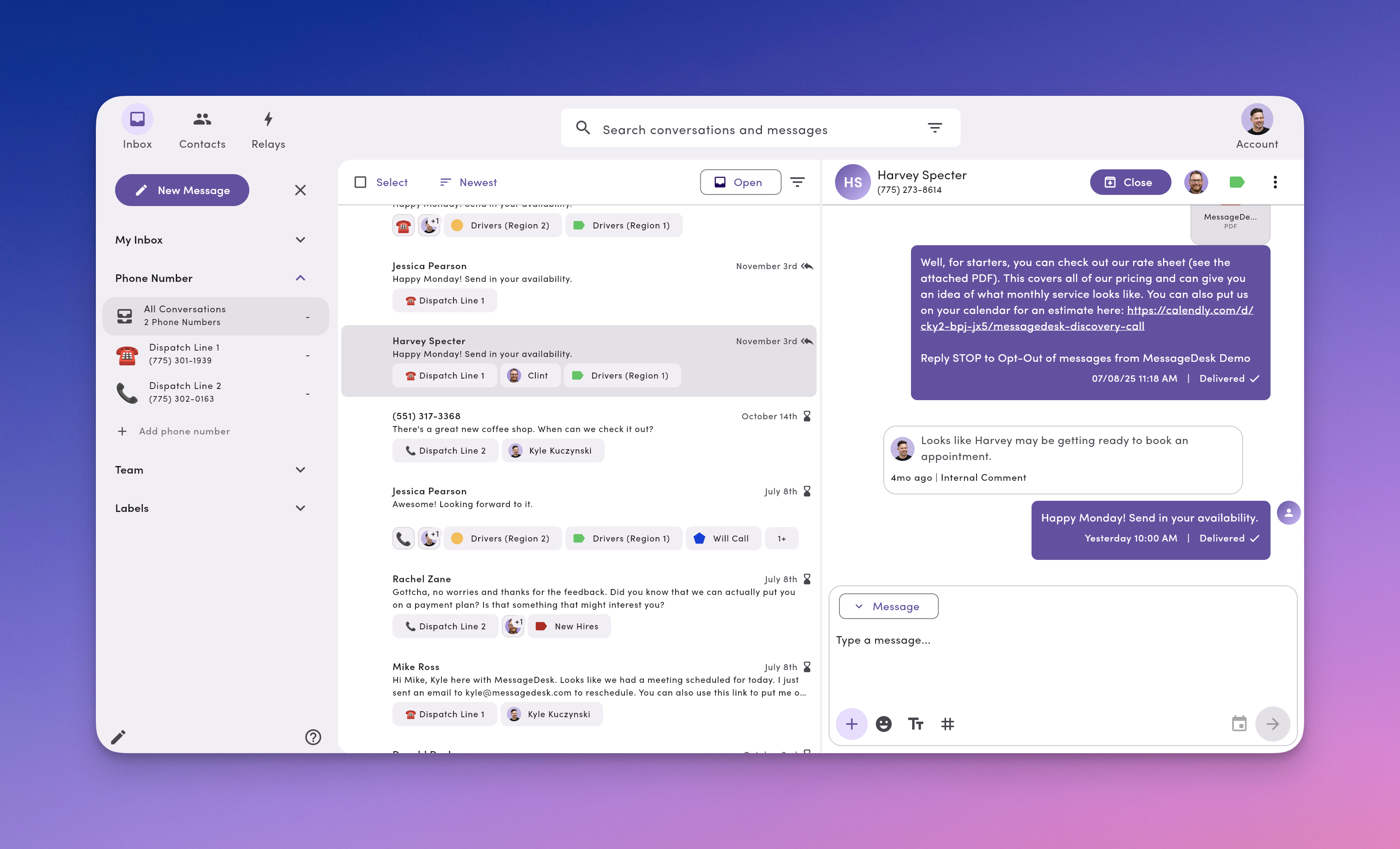
MessageDesk centralizes SMS across your business phone numbers (landline/VoIP hosting, purchased local/toll-free, or connected Twilio) into a single, collaborative inbox.
**Key features**
* **Shared Inbox:** Teammates see the same thread, assign owners, leave internal comments, and reply fast.
* **Custom roles and permissions:** Control access by **phone line**, **label**, or **teammate inbox** (roles and resource-level permissions).
* **Relays and scheduling:** Set **auto-replies** (e.g., after-hours) and **schedule** messages for later.
* **Compliance tools:** Support for **opt-in and opt-out** and **carrier registration** to improve deliverability.
## Get started
### 1. Sign up
Create your free account at **inbox.messagedesk.com**. No credit card required to start.
### 2. Add a phone number
Connect your first line:
* **Host** an existing **landline/VoIP** number
* **Purchase** a new local or **toll-free** text-enabled number
* **Connect** an existing **Twilio** number
### 3. Invite your team
Invite teammates to share phone access and collaborate.
* Assign **roles** (Admin, Manager, Operator)
* Fine-tune with **labels/lines/teammate inbox** permissions
## What you'll love on day one
* **Faster replies:** Text from a number your customers already know.
* **Cleaner hand-offs:** Assign owners and mention teammates with internal comments.
* **Less chaos:** Labels and filters keep the queue organized.
* **Set it and forget it:** Schedule reminders and auto-replies so nothing slips.
 ## How MessageDesk works
MessageDesk centralizes SMS across your business phone numbers (landline/VoIP hosting, purchased local/toll-free, or connected Twilio) into a single, collaborative inbox.
**Key features**
* **Shared Inbox:** Teammates see the same thread, assign owners, leave internal comments, and reply fast.
* **Custom roles and permissions:** Control access by **phone line**, **label**, or **teammate inbox** (roles and resource-level permissions).
* **Relays and scheduling:** Set **auto-replies** (e.g., after-hours) and **schedule** messages for later.
* **Compliance tools:** Support for **opt-in and opt-out** and **carrier registration** to improve deliverability.
## Get started
### 1. Sign up
Create your free account at **inbox.messagedesk.com**. No credit card required to start.
### 2. Add a phone number
Connect your first line:
* **Host** an existing **landline/VoIP** number
* **Purchase** a new local or **toll-free** text-enabled number
* **Connect** an existing **Twilio** number
### 3. Invite your team
Invite teammates to share phone access and collaborate.
* Assign **roles** (Admin, Manager, Operator)
* Fine-tune with **labels/lines/teammate inbox** permissions
## What you'll love on day one
* **Faster replies:** Text from a number your customers already know.
* **Cleaner hand-offs:** Assign owners and mention teammates with internal comments.
* **Less chaos:** Labels and filters keep the queue organized.
* **Set it and forget it:** Schedule reminders and auto-replies so nothing slips.
## How MessageDesk works
MessageDesk centralizes SMS across your business phone numbers (landline/VoIP hosting, purchased local/toll-free, or connected Twilio) into a single, collaborative inbox.
**Key features**
* **Shared Inbox:** Teammates see the same thread, assign owners, leave internal comments, and reply fast.
* **Custom roles and permissions:** Control access by **phone line**, **label**, or **teammate inbox** (roles and resource-level permissions).
* **Relays and scheduling:** Set **auto-replies** (e.g., after-hours) and **schedule** messages for later.
* **Compliance tools:** Support for **opt-in and opt-out** and **carrier registration** to improve deliverability.
## Get started
### 1. Sign up
Create your free account at **inbox.messagedesk.com**. No credit card required to start.
### 2. Add a phone number
Connect your first line:
* **Host** an existing **landline/VoIP** number
* **Purchase** a new local or **toll-free** text-enabled number
* **Connect** an existing **Twilio** number
### 3. Invite your team
Invite teammates to share phone access and collaborate.
* Assign **roles** (Admin, Manager, Operator)
* Fine-tune with **labels/lines/teammate inbox** permissions
## What you'll love on day one
* **Faster replies:** Text from a number your customers already know.
* **Cleaner hand-offs:** Assign owners and mention teammates with internal comments.
* **Less chaos:** Labels and filters keep the queue organized.
* **Set it and forget it:** Schedule reminders and auto-replies so nothing slips.