> ## Documentation Index
> Fetch the complete documentation index at: https://docs.messagedesk.com/llms.txt
> Use this file to discover all available pages before exploring further.
# Host a Landline or VoIP Number with MessageDesk
> Text-enable an existing landline, VoIP, or local number with MessageDesk while your voice service stays with your current provider. Setup steps, supported carriers, and timelines.
Hosting adds texting to a number you already own. Your voice service stays exactly where it is, with the provider you use today. You can complete the whole request yourself in MessageDesk, including signing the Letter of Authorization.
***
## Hosting or porting?
MessageDesk supports both, and they're genuinely different. Pick the one that matches what you want to happen to your phone service.
| | Hosting (this page) | [Porting](/get-started/phone-numbers/port-number) |
| ----------------------------- | -------------------------------------------- | ------------------------------------------------- |
| **What moves to MessageDesk** | Texting only | Voice and texting |
| **Your current provider** | Keeps handling your calls | No longer serves the number |
| **Your phone system** | Unchanged | You leave it |
| **Best for** | Adding texting to the setup you already have | Leaving your current provider entirely |
**Most teams want hosting.** If you're happy with your current phone system and just want to text from your business number, host it. Port only when you're moving off your current provider.
***
## What you can host
Hosting works for numbers that aren't tied to a mobile device:
* **Landlines** and traditional wired lines
* **Local 10-digit numbers**
* **VoIP numbers** from most business phone systems (see [supported providers](#supported-voip-providers))
* **Toll-free numbers** — see [Connect toll-free numbers](/get-started/phone-numbers/toll-free) for the separate verification process
You can't host **mobile numbers**, **Google Voice numbers**, or **virtual SMS app numbers**. Those have to be [ported](/get-started/phone-numbers/port-number) out of their current service first. See [Move a Google Voice Number to MessageDesk](/migration/google-voice) for that path.
***
## Before you start
**US numbers need an approved carrier registration campaign first.** If your workspace has no campaign, or your campaign hasn't been approved yet, MessageDesk blocks the hosting request and prompts you to finish [carrier registration](/carrier-registration/submit). Start registration before you plan to host numbers.
**Canadian numbers are the exception.** Numbers with a Canadian area code can be hosted without an approved campaign. Canada doesn't run on the A2P 10DLC registration system that US numbers require.
A Canadian number added this way can only text **Canadian recipients** until you complete [carrier registration](/carrier-registration/submit) and associate it with an approved campaign.
Have this ready before you begin:
* The **phone number** you want to text-enable
* Your **current provider** and account details for that number
* The name and title of someone **authorized to sign** on behalf of the account holder
***
## How to host a phone number
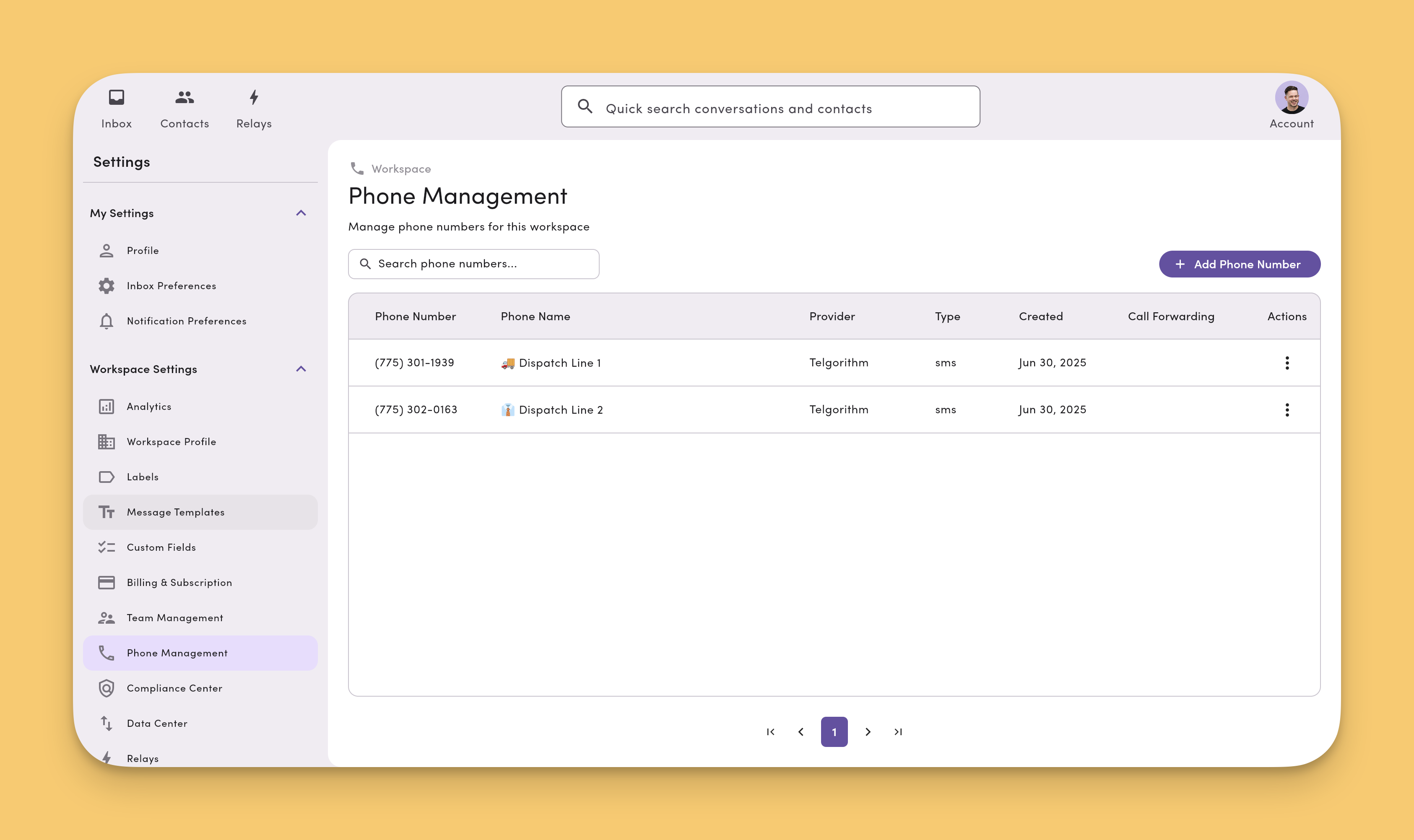
* Click your profile image in the top right of MessageDesk
* Click "Settings" from the dropdown menu
* From the left-hand navigation, select "Phone Management" under Workspace Settings
* If you don't see `Phone Management` you may not have access. Speak with your account administrator for more details.
* Click `Add Phone Number` button in the top right corner of the Phone Management screen
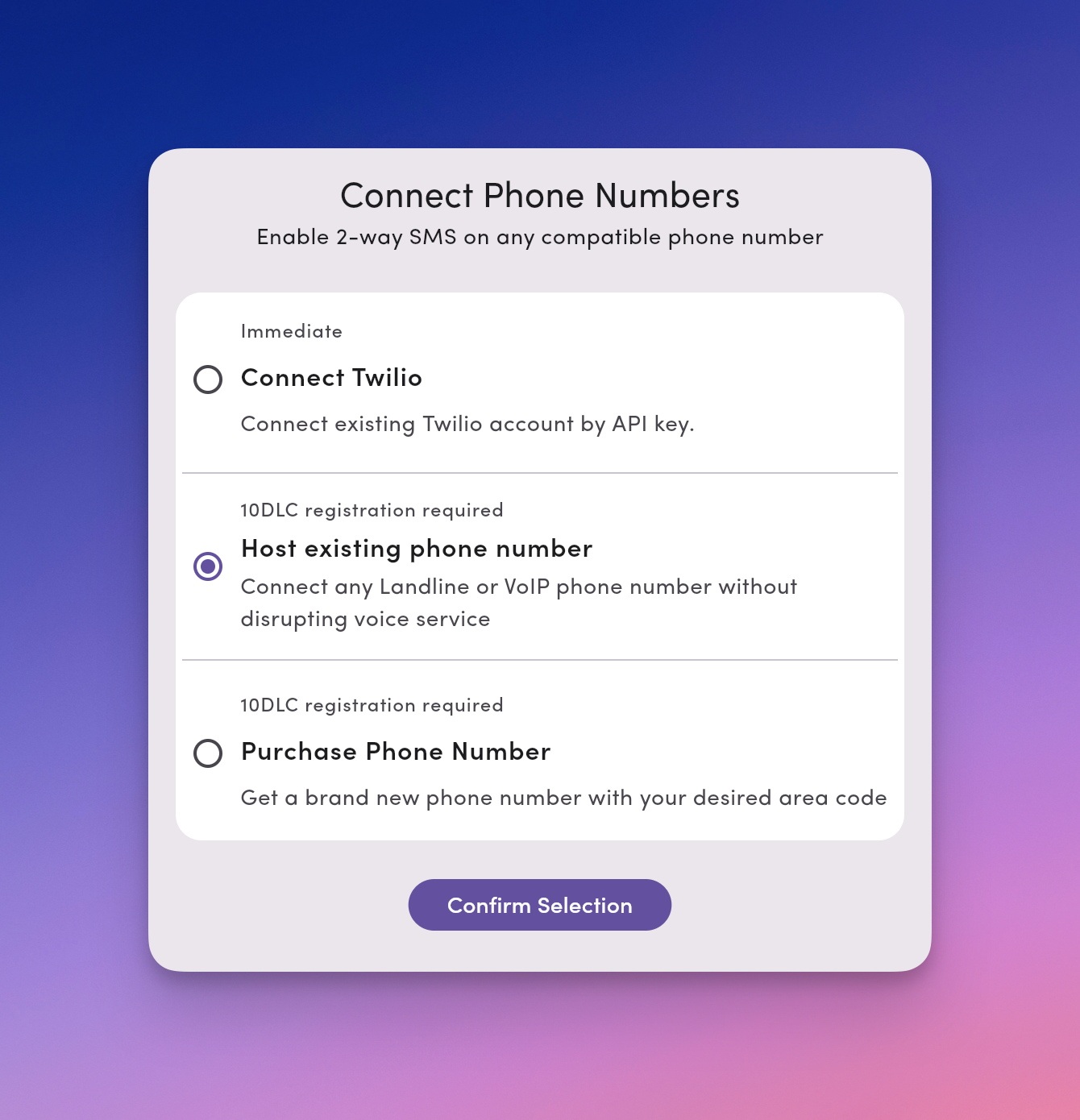
* Select **Host existing phone number**
* Enter the phone number
* MessageDesk checks whether the number can be hosted before you go any further. If it isn't hostable, you'll be told at this step rather than after submitting.
* Complete the account and authorized-signer fields
* MessageDesk generates a **PDF Letter of Authorization** from what you enter
* Sign the LOA using the signature field
* Submit the request
 After clicking, `Add Phone Number` you'll see the following dialog. Select **Host existing phone number**.
 **You can add at most 2 numbers per day** through hosting, porting, or purchase combined, per workspace. This is a fraud-prevention limit against number-rotation scams. If you need to host or port more numbers in a day, [contact support](/contact-us).
## If you haven't already completed carrier registration
[Carrier registration](/carrier-registration/overview) is required for texting with MessageDesk. If you haven't already completed this process, you'll be prompted to do so first.
Learn how to [submit your carrier registration submission](/carrier-registration/submit).
## Processing time
After you submit your Letter of Authorization (LOA), the hosting request goes to the carrier for processing. Processing time varies by provider:
* **Typical timeline:** 5 minutes to 72 hours
Track progress from the **Status** column in [Phone Management](/settings/workspace-settings/phone-management#what-the-phone-management-table-shows). The number moves from pending to active once the carrier completes the transfer, and MessageDesk associates it with your campaign automatically.
**Adding additional numbers later?** You'll need to complete a new LOA for each number you want to add. The same processing timeline applies.
***
## What changes once your number is hosted
**Texts stop arriving in your current phone system.** After hosting, every text sent to that number lands in your MessageDesk Inbox and nowhere else. If your VoIP system shows texts today, it won't after hosting.
**Voice is unaffected.** Calls keep routing exactly as they do now, through your existing provider.
**Moving voice later can break texting.** If you move the voice side of a hosted number to a new provider, that provider often pulls the texting side back too. This is called a snapback, and it happens because MessageDesk doesn't own the number outright. Tell your new voice provider explicitly that **SMS stays with MessageDesk**. See [Removed numbers and snapbacks](/settings/workspace-settings/phone-management#removed-numbers-and-snapbacks).
***
## Supported VoIP providers
Below is a list of all supported VoIP providers. You can text-enable and transfer phone numbers from any of these providers to MessageDesk via phone number hosting.
In this case, all of your calling, voice features, and service will remain with your VoIP provider. The text messaging associated with the number will move to MessageDesk. Many businesses and organizations configure their numbers in this way to get the best of both voice and text messaging features.
Don't see your provider? If your number is non-mobile and not tied to a mobile device, in most cases, you can still transfer it to MessageDesk and text-enable it.
* Microsoft Teams Phone
* Cisco Webex Calling
* Zoom Phone
* RingCentral
* 8x8
* Nextiva
* Dialpad
* Vonage
* GoTo Connect
* Intermedia Unite
* Ooma
* aircall
* Avaya Cloud
* Mitel
* Sangoma
* Quo (formerly OpenPhone)
* Grasshopper
* Phone.com
* net2phone
* Verizon Business
* AT\&T Business
* Comcast Business
* Spectrum Business
* Lumen Business
* Cox Business
* Frontier Business
* Rogers Business
* Bell Business
* TELUS Business
**Verizon One Talk isn't compatible with MessageDesk.** One Talk numbers are tied to Verizon's mobile network, so you can't text-enable or host them with MessageDesk. If you use One Talk today and want texting through MessageDesk, use a separate MessageDesk business number. To keep voice continuity, set up [call forwarding](/settings/workspace-settings/phone-management#call-forwarding) from that number to your One Talk line.
***
## FAQ
**Will hosting interrupt my phone service?**\
No. Voice keeps working throughout, and there's no cutover window for calls. Only texting changes hands.
**Can I undo hosting?**\
Yes. Hosting is reversible in a way porting isn't. Texting returns to your provider if you stop hosting with MessageDesk, though you may need them to re-enable it.
**Do I need a new LOA for every number?**\
Yes. Each number needs its own Letter of Authorization, even numbers on the same account.
**My number couldn't be hosted. Why?**\
MessageDesk checks hostability before you fill out the LOA. Mobile numbers, Google Voice numbers, and some carrier configurations can't be hosted. [Contact support](/contact-us) if you think the result is wrong.
**What if I want to move voice to MessageDesk too?**\
That's a port, not a host. See [Port a phone number to MessageDesk](/get-started/phone-numbers/port-number) — and note MessageDesk doesn't provide full voice service, so you'd set up call forwarding after.
**You can add at most 2 numbers per day** through hosting, porting, or purchase combined, per workspace. This is a fraud-prevention limit against number-rotation scams. If you need to host or port more numbers in a day, [contact support](/contact-us).
## If you haven't already completed carrier registration
[Carrier registration](/carrier-registration/overview) is required for texting with MessageDesk. If you haven't already completed this process, you'll be prompted to do so first.
Learn how to [submit your carrier registration submission](/carrier-registration/submit).
## Processing time
After you submit your Letter of Authorization (LOA), the hosting request goes to the carrier for processing. Processing time varies by provider:
* **Typical timeline:** 5 minutes to 72 hours
Track progress from the **Status** column in [Phone Management](/settings/workspace-settings/phone-management#what-the-phone-management-table-shows). The number moves from pending to active once the carrier completes the transfer, and MessageDesk associates it with your campaign automatically.
**Adding additional numbers later?** You'll need to complete a new LOA for each number you want to add. The same processing timeline applies.
***
## What changes once your number is hosted
**Texts stop arriving in your current phone system.** After hosting, every text sent to that number lands in your MessageDesk Inbox and nowhere else. If your VoIP system shows texts today, it won't after hosting.
**Voice is unaffected.** Calls keep routing exactly as they do now, through your existing provider.
**Moving voice later can break texting.** If you move the voice side of a hosted number to a new provider, that provider often pulls the texting side back too. This is called a snapback, and it happens because MessageDesk doesn't own the number outright. Tell your new voice provider explicitly that **SMS stays with MessageDesk**. See [Removed numbers and snapbacks](/settings/workspace-settings/phone-management#removed-numbers-and-snapbacks).
***
## Supported VoIP providers
Below is a list of all supported VoIP providers. You can text-enable and transfer phone numbers from any of these providers to MessageDesk via phone number hosting.
In this case, all of your calling, voice features, and service will remain with your VoIP provider. The text messaging associated with the number will move to MessageDesk. Many businesses and organizations configure their numbers in this way to get the best of both voice and text messaging features.
Don't see your provider? If your number is non-mobile and not tied to a mobile device, in most cases, you can still transfer it to MessageDesk and text-enable it.
* Microsoft Teams Phone
* Cisco Webex Calling
* Zoom Phone
* RingCentral
* 8x8
* Nextiva
* Dialpad
* Vonage
* GoTo Connect
* Intermedia Unite
* Ooma
* aircall
* Avaya Cloud
* Mitel
* Sangoma
* Quo (formerly OpenPhone)
* Grasshopper
* Phone.com
* net2phone
* Verizon Business
* AT\&T Business
* Comcast Business
* Spectrum Business
* Lumen Business
* Cox Business
* Frontier Business
* Rogers Business
* Bell Business
* TELUS Business
**Verizon One Talk isn't compatible with MessageDesk.** One Talk numbers are tied to Verizon's mobile network, so you can't text-enable or host them with MessageDesk. If you use One Talk today and want texting through MessageDesk, use a separate MessageDesk business number. To keep voice continuity, set up [call forwarding](/settings/workspace-settings/phone-management#call-forwarding) from that number to your One Talk line.
***
## FAQ
**Will hosting interrupt my phone service?**\
No. Voice keeps working throughout, and there's no cutover window for calls. Only texting changes hands.
**Can I undo hosting?**\
Yes. Hosting is reversible in a way porting isn't. Texting returns to your provider if you stop hosting with MessageDesk, though you may need them to re-enable it.
**Do I need a new LOA for every number?**\
Yes. Each number needs its own Letter of Authorization, even numbers on the same account.
**My number couldn't be hosted. Why?**\
MessageDesk checks hostability before you fill out the LOA. Mobile numbers, Google Voice numbers, and some carrier configurations can't be hosted. [Contact support](/contact-us) if you think the result is wrong.
**What if I want to move voice to MessageDesk too?**\
That's a port, not a host. See [Port a phone number to MessageDesk](/get-started/phone-numbers/port-number) — and note MessageDesk doesn't provide full voice service, so you'd set up call forwarding after.