> ## Documentation Index
> Fetch the complete documentation index at: https://docs.messagedesk.com/llms.txt
> Use this file to discover all available pages before exploring further.
# Connect a Landline or VoIP Number to MessageDesk
> Text-enable your existing landline or VoIP number with MessageDesk. Step-by-step setup, supported carriers, and what to expect during the porting process.
## How to connect a new landline or VoIP phone number
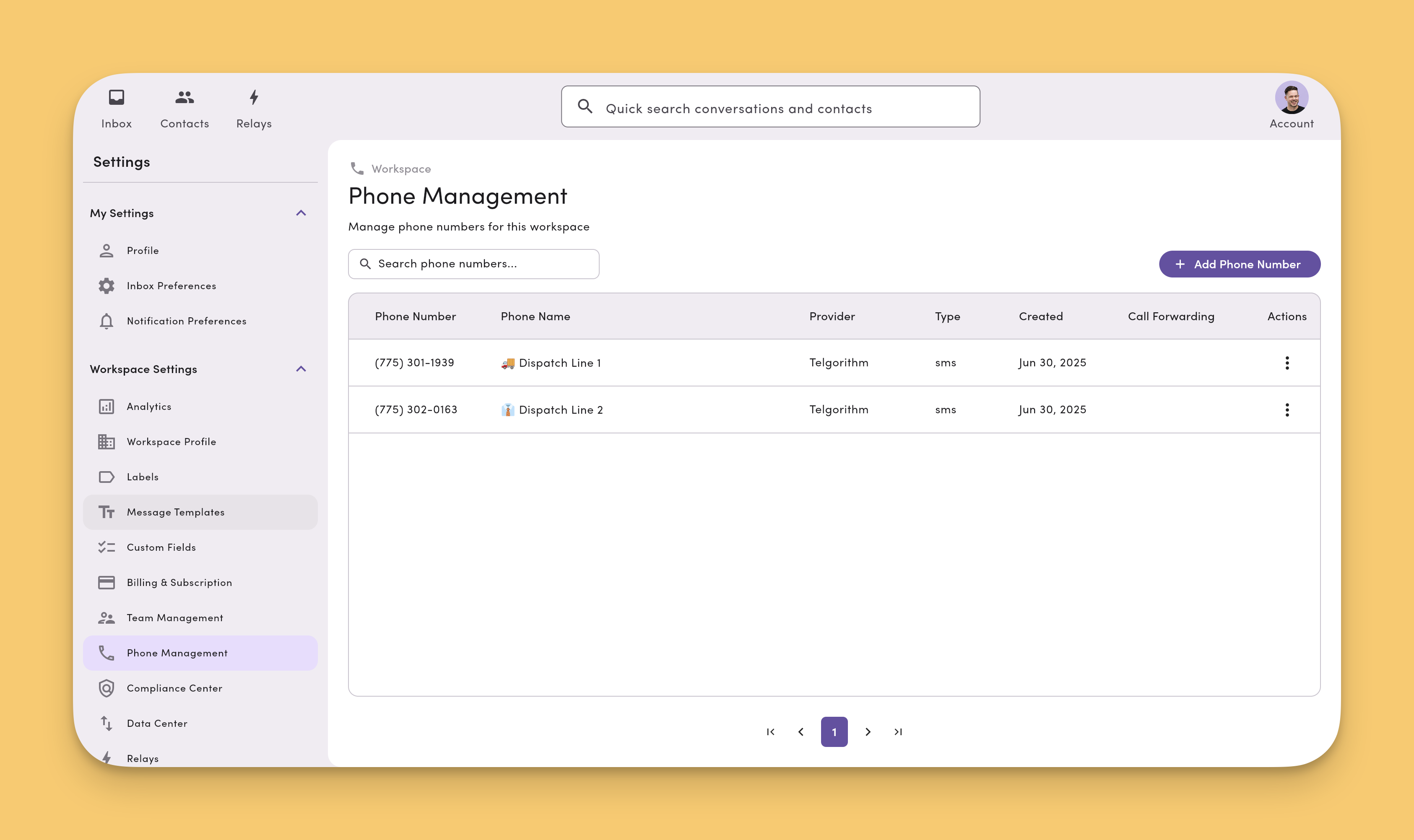
* Click your profile image in the top right of MessageDesk
* Click "Settings" from the dropdown menu
* From the left-hand navigation, select "Phone Management" under Workspace Settings,
If you don't see `Phone Management` you may not have access. Speak with your account administrator for more details.
* Click `Add Phone Number` button in the top right corner of the Phone Management screen
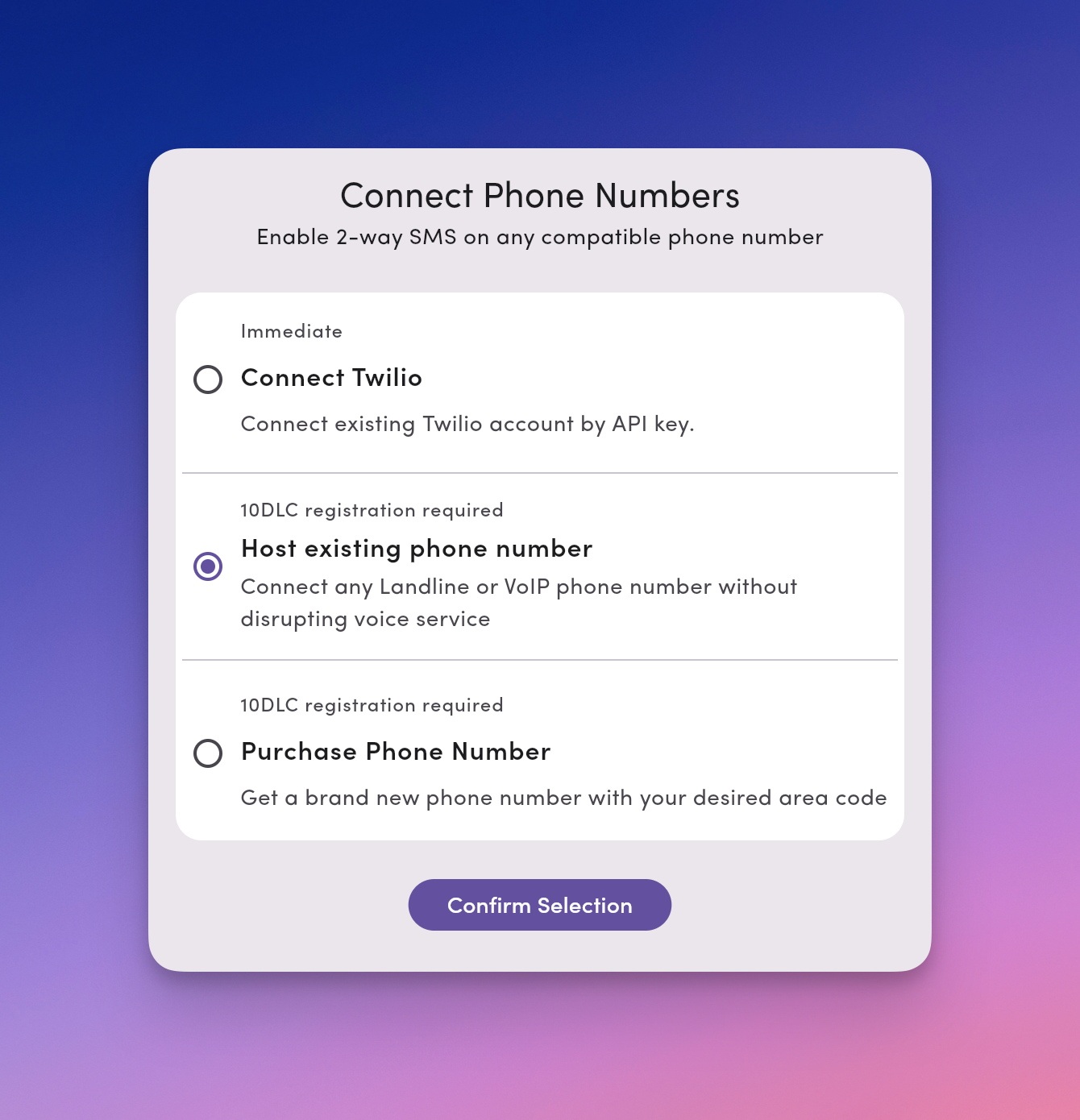
* Select **Host existing phone number**
 After clicking, `Add Phone Number` you'll see the following dialog. Select **Host existing phone number**.
 ## If you haven't already completed carrier registration
[Carrier registration](/carrier-registration/overview) is required for texting with MessageDesk. If you haven't already completed this process, you'll be prompted to do so first.
Learn how to [submit your carrier registration submission](/carrier-registration/submit).
## Processing time
After you submit your Letter of Authorization (LOA), our team processes the hosting request on the backend. Processing time varies by provider:
* **Typical timeline:** 5 minutes to 72 hours
**Adding additional numbers later?** You'll need to complete a new LOA for each number you want to add. The same processing timeline applies.
## Supported VoIP providers
Below is a list of all supported VoIP providers. You can text-enable and transfer phone numbers from any of these providers to MessageDesk via [phone number hosting](https://docs.messagedesk.com/get-started/phone-numbers/overview#hosting-vs-porting-what%E2%80%99s-the-difference).
In this case, all of your calling, voice features, and service will remain with your VoIP provider. The text messaging associated with the number will move to MessageDesk. Many businesses and organizations configure their numbers in this way to get the best of both voice and text messaging features.
Don't see your provider? If your number is non-mobile and not tied to a mobile device, in most cases, you can still transfer it to MessageDesk and text-enable it.
* Microsoft Teams Phone
* Cisco Webex Calling
* Zoom Phone
* RingCentral
* 8x8
* Nextiva
* Vonage
* GoTo Connect
* Intermedia Unite
* Ooma
* aircall
* Avaya Cloud
* Mitel
* Sangoma
* Quo (formerly OpenPhone)
* Grasshopper
* Phone.com
* net2phone
* Verizon Business
* AT\&T Business
* Comcast Business
* Spectrum Business
* Lumen Business
* Cox Business
* Frontier Business
* Rogers Business
* Bell Business
* TELUS Business
## If you haven't already completed carrier registration
[Carrier registration](/carrier-registration/overview) is required for texting with MessageDesk. If you haven't already completed this process, you'll be prompted to do so first.
Learn how to [submit your carrier registration submission](/carrier-registration/submit).
## Processing time
After you submit your Letter of Authorization (LOA), our team processes the hosting request on the backend. Processing time varies by provider:
* **Typical timeline:** 5 minutes to 72 hours
**Adding additional numbers later?** You'll need to complete a new LOA for each number you want to add. The same processing timeline applies.
## Supported VoIP providers
Below is a list of all supported VoIP providers. You can text-enable and transfer phone numbers from any of these providers to MessageDesk via [phone number hosting](https://docs.messagedesk.com/get-started/phone-numbers/overview#hosting-vs-porting-what%E2%80%99s-the-difference).
In this case, all of your calling, voice features, and service will remain with your VoIP provider. The text messaging associated with the number will move to MessageDesk. Many businesses and organizations configure their numbers in this way to get the best of both voice and text messaging features.
Don't see your provider? If your number is non-mobile and not tied to a mobile device, in most cases, you can still transfer it to MessageDesk and text-enable it.
* Microsoft Teams Phone
* Cisco Webex Calling
* Zoom Phone
* RingCentral
* 8x8
* Nextiva
* Vonage
* GoTo Connect
* Intermedia Unite
* Ooma
* aircall
* Avaya Cloud
* Mitel
* Sangoma
* Quo (formerly OpenPhone)
* Grasshopper
* Phone.com
* net2phone
* Verizon Business
* AT\&T Business
* Comcast Business
* Spectrum Business
* Lumen Business
* Cox Business
* Frontier Business
* Rogers Business
* Bell Business
* TELUS Business