> ## Documentation Index
> Fetch the complete documentation index at: https://docs.messagedesk.com/llms.txt
> Use this file to discover all available pages before exploring further.
# Connect Phone Lines to MessageDesk
> Compare phone number options for MessageDesk: local 10DLC, toll-free, landline, VoIP, and Twilio BYOC. Pricing, setup steps, and registration timelines.
# Learn how to connect new or existing phone numbers to MessageDesk
Setting up texting is one flow that combines [**carrier registration**](/carrier-registration/overview) with **phone configuration**. You choose the number path (purchase, host, or connect), we guide you through the right steps, and you start texting.
***
## Your onboarding journey
1. Complete the [Carrier Registration Questionnaire](/carrier-registration/submit)
**2. Provide business information (if needed)** If you haven't registered yet, you'll add basic business details so we can complete **A2P 10DLC** (for local numbers) or **Toll-Free Verification**.
**3. Choose your configuration path**
* **Purchase new**: Local **10DLC** or **toll-free** numbers
* **Connect existing**: **Landline**, **VoIP**, local 10DLC, or **toll-free** numbers
* **Connect Twilio**: Plug in your Twilio numbers (see note below)
**4. Start texting**: Once approved and connected, you're ready to message from your shared inbox.
**Twilio users:** You manage registration directly with Twilio. When you connect those numbers to MessageDesk, you generally don't need to register again. Just connect and go. MessageDesk automatically configures webhooks for your Twilio numbers so messages sync.
***
## Important to know
* **Registration is part of setup**: It's not a separate first step. Our flow handles it.
* **Smart routing in the form**: The configuration form adapts to your choices (purchase vs. connect, local vs. toll-free, etc.).
* **Different paths for different stacks**: Twilio-connected numbers keep using your Twilio registration state.
***
## Supported number types
MessageDesk can **text-enable** most business numbers in the U.S. and Canada.
1. **Landlines / local 10-digit numbers**
2. **VoIP provider numbers** (RingCentral, Dialpad, Zoom, Vonage, Nextiva, etc.)
3. **Toll-free numbers** (800, 833, 844, 855, 866, 877, 888)
4. **Twilio numbers** (connected to your Twilio account)
**Note:** MessageDesk supports numbers located in **North America (US & Canada)**.
### Landlines / local 10-digit numbers
Text-enable traditional wired/legacy lines across all U.S. states and Canadian provinces.
Learn how to connect an existing landline or VoIP number to MessageDesk for texting.
### VoIP provider numbers
Integrate numbers from common business VoIP systems (e.g., RingCentral, Dialpad, Grasshopper, Ooma, Aircall, Vonage, Nextiva, Verizon Business, AT\&T Business, Zoom).
Learn how to connect an existing landline or VoIP number to MessageDesk for texting.
### Toll-free numbers
Text-enable North American toll-free numbers with prefixes **800/833/844/855/866/877/888**.
Learn how to connect an existing landline or VoIP number to MessageDesk for texting.
### Twilio numbers
Use your Twilio numbers within MessageDesk's shared team inbox.
Learn how to connect your Twilio numbers to MessageDesk.
***
## Unsupported number types
* **International numbers** outside the U.S./Canada
* **Google Voice** and **mobile carrier personal numbers** (unless fully **ported** to a VoIP provider first)
* **Virtual numbers** (non-carrier virtual SMS apps/services)
* **Short codes (outbound)** – MessageDesk doesn't send from 5–6 digit codes
* Inbound from short codes is supported (you can receive replies)
**Note:** To use a personal mobile or Google Voice number, first **port** it to a VoIP provider, then connect it for texting with MessageDesk.
***
## Hosting vs. porting (what's the difference?)
### Phone number hosting (text-enable only)
We add **SMS** to your existing number. **Voice stays with your current provider.**
* Keep your current number
* Calls continue to route exactly as they do now
* Texts flow through MessageDesk into your shared inbox
**Important:** Once we host your number for texting, any text messages currently being received in your VoIP system will no longer appear there. All text messages will only be received in MessageDesk. Voice calls remain unaffected and continue to work in your current system.
**Note:** Hosting works for traditional landlines, local 10-digit numbers, and most VoIP-connected numbers.
### Phone number porting (move everything)
We **move the entire number** (voice + text) to MessageDesk.
* Full transfer of services
* MessageDesk becomes the provider for that number
**Note:** In short: **Hosting = add texting** to your current setup. **Porting = move voice + text** to MessageDesk.
***
## Texting with multiple numbers
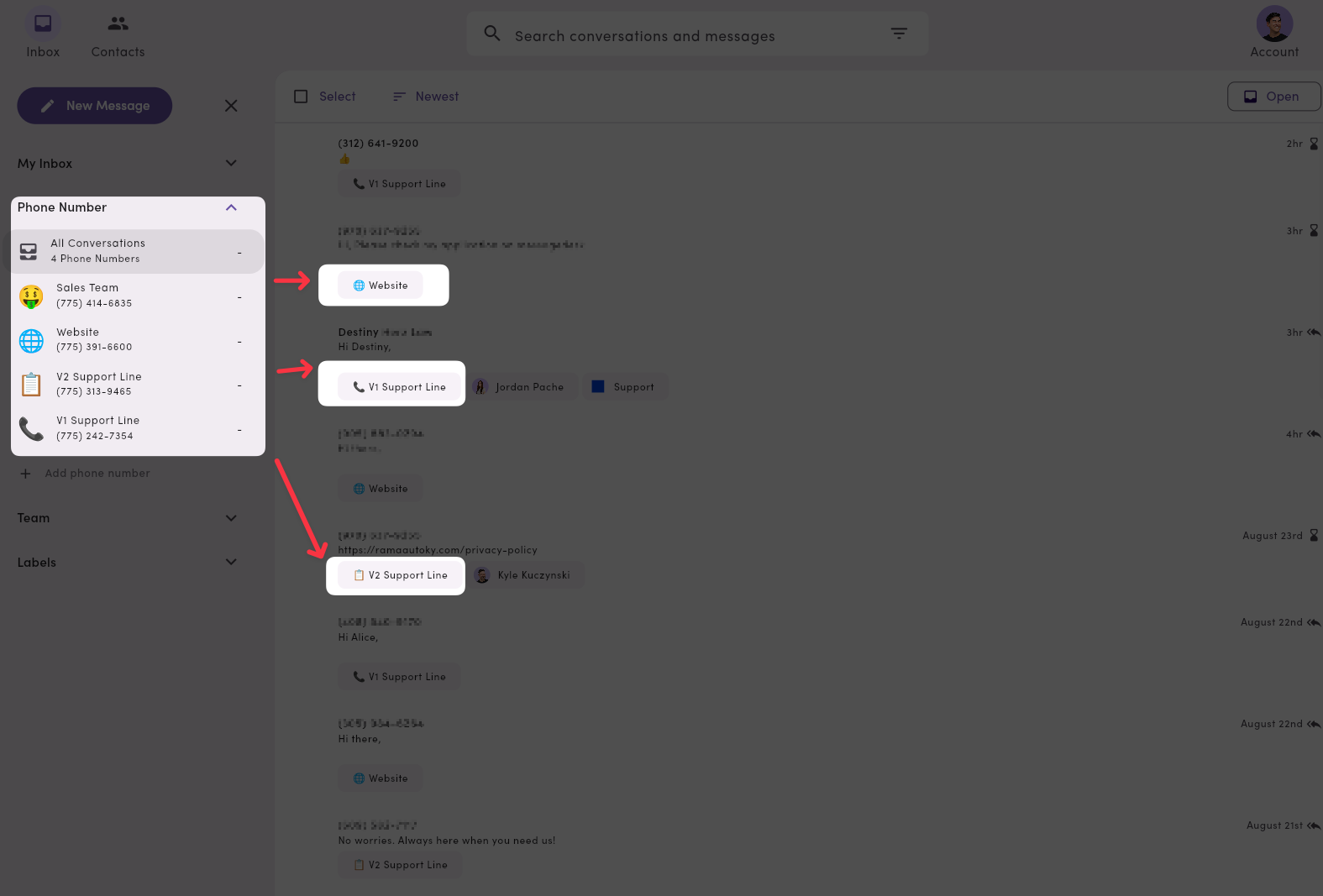
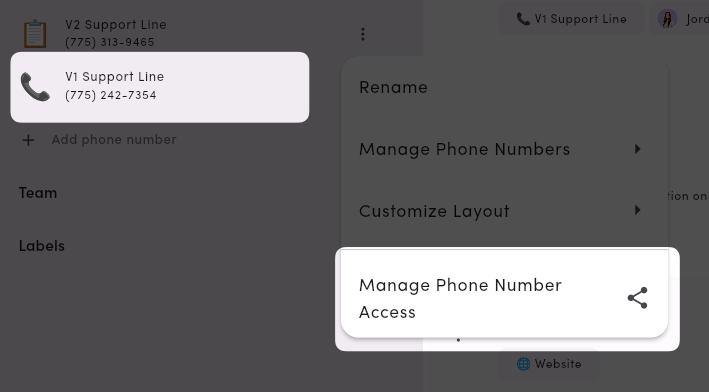
You can connect **up to 48 phone lines** to a single workspace and manage all conversations in one place. Filter your inbox by **phone line**, and tailor **roles & permissions** so only the right teammates see the right conversations.
 ***
## Registration and deliverability essentials
* **A2P 10DLC (local)**: Required for most U.S. local business texting. It improves throughput and reduces filtering.
* **Toll-Free Verification**: Recommended or required for higher volume and better deliverability on toll-free.
* **Twilio**: Registration stays in Twilio. Just connect your numbers to MessageDesk.
* **Timing**: Registration can take time to approve. Plan ahead for campaigns.
* **Content**: Avoid generic short links and spammy phrasing. Include opt-out language when appropriate.
Learn more: [**Carrier Registration Overview**](/carrier-registration/overview)
***
## Frequently asked phone number questions
### How many phone numbers can I connect?
Up to **48** phone numbers per workspace.
### How soon can I start texting?
* **Outbound**: After your number is connected **and** registration (10DLC or toll-free) is approved.
* **Inbound**: As soon as the number is connected, inbound texts will appear in your inbox.
### Does every teammate see every conversation?
No. Use **roles & permissions** to limit access by **phone line**, **label**, or **teammate inbox**.
### Can I rename lines for clarity?
Yes. Go to **Settings → Phone Management** to name a line (you can even add an emoji), which helps triage in the Inbox.
### Can international users access MessageDesk with US or Canadian numbers?
Yes. You can use MessageDesk with US or Canadian numbers from outside North America if you're tied to a North American business entity and can complete carrier registration for that entity. For example, a US-based business with support representatives in other countries can use MessageDesk.
### Can I send or receive texts internationally with a US or Canadian number?
No. MessageDesk only supports sending and receiving text messages to and from phone numbers in North America (US and Canada). Even if you have a US-registered number, you can't text phone numbers outside of North America.
### What if my provider isn't listed?
If it's a standard **landline** or **VoIP** number in the U.S./Canada, we can likely text-enable it. Use the configuration form, and we'll route you down the right path.
### Can I use phone line extension numbers with MessageDesk?
MessageDesk doesn't integrate with or support texting for phone line extension numbers. You can still configure **user Roles and Permissions** to limit access to certain phone lines. You can also use **conversation assignment** and **Relays** to automate who gets assigned to what conversation on any given phone line.
Learn more: [**Team Management**](/settings/workspace-settings/team-management) | [**Relays**](/relays/overview)
***
## Registration and deliverability essentials
* **A2P 10DLC (local)**: Required for most U.S. local business texting. It improves throughput and reduces filtering.
* **Toll-Free Verification**: Recommended or required for higher volume and better deliverability on toll-free.
* **Twilio**: Registration stays in Twilio. Just connect your numbers to MessageDesk.
* **Timing**: Registration can take time to approve. Plan ahead for campaigns.
* **Content**: Avoid generic short links and spammy phrasing. Include opt-out language when appropriate.
Learn more: [**Carrier Registration Overview**](/carrier-registration/overview)
***
## Frequently asked phone number questions
### How many phone numbers can I connect?
Up to **48** phone numbers per workspace.
### How soon can I start texting?
* **Outbound**: After your number is connected **and** registration (10DLC or toll-free) is approved.
* **Inbound**: As soon as the number is connected, inbound texts will appear in your inbox.
### Does every teammate see every conversation?
No. Use **roles & permissions** to limit access by **phone line**, **label**, or **teammate inbox**.
### Can I rename lines for clarity?
Yes. Go to **Settings → Phone Management** to name a line (you can even add an emoji), which helps triage in the Inbox.
### Can international users access MessageDesk with US or Canadian numbers?
Yes. You can use MessageDesk with US or Canadian numbers from outside North America if you're tied to a North American business entity and can complete carrier registration for that entity. For example, a US-based business with support representatives in other countries can use MessageDesk.
### Can I send or receive texts internationally with a US or Canadian number?
No. MessageDesk only supports sending and receiving text messages to and from phone numbers in North America (US and Canada). Even if you have a US-registered number, you can't text phone numbers outside of North America.
### What if my provider isn't listed?
If it's a standard **landline** or **VoIP** number in the U.S./Canada, we can likely text-enable it. Use the configuration form, and we'll route you down the right path.
### Can I use phone line extension numbers with MessageDesk?
MessageDesk doesn't integrate with or support texting for phone line extension numbers. You can still configure **user Roles and Permissions** to limit access to certain phone lines. You can also use **conversation assignment** and **Relays** to automate who gets assigned to what conversation on any given phone line.
Learn more: [**Team Management**](/settings/workspace-settings/team-management) | [**Relays**](/relays/overview)