> ## Documentation Index
> Fetch the complete documentation index at: https://docs.messagedesk.com/llms.txt
> Use this file to discover all available pages before exploring further.
# Multi-Select Quick Actions
> Bulk-manage SMS threads in MessageDesk. Multi-select conversations to close, assign, label, archive, or delete dozens of messages in a single click.
# Multi-Select Quick Actions from Any Inbox View
Select multiple conversations and apply bulk actions straight from the conversation list. Works in **sorted**, **filtered**, and **pre-saved** inbox views.
***
## Multi-select and apply quick actions
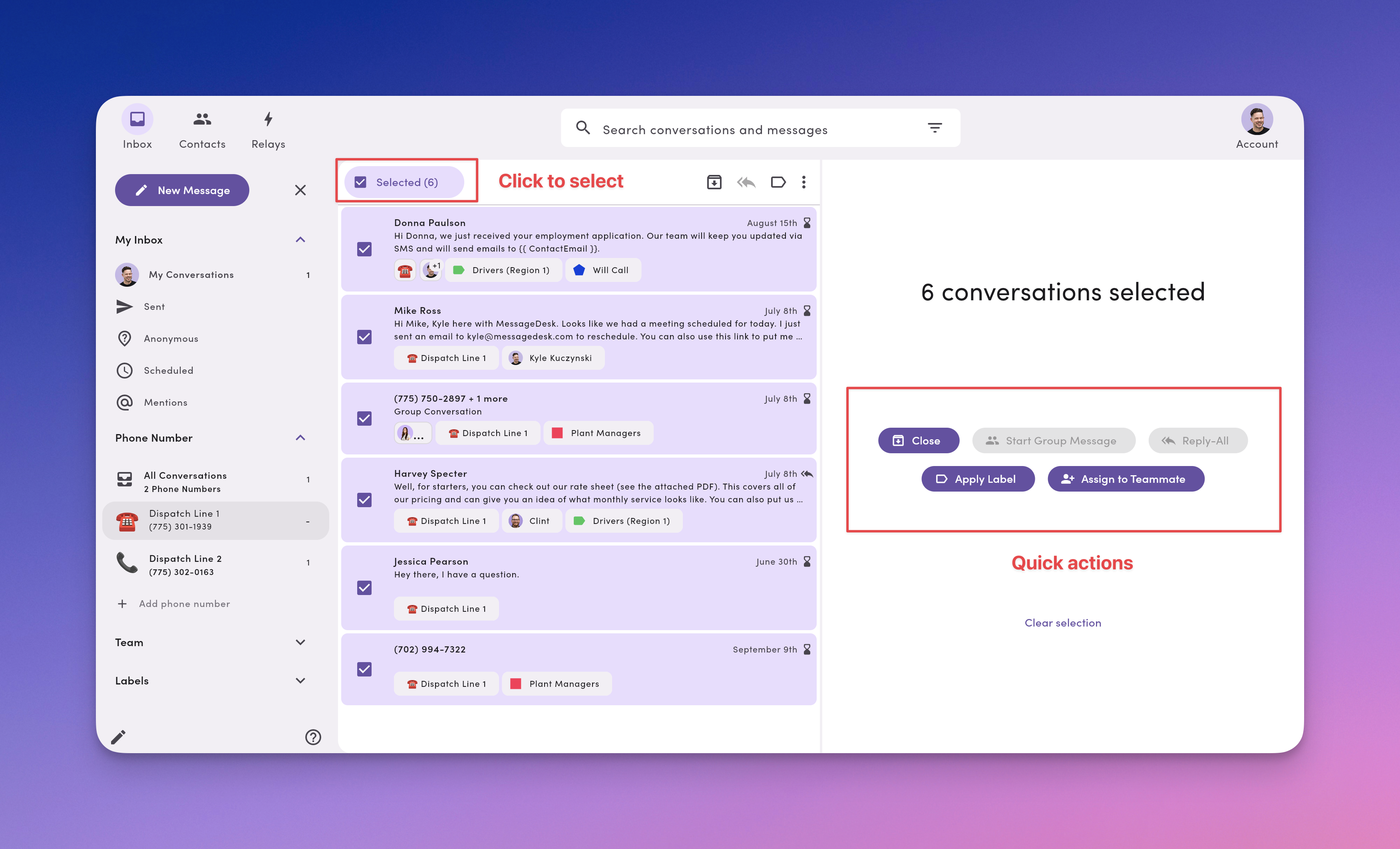
1. In any Inbox list, click **Select**.
2. Check up to **25 conversations** (per page).
3. Choose a **Quick Action**:
* **Close.** Close selected threads and move them to the **Closed Inbox**.
* **Start Group Message.** Create **one group thread** (max **7 contacts**).
* **Reply-All.** Send **one individual reply per conversation**. Replies stay private in each thread.
* **Apply label.** Add a label to every selected conversation.
* **Assign to teammate.** Bulk-assign every selected conversation to one teammate.
* **Clear selection.** Unselect everything.
 Need to message **more than 25** people at once? Use **Contacts** → multi-select → **Compose** to send a broadcast to **up to 100** recipients (send individually).
***
## How teams use multi-select (real workflows)
**HR / Operations**
* **Benefits reminder.** **Filter** by **Label** (*HR: Benefits*), **Sort** by **Waiting Longest**, **multi-select**, **Reply-All**, apply **"Benefits reminder"** template, **Schedule**.
* **New-hire day one.** **Filter** by **Label** (*HR: New hire*), **multi-select** cohort, **Reply-All**, apply **"Welcome + paperwork link"** template, **Send**.
* **Policy acknowledgment.** **Filter** by **Label** (*HR: Policy Update*), **Sort** by **Oldest**, **multi-select** non-responders, **Reply-All**, apply **"Reply YES to confirm"** template, **Send**.
**Dispatch / Logistics**
* **Route change blast.** **Filter** by **Label** (*Region – West*), **multi-select**, **Reply-All**, apply **"Route change"** template, **Send**.
* **Late arrival follow-ups.** **Sort** by **Waiting Longest**, **Filter** by **Label** (*Delivery – Delayed*), **multi-select**, **Reply-All**, apply **"Delay + new ETA"** template, **Send** or **Schedule**.
* **Emergency coordination.** **Filter** by **Labels** (*Urgent* + *Crew #*, **Match ALL**), **multi-select** up to **7**, **Start Group Message**, paste **critical update**, **Send**.
**Law / Legal**
* **Hearing reminders.** **Filter** by **Label** (*Hearing this week*), **multi-select**, **Reply-All**, apply **"Court time + location"** template, **Schedule** for 24h prior.
* **Doc signature chase.** **Filter** by **Label** (*eSign sent*), **multi-select** non-responders, **Reply-All**, apply **"Signature reminder"** template, **Send** or **Schedule**.
* **Retainer follow-up.** **Filter** by **Label** (*Retainer pending*), **Sort** by **Waiting Longest**, **multi-select**, **Reply-All**, apply **"Retainer link + due date"** template, **Send**.
**CPAs & Bookkeepers**
* **Tax doc request.** **Filter** by **Label** (*Missing docs*), **Sort** by **Waiting Longest**, **multi-select**, **Reply-All**, apply **"Need W-2/1099 link"** template, **Send**.
* **E-file PIN reminder.** **Filter** by **Label** (*E-file pending*), **multi-select**, **Reply-All**, apply **"PIN/consent reminder"** template, **Schedule** for 10 AM.
* **Invoice follow-ups.** **Filter** by **Label** (*AR: Past due*), **Sort** by **Oldest**, **multi-select**, **Reply-All**, apply **"Payment link + terms"** template, **Send**.
**Home Services (HVAC, Plumbing, Electrical, etc.)**
* **Appointment confirmations.** **Filter** by **Label** (*Tomorrow's jobs*), **multi-select**, **Reply-All**, apply **"Confirm window + tech name"** template, **Send**.
* **Tech running late.** **Filter** by **Label** (*Delay*), **Sort** by **Newest**, **multi-select**, **Reply-All**, apply **"Running X minutes late"** template, **Send**.
* **Job-complete follow-up.** **Filter** by **Label** (*Job complete*), **multi-select**, **Reply-All**, apply **"Care instructions + review link"** template, **Send**.
***
## Multi-select best practices
* **Filter first, then select.** Narrow the list by **Label/Assignee/Phone Line** before bulk actions.
* **Use templates.** With **Reply-All**, insert a template, personalize if needed, then send.
* **Mind the limits.** Max **25** selected at once. **Group Message** limited to **7** participants.
* **Choose the right tool.** For one-to-many notices, a **broadcast** from **Contacts** is usually better than Reply-All.
***
## FAQ
**Does Reply-All create a group thread?**\
No. It sends **separate** messages. Each reply stays in its own private conversation.
**Can I apply more than one label in bulk?**\
Yes. Use **Apply label** and select every label you want to add.
**Will bulk assign overwrite current owners?**\
Yes. The selected teammate becomes the assignee on **every** selected conversation.
**Can I undo a bulk close or assign?**\
There's no one-click undo. Reopen or reassign affected threads individually, or re-run a bulk action on a filtered list.
**Can I select across multiple pages?**\
Selection applies to the **current page**. Work page by page (up to **25** per page).
***
## Troubleshooting
* **Actions are greyed out.**\
Make sure at least one conversation is selected and that you have permission to perform that action.
* **Group Message option missing/greyed out.**\
You probably selected more than **7** conversations. Deselect until you're at 7 or fewer.
* **Reply-All is greyed out.**
Make sure you don't have a group conversation selected in your list. Reply-All doesn't work on group threads.
* **Didn't reach everyone.**\
For larger sends, switch to a **broadcast** via **Contacts** (up to **100** recipients per send).
***
Need to message **more than 25** people at once? Use **Contacts** → multi-select → **Compose** to send a broadcast to **up to 100** recipients (send individually).
***
## How teams use multi-select (real workflows)
**HR / Operations**
* **Benefits reminder.** **Filter** by **Label** (*HR: Benefits*), **Sort** by **Waiting Longest**, **multi-select**, **Reply-All**, apply **"Benefits reminder"** template, **Schedule**.
* **New-hire day one.** **Filter** by **Label** (*HR: New hire*), **multi-select** cohort, **Reply-All**, apply **"Welcome + paperwork link"** template, **Send**.
* **Policy acknowledgment.** **Filter** by **Label** (*HR: Policy Update*), **Sort** by **Oldest**, **multi-select** non-responders, **Reply-All**, apply **"Reply YES to confirm"** template, **Send**.
**Dispatch / Logistics**
* **Route change blast.** **Filter** by **Label** (*Region – West*), **multi-select**, **Reply-All**, apply **"Route change"** template, **Send**.
* **Late arrival follow-ups.** **Sort** by **Waiting Longest**, **Filter** by **Label** (*Delivery – Delayed*), **multi-select**, **Reply-All**, apply **"Delay + new ETA"** template, **Send** or **Schedule**.
* **Emergency coordination.** **Filter** by **Labels** (*Urgent* + *Crew #*, **Match ALL**), **multi-select** up to **7**, **Start Group Message**, paste **critical update**, **Send**.
**Law / Legal**
* **Hearing reminders.** **Filter** by **Label** (*Hearing this week*), **multi-select**, **Reply-All**, apply **"Court time + location"** template, **Schedule** for 24h prior.
* **Doc signature chase.** **Filter** by **Label** (*eSign sent*), **multi-select** non-responders, **Reply-All**, apply **"Signature reminder"** template, **Send** or **Schedule**.
* **Retainer follow-up.** **Filter** by **Label** (*Retainer pending*), **Sort** by **Waiting Longest**, **multi-select**, **Reply-All**, apply **"Retainer link + due date"** template, **Send**.
**CPAs & Bookkeepers**
* **Tax doc request.** **Filter** by **Label** (*Missing docs*), **Sort** by **Waiting Longest**, **multi-select**, **Reply-All**, apply **"Need W-2/1099 link"** template, **Send**.
* **E-file PIN reminder.** **Filter** by **Label** (*E-file pending*), **multi-select**, **Reply-All**, apply **"PIN/consent reminder"** template, **Schedule** for 10 AM.
* **Invoice follow-ups.** **Filter** by **Label** (*AR: Past due*), **Sort** by **Oldest**, **multi-select**, **Reply-All**, apply **"Payment link + terms"** template, **Send**.
**Home Services (HVAC, Plumbing, Electrical, etc.)**
* **Appointment confirmations.** **Filter** by **Label** (*Tomorrow's jobs*), **multi-select**, **Reply-All**, apply **"Confirm window + tech name"** template, **Send**.
* **Tech running late.** **Filter** by **Label** (*Delay*), **Sort** by **Newest**, **multi-select**, **Reply-All**, apply **"Running X minutes late"** template, **Send**.
* **Job-complete follow-up.** **Filter** by **Label** (*Job complete*), **multi-select**, **Reply-All**, apply **"Care instructions + review link"** template, **Send**.
***
## Multi-select best practices
* **Filter first, then select.** Narrow the list by **Label/Assignee/Phone Line** before bulk actions.
* **Use templates.** With **Reply-All**, insert a template, personalize if needed, then send.
* **Mind the limits.** Max **25** selected at once. **Group Message** limited to **7** participants.
* **Choose the right tool.** For one-to-many notices, a **broadcast** from **Contacts** is usually better than Reply-All.
***
## FAQ
**Does Reply-All create a group thread?**\
No. It sends **separate** messages. Each reply stays in its own private conversation.
**Can I apply more than one label in bulk?**\
Yes. Use **Apply label** and select every label you want to add.
**Will bulk assign overwrite current owners?**\
Yes. The selected teammate becomes the assignee on **every** selected conversation.
**Can I undo a bulk close or assign?**\
There's no one-click undo. Reopen or reassign affected threads individually, or re-run a bulk action on a filtered list.
**Can I select across multiple pages?**\
Selection applies to the **current page**. Work page by page (up to **25** per page).
***
## Troubleshooting
* **Actions are greyed out.**\
Make sure at least one conversation is selected and that you have permission to perform that action.
* **Group Message option missing/greyed out.**\
You probably selected more than **7** conversations. Deselect until you're at 7 or fewer.
* **Reply-All is greyed out.**
Make sure you don't have a group conversation selected in your list. Reply-All doesn't work on group threads.
* **Didn't reach everyone.**\
For larger sends, switch to a **broadcast** via **Contacts** (up to **100** recipients per send).
***