> ## Documentation Index
> Fetch the complete documentation index at: https://docs.messagedesk.com/llms.txt
> Use this file to discover all available pages before exploring further.
# Shared Team SMS Inbox Overview
> Tour the MessageDesk shared inbox. See how it groups SMS threads, surfaces team activity, and keeps everyone aligned with assignments, labels, and filters.
# Shared Team Inbox Overview
The **Inbox** is where you and your team send, receive, and manage SMS/MMS across every connected phone number. Everyone sees the same conversation history. You can add internal comments, assign owners, apply labels, and keep work moving without juggling personal phones.
## Why a shared team SMS inbox
* **Unified view.** Texts and internal comments live in the same thread with full history.
* **Team alignment.** Assign owners, @mention teammates, and close resolved threads.
* **Organization at scale.** Filter by phone line, labels, or assignees so nothing slips.
* **Faster resolution.** Work the right queue (Unread, Waiting Longest, and so on) and finish more conversations per day.
## How MessageDesk organizes your Inbox
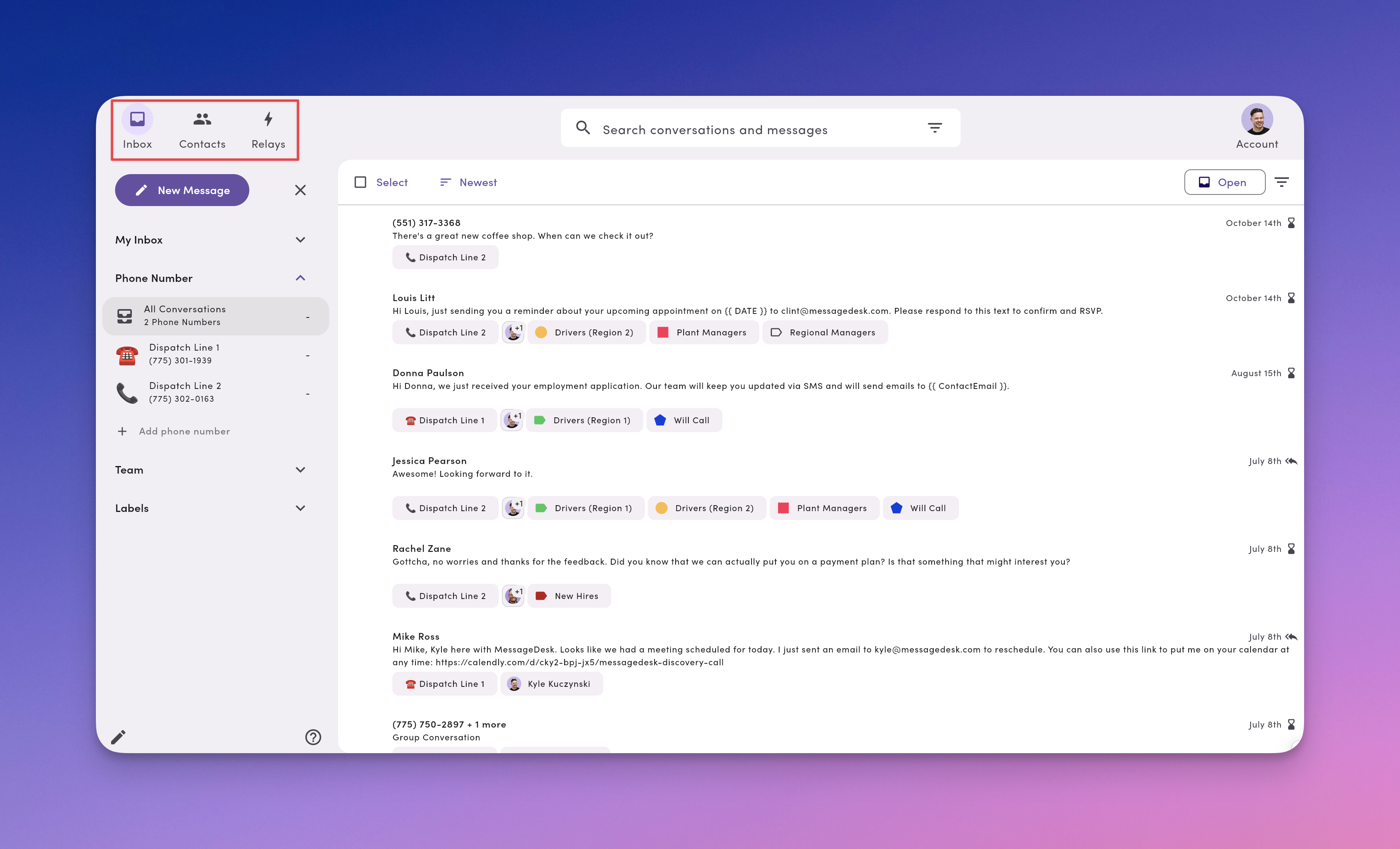
### Top navigation (modules)
* **Inbox.** Shared team space for every text conversation.
* **Contacts.** Saved contact records and lists.
* **Relays.** Triggered workflows tied to your workspace.
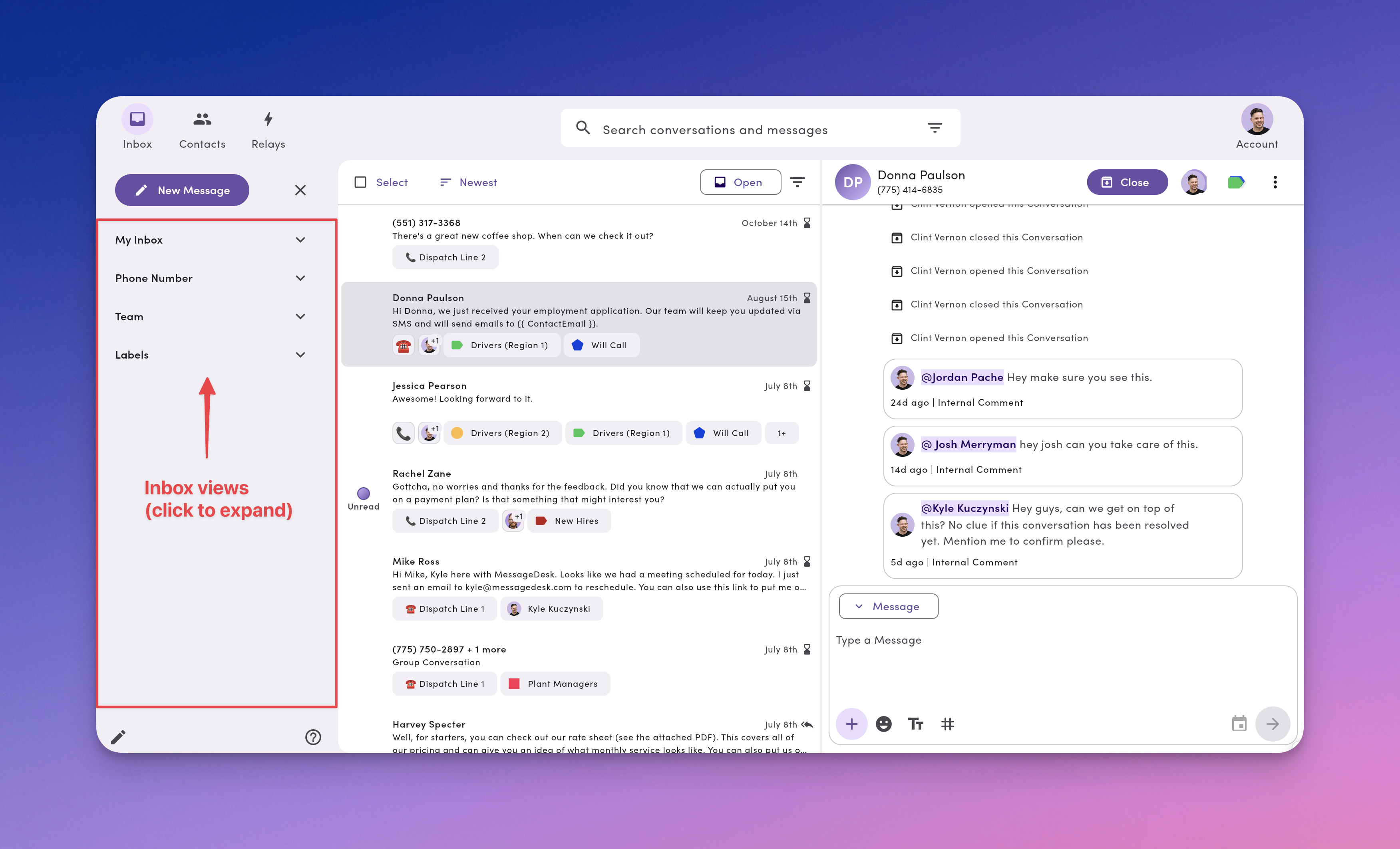
 ### Inbox views (left navigation)
* **New Message.** Compose to 1–100 recipients in a few clicks.
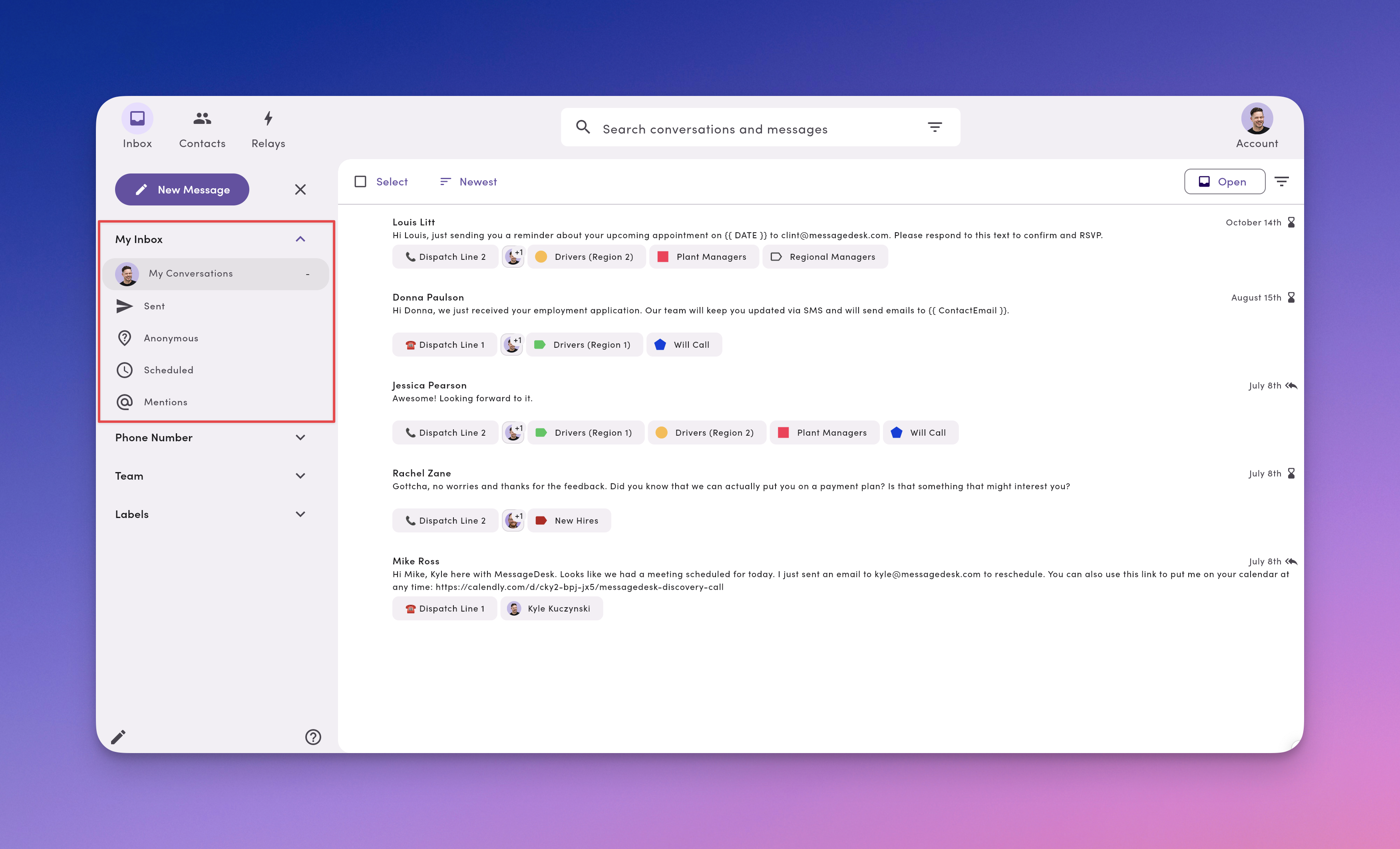
* **My Inbox.** Your personal working views (My conversations, Sent, Anonymous, Scheduled, Mentions).
* **Phone Numbers.** All Conversations (every line) or per-line views.
* **Team.** Jump into a teammate's assigned conversations.
* **Labels.** See conversations grouped by labels (Support, Proposal, Region – West, and so on).
### Inbox views (left navigation)
* **New Message.** Compose to 1–100 recipients in a few clicks.
* **My Inbox.** Your personal working views (My conversations, Sent, Anonymous, Scheduled, Mentions).
* **Phone Numbers.** All Conversations (every line) or per-line views.
* **Team.** Jump into a teammate's assigned conversations.
* **Labels.** See conversations grouped by labels (Support, Proposal, Region – West, and so on).
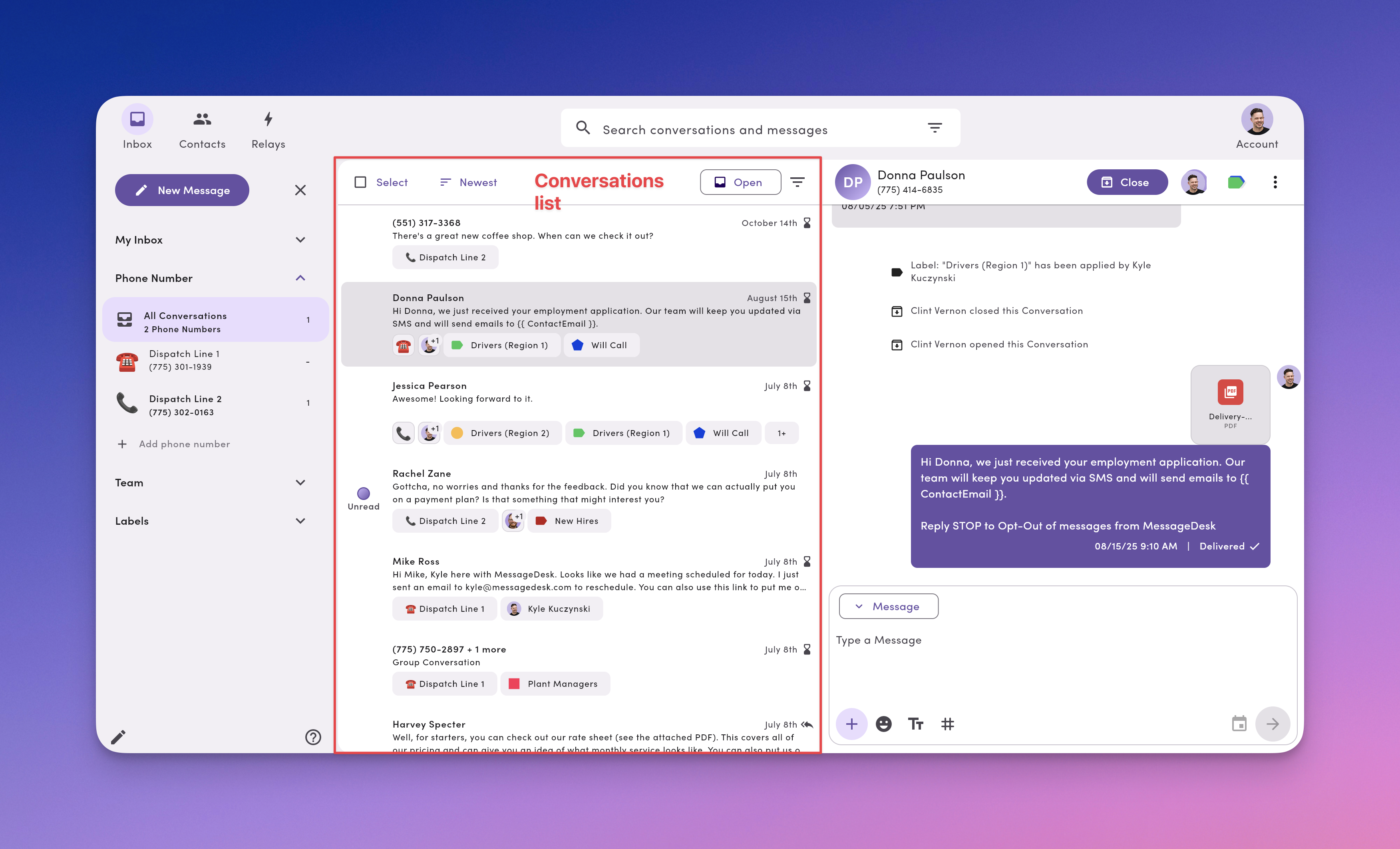
 ### Conversations list (every conversation in an inbox view)
* **Select.** Click to multi-select up to 25 conversations and take quick actions.
* **Sort.** Newest, Oldest, Waiting Longest, or Unread First.
* **Open/Closed.** Switch between your Open Inbox and Closed Inbox.
* **Filter.** Narrow by Labels, Assignee, or Workspace phone (match ALL or ANY).
* **Icons.** Dots mark unread, plus assignee avatars, label chips, line badges, and schedule/attachment icons.
### Conversations list (every conversation in an inbox view)
* **Select.** Click to multi-select up to 25 conversations and take quick actions.
* **Sort.** Newest, Oldest, Waiting Longest, or Unread First.
* **Open/Closed.** Switch between your Open Inbox and Closed Inbox.
* **Filter.** Narrow by Labels, Assignee, or Workspace phone (match ALL or ANY).
* **Icons.** Dots mark unread, plus assignee avatars, label chips, line badges, and schedule/attachment icons.
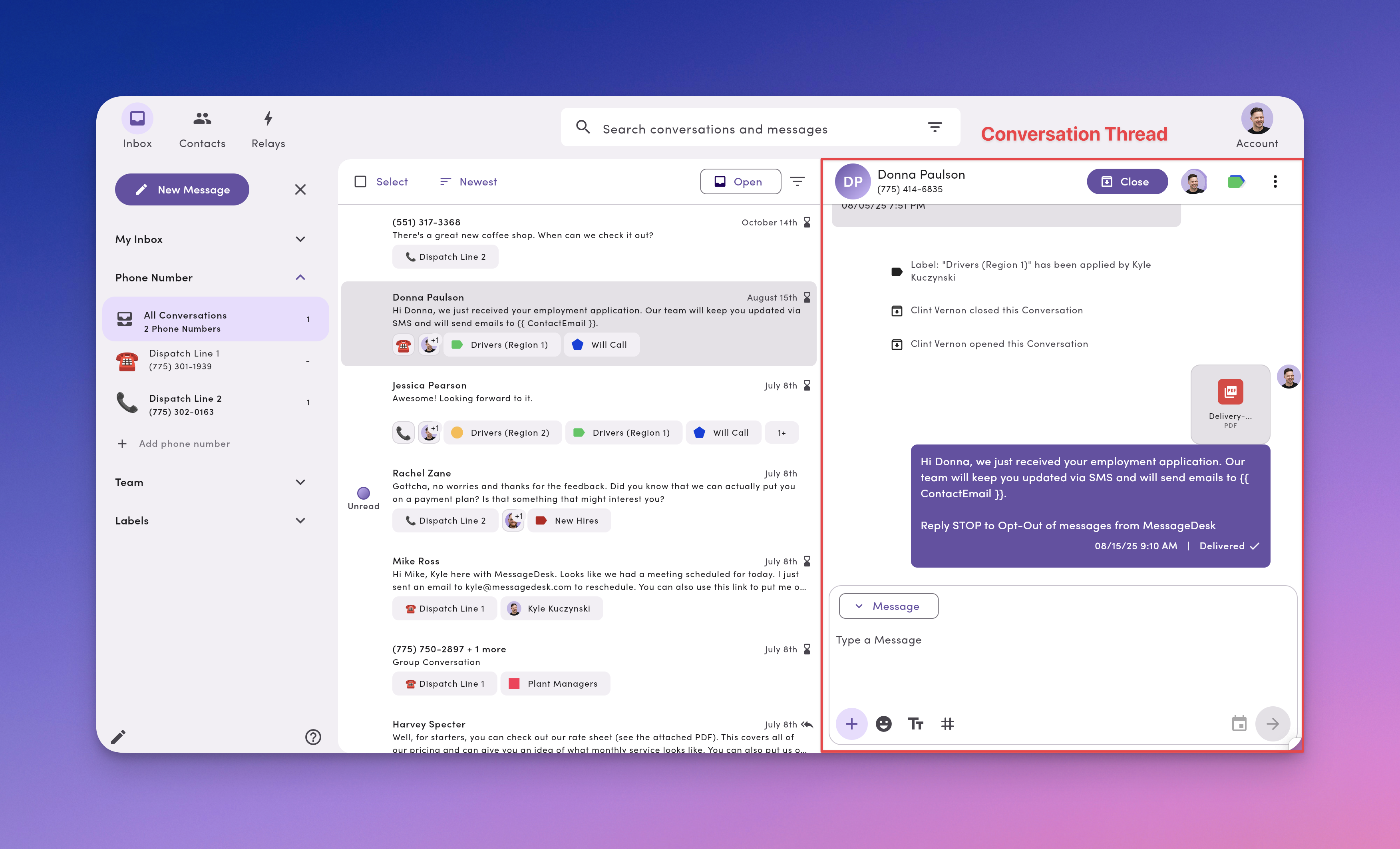
 ### Conversation thread (every message, exchange, and action in a conversation)
* **Thread.** Texts plus internal comments (clearly styled) plus emoji reactions.
* **Header actions (top-right).** Assign, Labels, Open/Close, Create Contact.
* **More Options ⋯ menu.** Conversation-level actions including [Export](/inbox/export-conversation) to CSV or PDF.
* **Message Composer (bottom).** Message/Comment toggle, Templates (TT), Tags (#), Media (+), Emoji, Schedule, Send.
### Conversation thread (every message, exchange, and action in a conversation)
* **Thread.** Texts plus internal comments (clearly styled) plus emoji reactions.
* **Header actions (top-right).** Assign, Labels, Open/Close, Create Contact.
* **More Options ⋯ menu.** Conversation-level actions including [Export](/inbox/export-conversation) to CSV or PDF.
* **Message Composer (bottom).** Message/Comment toggle, Templates (TT), Tags (#), Media (+), Emoji, Schedule, Send.
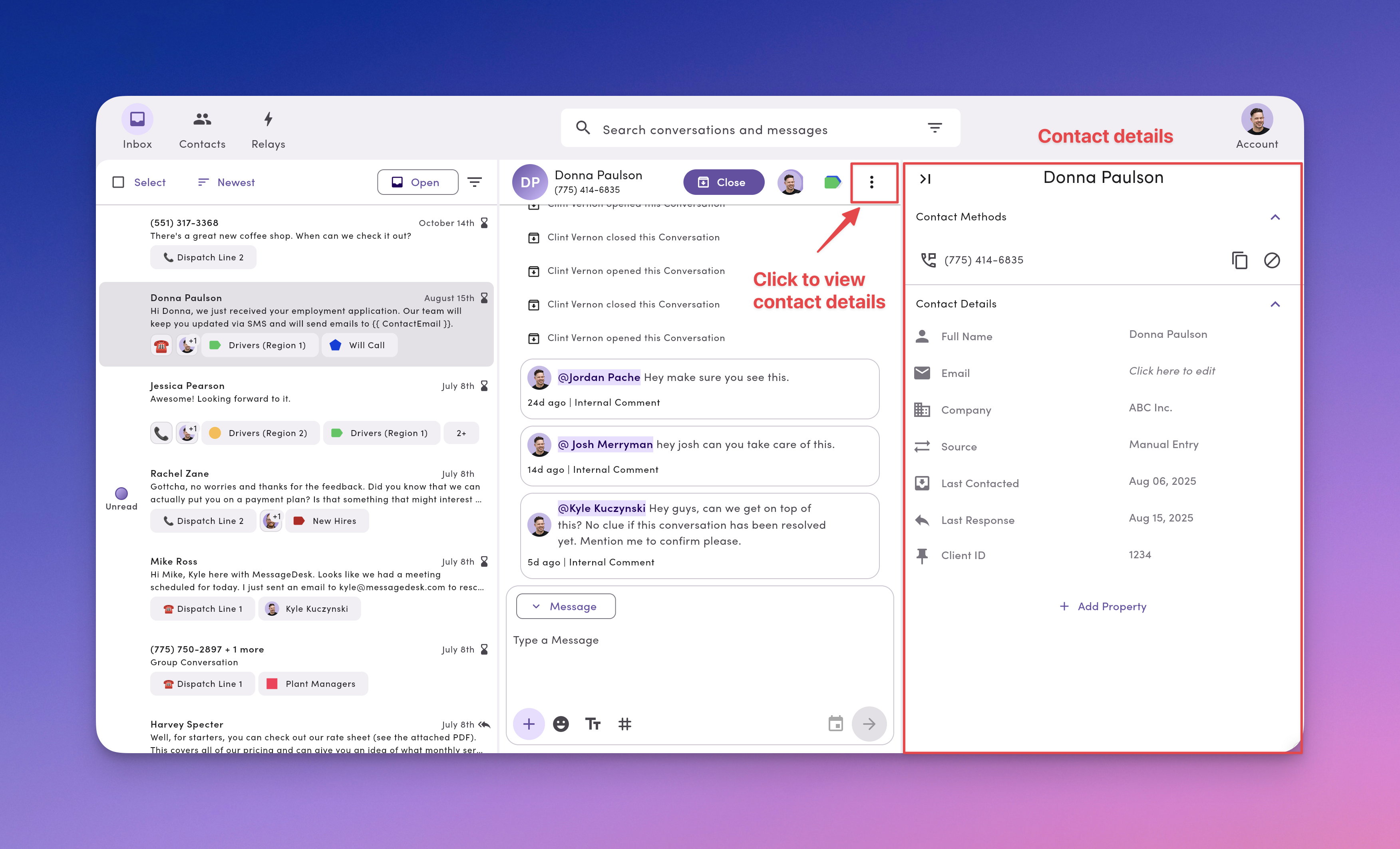
 ### Contact details (expandable)
* **Open.** Click **More** (or **Create Contact** for anonymous numbers).
* **View.** First/Last name, email, company, source, last contacted, last response.
* **Click.** Add [custom fields](/settings/workspace-settings/custom-fields).
* **Block.** Click the **Block** icon to stop messages from the contact's phone number.
### Contact details (expandable)
* **Open.** Click **More** (or **Create Contact** for anonymous numbers).
* **View.** First/Last name, email, company, source, last contacted, last response.
* **Click.** Add [custom fields](/settings/workspace-settings/custom-fields).
* **Block.** Click the **Block** icon to stop messages from the contact's phone number.
 ## Add teammates to collaborate in your Inbox
MessageDesk works best with your team inside.
### Why add teammates
* **Visibility.** See who's working what, with full context.
* **Collaboration.** Assign owners, [@mention](/inbox/comments-mentions) for help, share [templates](/messaging/templates-tags) and [labels](/inbox/labels).
### Where to start
* Invite teammates and set roles/permissions to control access to phone lines, teammate inboxes, and labels.
Invite teammates and set roles and permissions for access to phone lines, teammate inboxes, labels, and more.
## New Message (composer)
Use **New Message** to send a 1-on-1, a small **broadcast** (send individually to up to 100 recipients), or start a **Group SMS**.
* Pick **Recipients** (search, paste numbers, or pick from Contacts).
* Choose **Send from** (which connected phone number).
* Compose your **Message** (use templates, add media, insert emoji).
* **Send now** or **Schedule** for later.
## Add teammates to collaborate in your Inbox
MessageDesk works best with your team inside.
### Why add teammates
* **Visibility.** See who's working what, with full context.
* **Collaboration.** Assign owners, [@mention](/inbox/comments-mentions) for help, share [templates](/messaging/templates-tags) and [labels](/inbox/labels).
### Where to start
* Invite teammates and set roles/permissions to control access to phone lines, teammate inboxes, and labels.
Invite teammates and set roles and permissions for access to phone lines, teammate inboxes, labels, and more.
## New Message (composer)
Use **New Message** to send a 1-on-1, a small **broadcast** (send individually to up to 100 recipients), or start a **Group SMS**.
* Pick **Recipients** (search, paste numbers, or pick from Contacts).
* Choose **Send from** (which connected phone number).
* Compose your **Message** (use templates, add media, insert emoji).
* **Send now** or **Schedule** for later.
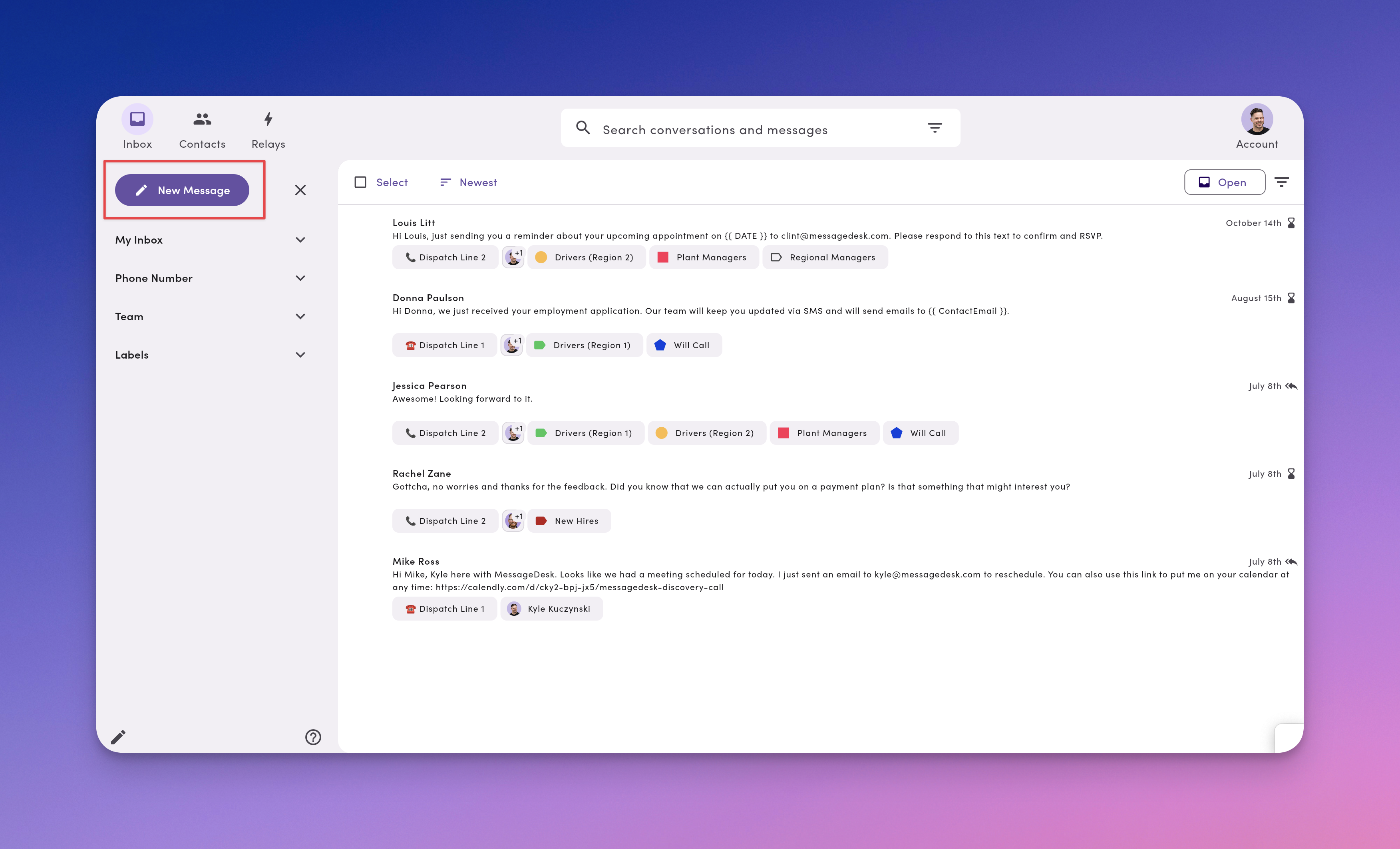 Compose a new text message to contacts from MessageDesk.
For best deliverability with business texting, complete [carrier registration (10DLC)](/carrier-registration/overview) for each connected phone number before sending texts.
### My Inbox (personal working views)
* **My conversations.** Assigned to you right now.
* **Sent.** Threads where you've sent a message.
* **Anonymous.** Numbers (conversations) not yet linked to a contact.
* **Scheduled.** Past and upcoming scheduled texts.
* **Mentions.** Comments where teammates @mentioned you.
Use these views to focus your day without losing sight of the bigger picture.
Compose a new text message to contacts from MessageDesk.
For best deliverability with business texting, complete [carrier registration (10DLC)](/carrier-registration/overview) for each connected phone number before sending texts.
### My Inbox (personal working views)
* **My conversations.** Assigned to you right now.
* **Sent.** Threads where you've sent a message.
* **Anonymous.** Numbers (conversations) not yet linked to a contact.
* **Scheduled.** Past and upcoming scheduled texts.
* **Mentions.** Comments where teammates @mentioned you.
Use these views to focus your day without losing sight of the bigger picture.
 ### Phone Numbers (all lines or per-line)
* **All Conversations.** Everything across every connected phone number.
* Click a specific **phone line** to see only the conversations on that number.
* Connect up to **48** phone lines to your workspace.
Split work by department (Front Desk, Support, Sales) while keeping a unified history.
### Phone Numbers (all lines or per-line)
* **All Conversations.** Everything across every connected phone number.
* Click a specific **phone line** to see only the conversations on that number.
* Connect up to **48** phone lines to your workspace.
Split work by department (Front Desk, Support, Sales) while keeping a unified history.
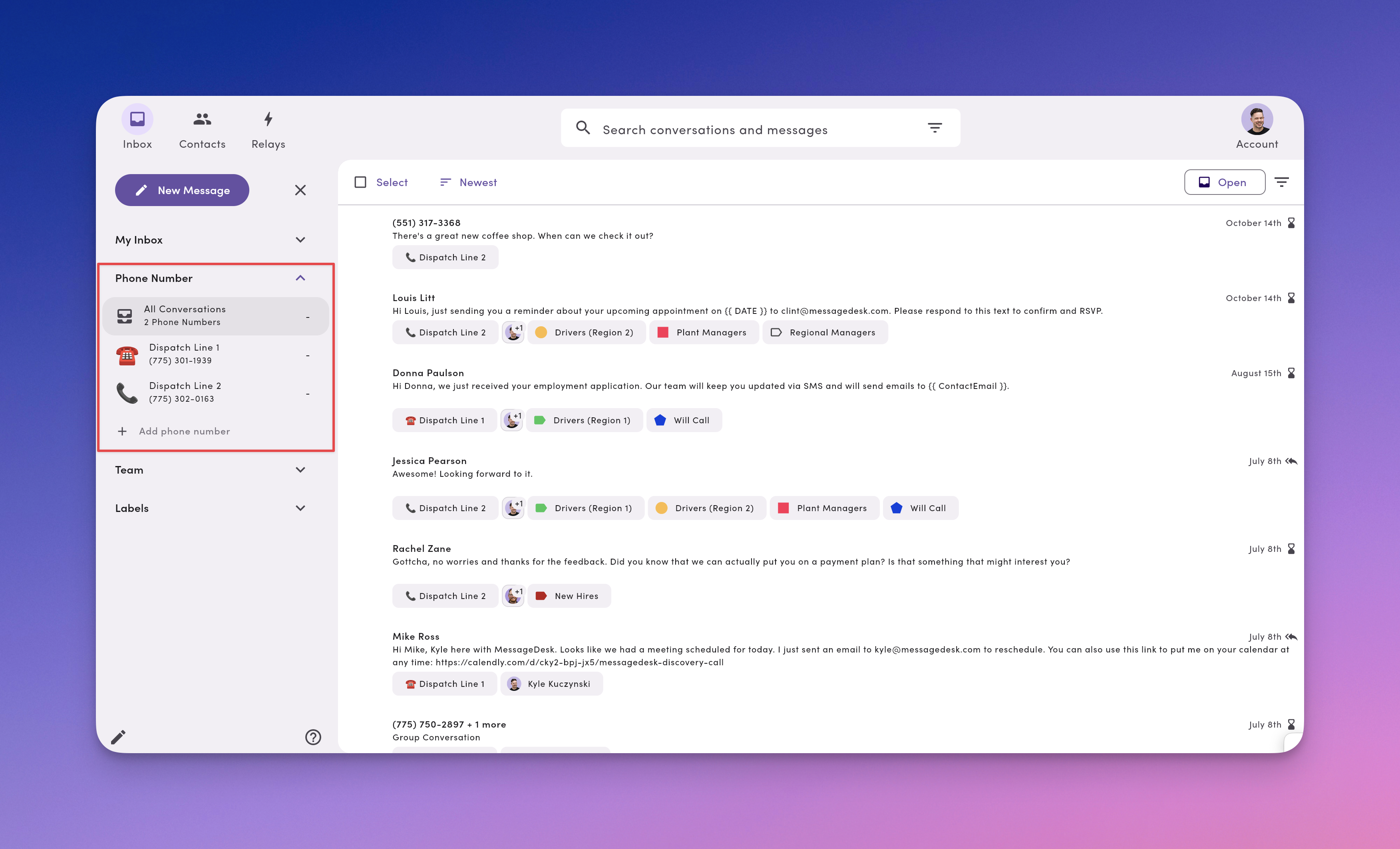 Connect different types of phone numbers and phone lines to MessageDesk.
### Team (see a teammate's conversations)
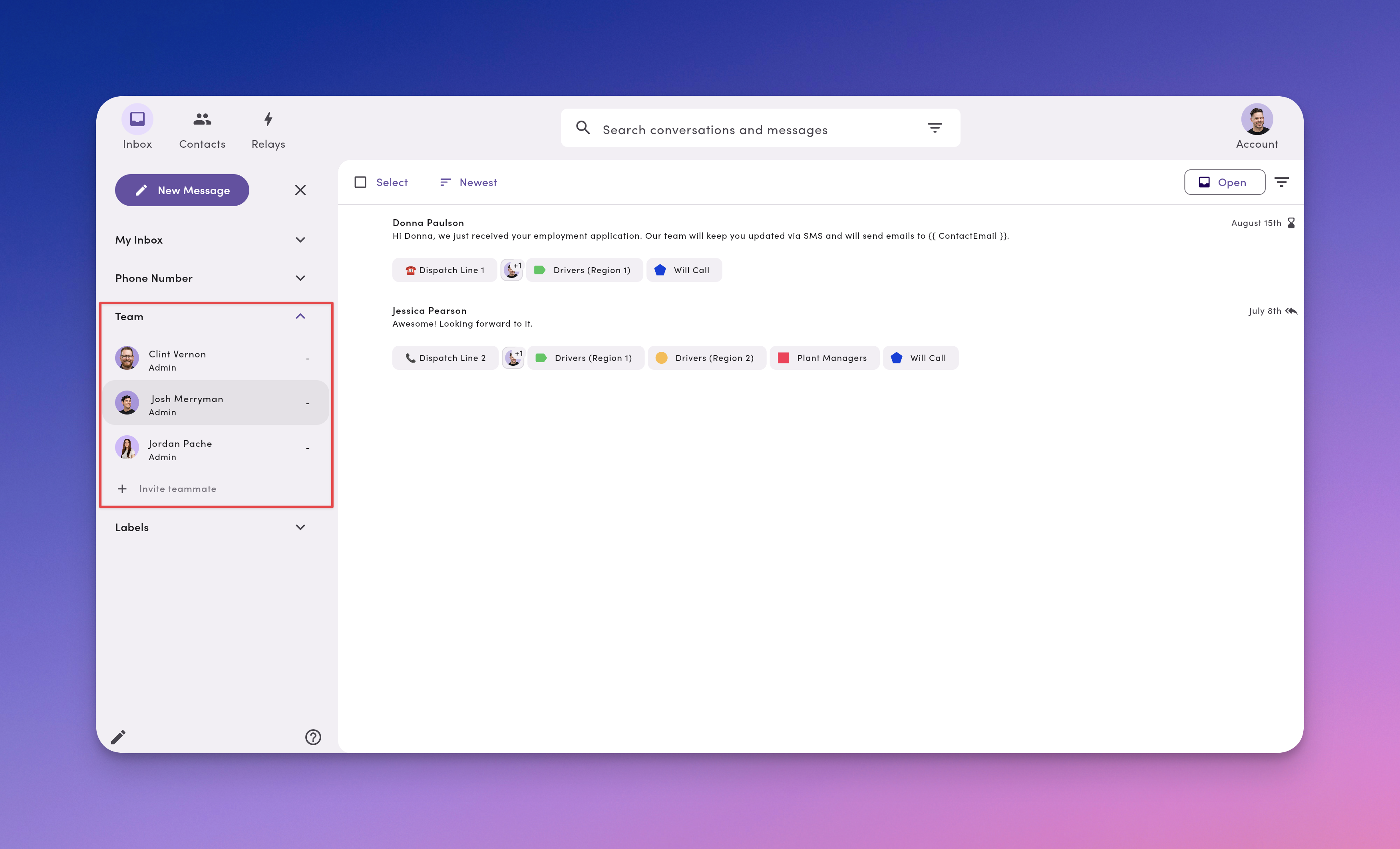
After you invite users, each teammate appears as a view. Click a teammate to see what's **assigned** to them. Useful for coverage, support, and handoffs.
Connect different types of phone numbers and phone lines to MessageDesk.
### Team (see a teammate's conversations)
After you invite users, each teammate appears as a view. Click a teammate to see what's **assigned** to them. Useful for coverage, support, and handoffs.
 ### Labels (fast organization)
Labels add color + icon + text to conversations so you can group and find related work (for example, **Support: Urgent**, **Sales: Proposal**, **Ops: Region – West**). Click a label to see every conversation tagged with it.
Create a small, shared set of labels with team-friendly names and colors. Consistency beats quantity.
### Labels (fast organization)
Labels add color + icon + text to conversations so you can group and find related work (for example, **Support: Urgent**, **Sales: Proposal**, **Ops: Region – West**). Click a label to see every conversation tagged with it.
Create a small, shared set of labels with team-friendly names and colors. Consistency beats quantity.
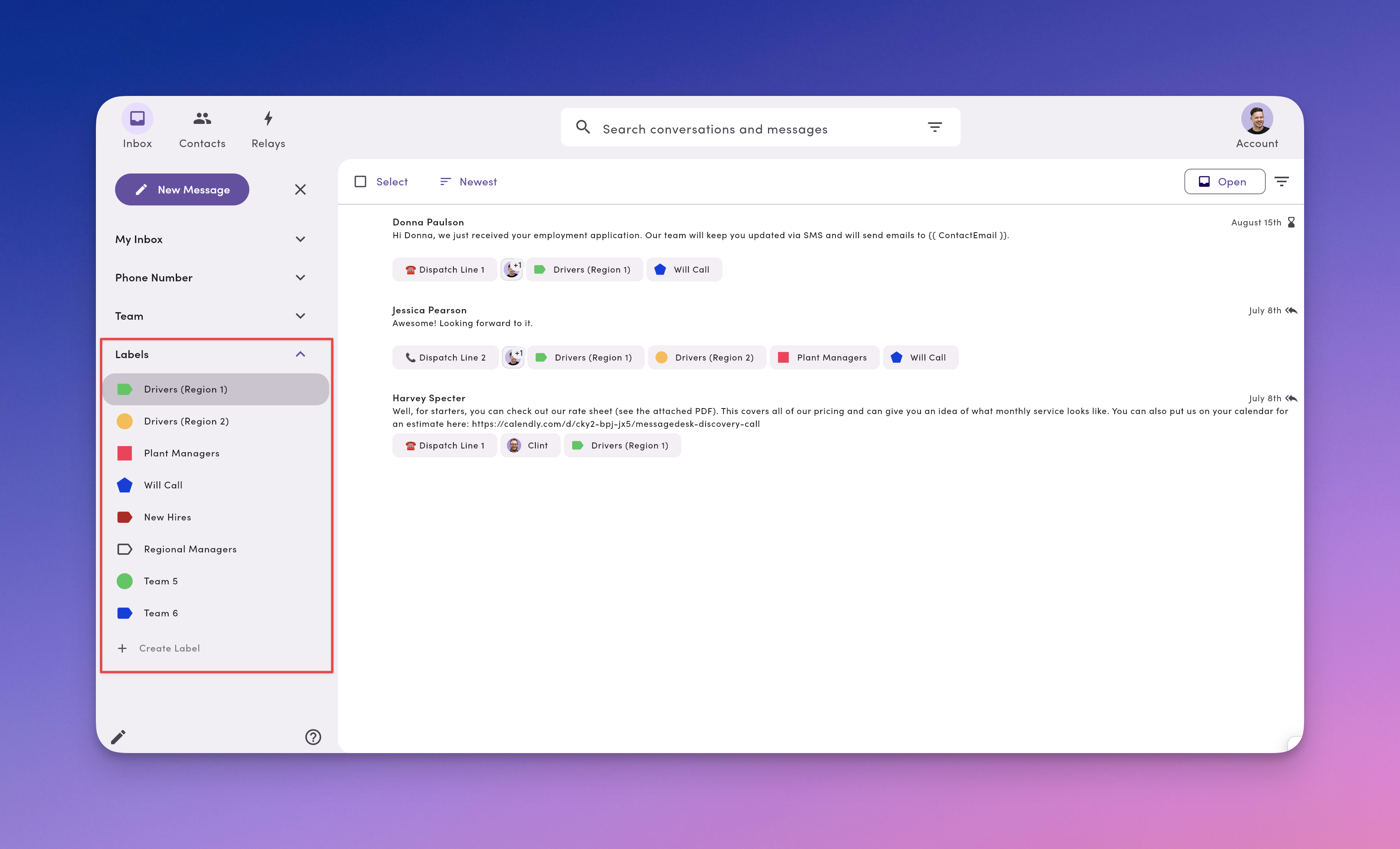 Create labels, label conversations, and manage labels in your MessageDesk workspace.
## Core Inbox actions you'll use every day
* **Assign** a conversation to a teammate. Ownership prevents double replies.
* **Comment** internally (yellow composer) and **@mention** the next owner.
* **React** with emojis to quickly acknowledge messages and comments.
* **Close** resolved threads. They'll reopen automatically on new activity.
* **Label** for easy filtering and reporting.
* **Multi-select** to take quick actions on conversations in bulk.
* **[Export conversation](/inbox/export-conversation)** to CSV or PDF from the conversation toolbar's **⋯ More Options** menu.
* **Search, sort, filter** to build focused queues (Unread First, Waiting Longest, by label/assignee/line).
**Deleting messages from a thread is restricted to Owners.** Only users with **Owner** permission on a phone number's Inbox Access can delete individual messages from a conversation thread. By default, only **Admins** have Owner access to every phone line. To prevent a user from deleting messages, make sure their role doesn't have Owner permission on that phone line. See [Team Management → Permissions](/settings/workspace-settings/team-management#what-each-permission-level-grants-access-to) for details.
***
## Best Inbox practices
* **One owner per live thread.** Assign early. Reassign on handoff with a comment.
* **Close what's done.** Keeps the Open Inbox clean and accurate.
* **Use templates + tags.** Respond faster and stay on-brand.
* **Segment by line.** Give each department a dedicated number for clarity.
* **Standardize labels.** Agree on names and colors so filters stay useful.
***
## FAQ
**Does the Inbox change message deliverability?**\
No. Open/Closed/Assigned/Labels affect team workflow only, not sending.
**Can I restrict who sees which phone lines?**\
Yes. Use roles and permissions to limit access to specific lines and teammate inboxes.
**Do comments go to customers?**\
No. Comments are internal-only. You'll see a yellow composer when commenting.
**How many recipients can I message at once?**\
Up to **100** per message sent. Each reply comes back as a private 1-on-1 message.
**Can I upload and reuse files?**\
Yes. Attach media from your computer or Workspace files. Larger files send as secure links.
***
## Troubleshooting
* **I can't find a conversation.**\
Clear filters, check you're on the right **phone line** view, then use **Search** (by message content or conversation). For **contact names**, search in **Contacts**.
* **I don't see Assign/Close/Labels.**\
Open a specific thread and check your **permissions**.
* **Too many labels to manage.**\
Consolidate with prefixes (`Support:`, `Sales:`), archive duplicates, and document your naming rules.
Create labels, label conversations, and manage labels in your MessageDesk workspace.
## Core Inbox actions you'll use every day
* **Assign** a conversation to a teammate. Ownership prevents double replies.
* **Comment** internally (yellow composer) and **@mention** the next owner.
* **React** with emojis to quickly acknowledge messages and comments.
* **Close** resolved threads. They'll reopen automatically on new activity.
* **Label** for easy filtering and reporting.
* **Multi-select** to take quick actions on conversations in bulk.
* **[Export conversation](/inbox/export-conversation)** to CSV or PDF from the conversation toolbar's **⋯ More Options** menu.
* **Search, sort, filter** to build focused queues (Unread First, Waiting Longest, by label/assignee/line).
**Deleting messages from a thread is restricted to Owners.** Only users with **Owner** permission on a phone number's Inbox Access can delete individual messages from a conversation thread. By default, only **Admins** have Owner access to every phone line. To prevent a user from deleting messages, make sure their role doesn't have Owner permission on that phone line. See [Team Management → Permissions](/settings/workspace-settings/team-management#what-each-permission-level-grants-access-to) for details.
***
## Best Inbox practices
* **One owner per live thread.** Assign early. Reassign on handoff with a comment.
* **Close what's done.** Keeps the Open Inbox clean and accurate.
* **Use templates + tags.** Respond faster and stay on-brand.
* **Segment by line.** Give each department a dedicated number for clarity.
* **Standardize labels.** Agree on names and colors so filters stay useful.
***
## FAQ
**Does the Inbox change message deliverability?**\
No. Open/Closed/Assigned/Labels affect team workflow only, not sending.
**Can I restrict who sees which phone lines?**\
Yes. Use roles and permissions to limit access to specific lines and teammate inboxes.
**Do comments go to customers?**\
No. Comments are internal-only. You'll see a yellow composer when commenting.
**How many recipients can I message at once?**\
Up to **100** per message sent. Each reply comes back as a private 1-on-1 message.
**Can I upload and reuse files?**\
Yes. Attach media from your computer or Workspace files. Larger files send as secure links.
***
## Troubleshooting
* **I can't find a conversation.**\
Clear filters, check you're on the right **phone line** view, then use **Search** (by message content or conversation). For **contact names**, search in **Contacts**.
* **I don't see Assign/Close/Labels.**\
Open a specific thread and check your **permissions**.
* **Too many labels to manage.**\
Consolidate with prefixes (`Support:`, `Sales:`), archive duplicates, and document your naming rules.