> ## Documentation Index
> Fetch the complete documentation index at: https://docs.messagedesk.com/llms.txt
> Use this file to discover all available pages before exploring further.
# Message Delivery Errors & Troubleshooting
> Diagnose SMS delivery failures in MessageDesk. Decode every status code, find root causes for blocked or undelivered texts, and fix common carrier errors.
# Message delivery errors and troubleshooting
Get messages through, fast. This guide shows you **what each status means**, **how to fix failures**, and **what to send support** if you need help.
***
## TL;DR: your fastest path to fix messaging problems
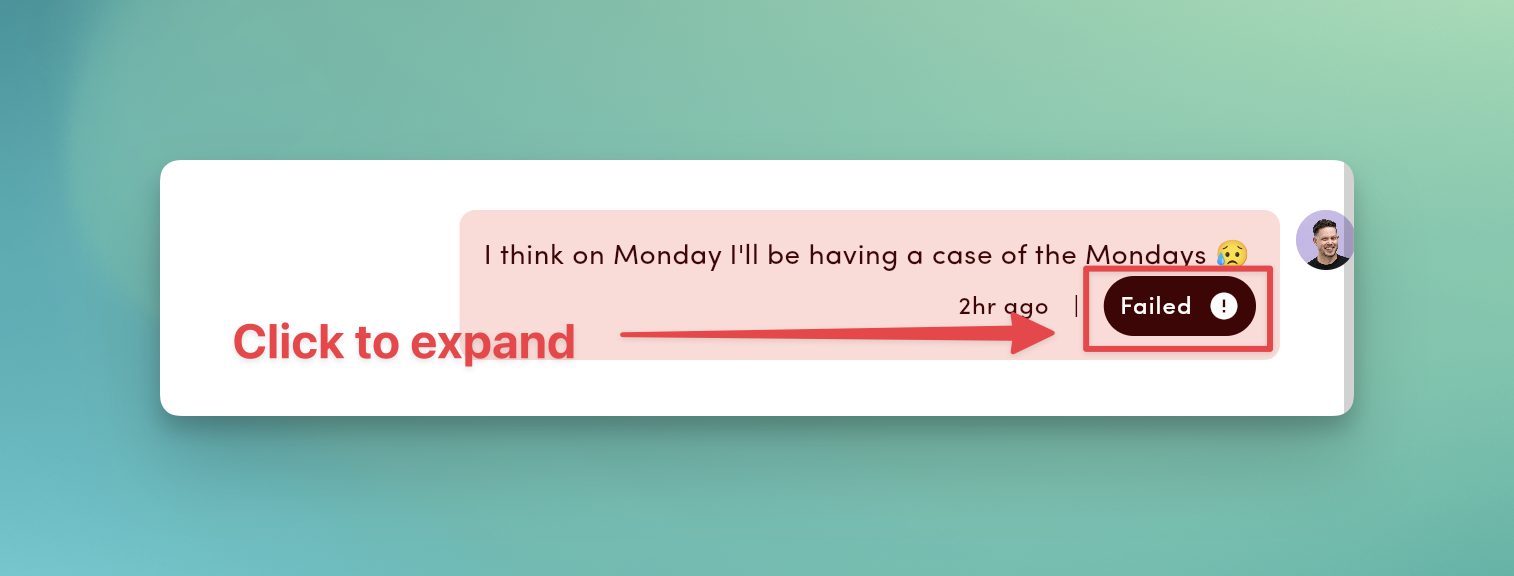
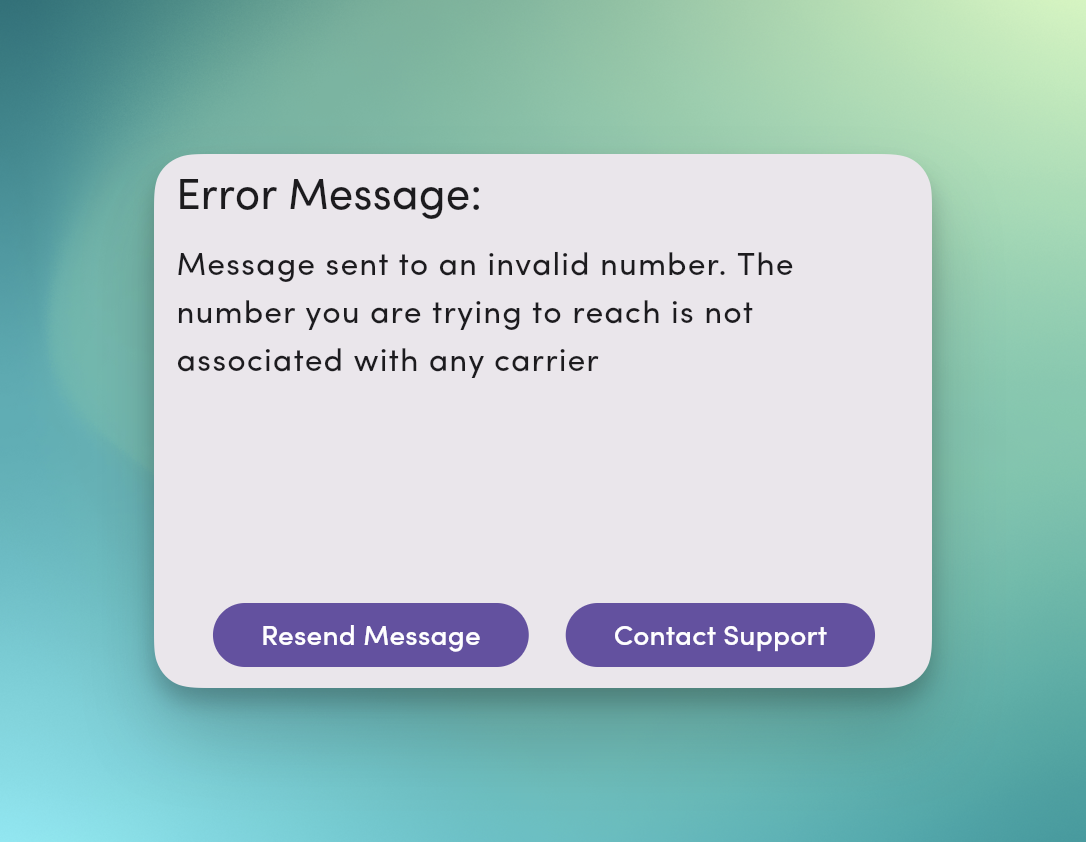
1. **Open the status badge.** If it's **Failed**, click/tap to see the error reason.
2. **Retry smartly.** Click **Resend Message** or send a short, **plain-text** message **without links or media**.
3. **Check the basics.** Is the number **mobile** and formatted **E.164** (`+15551234567`)?
4. **Registration matters.** Make sure your line is **A2P 10DLC-registered** (local) or **verified** (toll-free).
5. **If urgent, use another channel** (call/email) while you troubleshoot.
 ***
## What message delivery statuses mean and what to do
| Status | What it means | What you should do |
| ------------- | ------------------------------------------- | ------------------------------------------------------------------------------------------------------------------ |
| **Delivered** | Carrier confirmed delivery. | If your contact says "didn't get your message," resend a short message **without links or media**. |
| **Sent** | Handed to carriers; final delivery pending. | Wait for an update. Carriers don't always reply with a delivery status. If it stays "Sent," try a short follow-up. |
| **Queued** | Throttled to protect deliverability. | Leave it; the queue clears automatically. Heavy team usage on one line may extend queue time. |
| **Failed** | Carrier/network rejected delivery. | Use the **error reason** below → fix → **Resend**. |
**Inbound** messages show a **timestamp only** (no delivery status).
**Twilio BYOC numbers:** Messages sent from external systems (not MessageDesk) using your Twilio number appear in MessageDesk with a "Sent" status but don't receive delivery status updates. To track delivery status, send messages directly from MessageDesk.
***
## Top 3 reasons messages fail and fixes
1. **Landline or unreachable number**
* Signs: **Invalid Number (2)**, **Destination Unreachable (5)**
* Fix: Confirm it's a **mobile** number, correct formatting to **E.164**, and request an updated number if needed.
2. **Content filtered as spam / out of campaign scope**
* Signs: **Anti-spam (4)**, **Invalid Message (3)**, **Invalid Short Link (13)**
* Fix: Remove short links, ALL CAPS, and promo buzzwords. Add identity and **"Reply STOP to opt out."** Use full or branded URLs.
3. **Throughput or registration limits**
* Signs: **Carrier Error (7)**, **Rate Limit Exceeded (16)**, **Unregistered 10DLC (14)**, **Pending Registration (17)**, **Campaign Suspended (18)**
* Fix: Complete **10DLC** or **toll-free verification**. **Schedule** large sends in waves. Contact support if suspended.
***
## Error reasons (codes): quick fixes
Click a **Failed** badge to see a reason why your message failed to send. Use this table to resolve and resend.
| Code | UI message | What it means | What you should do |
| -----: | ----------------------- | --------------------------- | ---------------------------------------------------------------------------- |
| **1** | Unknown Error | Generic failure. | Retry once; if it persists, **contact support** with thread link/time. |
| **2** | Invalid Number | Landline/invalid/typo. | Use a **mobile** number; fix number formatting to **E.164**. |
| **3** | Invalid Message | Content blocked. | Remove blocked phrases/formatting; comply with campaign terms; resend. |
| **4** | Anti-spam | Filtered as spam. | Add opt-out, reduce links/ALL-CAPS; segment; ensure **10DLC**. |
| **5** | Destination Unreachable | Not valid on network. | Confirm with contact; update or remove. |
| **6** | Insufficient Funds | Billing/credits issue. | Update payment; retry after funds post. |
| **7** | Carrier Error | Downstream network issue. | Retry later; if recurring, contact support. |
| **8** | Media Error | Unsupported/corrupt media. | Re-attach supported types; keep **≤ 10 MB** each. |
| **10** | Opted Out | Recipient opted out. | **Don't** resend; re-opt-in via a compliant path only. |
| **11** | Blocked | Recipient/workspace block. | Unblock only if compliant and intended. |
| **12** | Unverified Toll-Free | Toll-free not verified. | Complete verification; resend. |
| **13** | Invalid Short Link | Generic shortener blocked. | Use full or branded links. |
| **14** | Unregistered 10DLC | Local number unregistered. | Register brand/campaign; resend post-approval. |
| **15** | Media Too Large | Attachment too big. | Compress; keep **≤ 10 MB** (files > **500 KB** send as links automatically). |
| **16** | Rate Limit Exceeded | Throughput/daily caps hit. | **Schedule** in waves; upgrade throughput via registration. |
| **17** | Pending Registration | Awaiting 10DLC association. | Wait (up to **24h**), then resend. |
| **18** | Campaign Suspended | Registration suspended. | **Contact support**; fix compliance; reinstate. |
***
## Deliverability checklist
* **Identify yourself:** "Hi \[Name], it's \[Business]…"
* **Consent and opt-out:** Include "Reply STOP to opt out."
* **Keep it short:** One clear purpose per message.
* **Avoid shorteners:** Use full/branded URLs.
* **Right-size media:** ≤ **10 MB** each; prefer images over video.
***
## After porting or hosting a number with MessageDesk
* **0–24 hours:** SMS/MMS may be inconsistent while routes update.
* **24–48 hours:** Most issues resolve.
* **48+ hours:** Collect examples and **contact support**.
Test with 2–3 contacts on different carriers (Verizon, AT\&T, T-Mobile) and save timestamps/screenshots.
***
## What to send MessageDesk support for help
Email [**support@messagedesk.com**](mailto:support@messagedesk.com) with:
* **3+ failed examples** (dates/times, recipient numbers)
* **Exact error details** (screenshots of status/reason)
* **Recipient carriers** (if known)
* **Your message content** (including any links)
* **Which sending number** you used
***
## Reference (additional details)
### How statuses appear in the UI
* **Outbound:** `10:42 AM | Delivered ✓` (timestamp **|** status + icon)
* **Failed:** Red/error styling; click to open details and **Resend**
* **Media:** Status shows even without text content
* **Inbound:** Timestamp only (no status)
### MMS and media tips
* **Aim for ≤ 500 KB per image** (hard max **10 MB**). Files over 500 KB are auto-compressed; .jpg compresses cleanly, while large .png files may show visible compression artifacts.
* Files that can't be reduced under the threshold send as **links** automatically.
* **Prefer .jpg over .png when texting iPhone recipients.** PNG MMS to iOS is known to fail intermittently at the carrier/device level.
* If repeated failures occur, **share a file link** instead of attaching video.
* HEIC/JPG/PNG/GIF/PDF supported; files > **500 KB** send as links automatically.
***
## What message delivery statuses mean and what to do
| Status | What it means | What you should do |
| ------------- | ------------------------------------------- | ------------------------------------------------------------------------------------------------------------------ |
| **Delivered** | Carrier confirmed delivery. | If your contact says "didn't get your message," resend a short message **without links or media**. |
| **Sent** | Handed to carriers; final delivery pending. | Wait for an update. Carriers don't always reply with a delivery status. If it stays "Sent," try a short follow-up. |
| **Queued** | Throttled to protect deliverability. | Leave it; the queue clears automatically. Heavy team usage on one line may extend queue time. |
| **Failed** | Carrier/network rejected delivery. | Use the **error reason** below → fix → **Resend**. |
**Inbound** messages show a **timestamp only** (no delivery status).
**Twilio BYOC numbers:** Messages sent from external systems (not MessageDesk) using your Twilio number appear in MessageDesk with a "Sent" status but don't receive delivery status updates. To track delivery status, send messages directly from MessageDesk.
***
## Top 3 reasons messages fail and fixes
1. **Landline or unreachable number**
* Signs: **Invalid Number (2)**, **Destination Unreachable (5)**
* Fix: Confirm it's a **mobile** number, correct formatting to **E.164**, and request an updated number if needed.
2. **Content filtered as spam / out of campaign scope**
* Signs: **Anti-spam (4)**, **Invalid Message (3)**, **Invalid Short Link (13)**
* Fix: Remove short links, ALL CAPS, and promo buzzwords. Add identity and **"Reply STOP to opt out."** Use full or branded URLs.
3. **Throughput or registration limits**
* Signs: **Carrier Error (7)**, **Rate Limit Exceeded (16)**, **Unregistered 10DLC (14)**, **Pending Registration (17)**, **Campaign Suspended (18)**
* Fix: Complete **10DLC** or **toll-free verification**. **Schedule** large sends in waves. Contact support if suspended.
***
## Error reasons (codes): quick fixes
Click a **Failed** badge to see a reason why your message failed to send. Use this table to resolve and resend.
| Code | UI message | What it means | What you should do |
| -----: | ----------------------- | --------------------------- | ---------------------------------------------------------------------------- |
| **1** | Unknown Error | Generic failure. | Retry once; if it persists, **contact support** with thread link/time. |
| **2** | Invalid Number | Landline/invalid/typo. | Use a **mobile** number; fix number formatting to **E.164**. |
| **3** | Invalid Message | Content blocked. | Remove blocked phrases/formatting; comply with campaign terms; resend. |
| **4** | Anti-spam | Filtered as spam. | Add opt-out, reduce links/ALL-CAPS; segment; ensure **10DLC**. |
| **5** | Destination Unreachable | Not valid on network. | Confirm with contact; update or remove. |
| **6** | Insufficient Funds | Billing/credits issue. | Update payment; retry after funds post. |
| **7** | Carrier Error | Downstream network issue. | Retry later; if recurring, contact support. |
| **8** | Media Error | Unsupported/corrupt media. | Re-attach supported types; keep **≤ 10 MB** each. |
| **10** | Opted Out | Recipient opted out. | **Don't** resend; re-opt-in via a compliant path only. |
| **11** | Blocked | Recipient/workspace block. | Unblock only if compliant and intended. |
| **12** | Unverified Toll-Free | Toll-free not verified. | Complete verification; resend. |
| **13** | Invalid Short Link | Generic shortener blocked. | Use full or branded links. |
| **14** | Unregistered 10DLC | Local number unregistered. | Register brand/campaign; resend post-approval. |
| **15** | Media Too Large | Attachment too big. | Compress; keep **≤ 10 MB** (files > **500 KB** send as links automatically). |
| **16** | Rate Limit Exceeded | Throughput/daily caps hit. | **Schedule** in waves; upgrade throughput via registration. |
| **17** | Pending Registration | Awaiting 10DLC association. | Wait (up to **24h**), then resend. |
| **18** | Campaign Suspended | Registration suspended. | **Contact support**; fix compliance; reinstate. |
***
## Deliverability checklist
* **Identify yourself:** "Hi \[Name], it's \[Business]…"
* **Consent and opt-out:** Include "Reply STOP to opt out."
* **Keep it short:** One clear purpose per message.
* **Avoid shorteners:** Use full/branded URLs.
* **Right-size media:** ≤ **10 MB** each; prefer images over video.
***
## After porting or hosting a number with MessageDesk
* **0–24 hours:** SMS/MMS may be inconsistent while routes update.
* **24–48 hours:** Most issues resolve.
* **48+ hours:** Collect examples and **contact support**.
Test with 2–3 contacts on different carriers (Verizon, AT\&T, T-Mobile) and save timestamps/screenshots.
***
## What to send MessageDesk support for help
Email [**support@messagedesk.com**](mailto:support@messagedesk.com) with:
* **3+ failed examples** (dates/times, recipient numbers)
* **Exact error details** (screenshots of status/reason)
* **Recipient carriers** (if known)
* **Your message content** (including any links)
* **Which sending number** you used
***
## Reference (additional details)
### How statuses appear in the UI
* **Outbound:** `10:42 AM | Delivered ✓` (timestamp **|** status + icon)
* **Failed:** Red/error styling; click to open details and **Resend**
* **Media:** Status shows even without text content
* **Inbound:** Timestamp only (no status)
### MMS and media tips
* **Aim for ≤ 500 KB per image** (hard max **10 MB**). Files over 500 KB are auto-compressed; .jpg compresses cleanly, while large .png files may show visible compression artifacts.
* Files that can't be reduced under the threshold send as **links** automatically.
* **Prefer .jpg over .png when texting iPhone recipients.** PNG MMS to iOS is known to fail intermittently at the carrier/device level.
* If repeated failures occur, **share a file link** instead of attaching video.
* HEIC/JPG/PNG/GIF/PDF supported; files > **500 KB** send as links automatically.