> ## Documentation Index
> Fetch the complete documentation index at: https://docs.messagedesk.com/llms.txt
> Use this file to discover all available pages before exploring further.
# SMS, MMS & Group Messaging Overview
> Explore the messaging types MessageDesk supports: 1:1 SMS, MMS, group texts, scheduled sends, and templated broadcasts. Plus throughput and channel rules.
# Messaging with MessageDesk
MessageDesk supports the following types of messages:
* 1-on-1 individual SMS/MMS
* 1-to-many text message broadcasts
* Group SMS
* Multimedia messages (MMS) in any thread
* 2FA (two-factor) (receive-only)
* Internal comments (private, team-only)
* Emoji reactions on messages and comments
* RCS (coming soon)
* WhatsApp (coming soon)
* Email (coming soon)
**Import historical messages:** You can import past messages into MessageDesk to maintain conversation continuity. Learn more in the [Data Center](/settings/workspace-settings/data-center) documentation.
## SMS character limits and message segments
Standard SMS messages are limited to **160 characters per segment**. If a message exceeds this limit, carriers automatically split it into multiple segments. Most modern phones display these as a single continuous message, but in rare cases they may appear as separate texts or arrive out of order.
**Special characters reduce the limit:** Emojis and accented letters (like "á" or "ñ") use more data per character. When these are included, the effective limit per segment drops to around **70–80 characters**.
**Maximum message length depends on encoding:** The compose box character counter automatically adjusts based on the characters in your message:
* **Standard (GSM-7) messages:** Up to **1,600 characters** per send. Uses only standard ASCII characters (letters, numbers, and common punctuation).
* **Unicode (UTF-16) messages:** Up to **800 characters** per send. Triggered by any non-ASCII character. For example, an emoji, an accented letter, curly quotes, or an em dash.
The lower cap on Unicode messages prevents carrier failures from oversized payloads. If you add a single emoji to a long message, the counter will drop from 1,600 to 800. Trim the message or remove the special character to send it as one piece.
**Automatic MMS conversion:** Once a message reaches approximately three segments, MessageDesk automatically converts it to MMS. This reduces carrier costs and ensures delivery as one complete message regardless of length.
**You don't need to worry about character counts.** MessageDesk includes unlimited messaging and automatic MMS conversion, so your contacts will almost always receive your message as one clean, professional text. Even if it technically splits behind the scenes.
### 1-on-1 individual text messages
Private, one-to-one messages with a single contact. Each conversation is its own thread in your shared inbox, so your team has full context and can assign, filter, and follow up without stepping on each other.
**Best for:** Conversational, back-and-forth service and support.
**How 1-on-1 individual messages work:** You text one person. Their replies stay in the same private thread.
**Advantages:**
* Keep conversations private and easy to follow.
* Route and assign to the right teammate from the shared inbox.
* Great for personalized, contextual help.
**Limitations:**
* One conversation at a time.
* Not efficient for announcements to many people.
### 1-to-many text message broadcasts
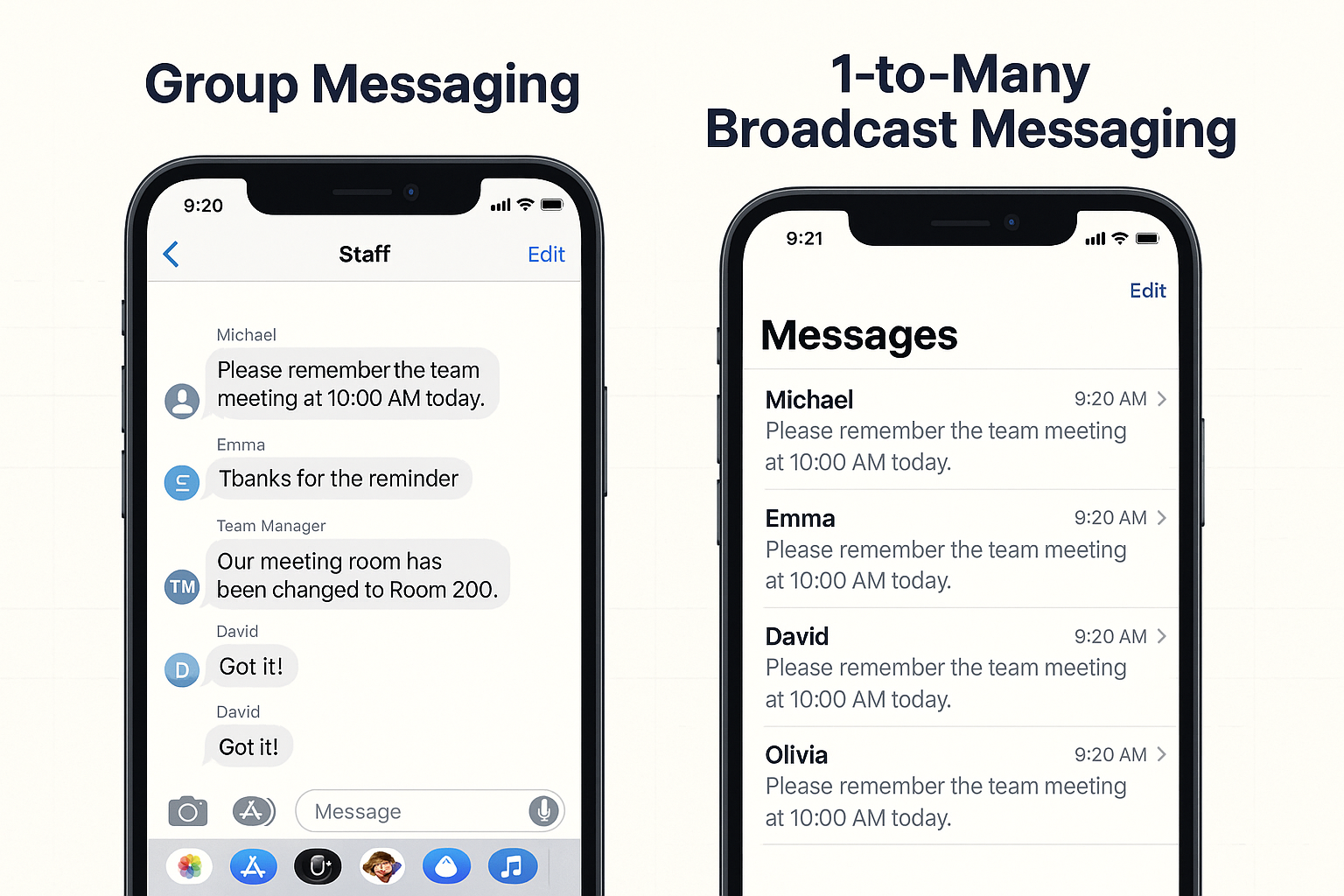
Send one message to many contacts at once. Replies come back as **private 1-on-1** threads so you can triage and follow up quickly. (This is why broadcasts scale *and* stay personal.)
**Best for:** Announcements, reminders, alerts, promotions.
**How broadcasts work:** Create a group/list and send. Every reply opens a private thread for you.
**Advantages:**
* Reach many people with one send.
* Every reply is private. No "reply all" disasters.
* Combine with templates and scheduling for speed.
**Limitations:**
* Currently limited to **100 contacts per send**.
* Best for one-way notices; not for group collaboration.
* Be mindful of consent and opt-out language for non-conversational texts.
**Pro tip:** Segment first. Targeted broadcasts get better engagement and fewer opt-outs.
### Group SMS
Group SMS messages create a text thread where all message recipients can see and respond to all messages within the text thread.
 **Best for:** Small, collaborative discussions (like a quick team check-in).
**How Group SMS works:** All replies go to everyone in the group.
**Advantages:**
* Creates a shared conversation where everyone can see, respond, and participate.
* Works well for small, collaborative discussions.
**Limitations:**
* Every reply alerts all recipients (which can quickly become noisy).
* Limited to **7 total participants - not including the sender**.
* Difficult to add or remove participants after the group is created.
### Multimedia text messages (MMS)
Multimedia text messages, or MMS for short, are available for all messaging types. You can attach media to individual, broadcast, and group text message conversations.
**Best for:** Visual messages like
**How multimedia text messaging works:** Attach your media to any text message and send.
**Advantages:**
* Faster than email for “show me” moments.
* Reduces back-and-forth and shortens resolution time.
**Limitations:**
* Carrier media file size limits apply.
* **Individual MMS messages are limited to 1,200 characters.** This is an inherent limitation of MMS as a messaging type, imposed by upstream carrier providers.
**Sending longer messages:** If you need to send content that exceeds 1,200 characters, break it into multiple messages of around 1,000 characters each. This ensures reliable delivery while keeping your messages easy to read.
Learn more about sending and receiving media files, including file size restrictions.
### 2FA (two-factor) authentication text messages
These are transactional **codes typically sent from a 5- or 6-digit short code**. MessageDesk connected numbers can **only receive** 2FA codes from shortcode phone numbers.
**Best for:** Receiving account-security codes on a shared team number.
**How 2FA messaging works:** Your connected number receives 2FA messages like any other text.
**Advantages:**
* Keep security-related messages in the same customer thread.
* Maintain a record alongside other messages in your shared inbox.
**Limitations:**
* MessageDesk connected phone numbers are only capable of receiving these types of text messages, not generating them or sending from a shortcode phone number.
* **Major carriers block 2FA codes from large organizations** (e.g., Facebook, Amazon, Google, financial institutions) when sent to VoIP numbers. This is a carrier-level restriction, not a MessageDesk limitation.
* **Test before relying on this workflow:** Send a test 2FA code to your MessageDesk number before committing to this use case. Smaller organizations and internal systems typically work fine, but codes from major platforms are often blocked.
**Security note:** Using a shared team number for 2FA codes bypasses the security model of two-factor authentication. This workflow is best suited for business scenarios like bookkeeping access, audit teams, or internal system logins. It's not for personal account security.
### Internal comments
Leave private notes right inside a text message conversation. Contacts never see these. They're team-only for handoffs and internal support.
**Best for:** Handoffs, support, approvals. Anything your contact shouldn't see.
**How internal comments work:** Add a comment to the thread. Assign or mention teammates.
**Advantages:**
* Keep the context within the conversation.
* Reduce "who said what" confusion across shifts.
**Limitations:**
* Only visible to MessageDesk users within your MessageDesk workspace.
Check out how to use comments, mentions, and emoji reactions for team collaboration.
### Emoji reactions
Add emoji reactions to messages and non-threaded comments to quickly acknowledge, respond, or express sentiment without typing a full reply. Reactions appear in the top-left of the message or comment with a count of unique reactions.
**Best for:** Quick acknowledgments, expressing sentiment, reducing message noise.
**How emoji reactions work:** Hover over a message or comment and select an emoji to react. Click the reaction icon to see all reactions and who posted them.
**Advantages:**
* Acknowledge messages without cluttering the thread with replies.
* See who reacted by clicking the reaction icon.
**Limitations:**
* Available on messages and non-threaded comments only.
### RCS, WhatsApp, Email (coming soon)
These channels will appear as additional conversation types when available. You’ll manage them from the same shared inbox alongside SMS.
**Best for:** Small, collaborative discussions (like a quick team check-in).
**How Group SMS works:** All replies go to everyone in the group.
**Advantages:**
* Creates a shared conversation where everyone can see, respond, and participate.
* Works well for small, collaborative discussions.
**Limitations:**
* Every reply alerts all recipients (which can quickly become noisy).
* Limited to **7 total participants - not including the sender**.
* Difficult to add or remove participants after the group is created.
### Multimedia text messages (MMS)
Multimedia text messages, or MMS for short, are available for all messaging types. You can attach media to individual, broadcast, and group text message conversations.
**Best for:** Visual messages like
**How multimedia text messaging works:** Attach your media to any text message and send.
**Advantages:**
* Faster than email for “show me” moments.
* Reduces back-and-forth and shortens resolution time.
**Limitations:**
* Carrier media file size limits apply.
* **Individual MMS messages are limited to 1,200 characters.** This is an inherent limitation of MMS as a messaging type, imposed by upstream carrier providers.
**Sending longer messages:** If you need to send content that exceeds 1,200 characters, break it into multiple messages of around 1,000 characters each. This ensures reliable delivery while keeping your messages easy to read.
Learn more about sending and receiving media files, including file size restrictions.
### 2FA (two-factor) authentication text messages
These are transactional **codes typically sent from a 5- or 6-digit short code**. MessageDesk connected numbers can **only receive** 2FA codes from shortcode phone numbers.
**Best for:** Receiving account-security codes on a shared team number.
**How 2FA messaging works:** Your connected number receives 2FA messages like any other text.
**Advantages:**
* Keep security-related messages in the same customer thread.
* Maintain a record alongside other messages in your shared inbox.
**Limitations:**
* MessageDesk connected phone numbers are only capable of receiving these types of text messages, not generating them or sending from a shortcode phone number.
* **Major carriers block 2FA codes from large organizations** (e.g., Facebook, Amazon, Google, financial institutions) when sent to VoIP numbers. This is a carrier-level restriction, not a MessageDesk limitation.
* **Test before relying on this workflow:** Send a test 2FA code to your MessageDesk number before committing to this use case. Smaller organizations and internal systems typically work fine, but codes from major platforms are often blocked.
**Security note:** Using a shared team number for 2FA codes bypasses the security model of two-factor authentication. This workflow is best suited for business scenarios like bookkeeping access, audit teams, or internal system logins. It's not for personal account security.
### Internal comments
Leave private notes right inside a text message conversation. Contacts never see these. They're team-only for handoffs and internal support.
**Best for:** Handoffs, support, approvals. Anything your contact shouldn't see.
**How internal comments work:** Add a comment to the thread. Assign or mention teammates.
**Advantages:**
* Keep the context within the conversation.
* Reduce "who said what" confusion across shifts.
**Limitations:**
* Only visible to MessageDesk users within your MessageDesk workspace.
Check out how to use comments, mentions, and emoji reactions for team collaboration.
### Emoji reactions
Add emoji reactions to messages and non-threaded comments to quickly acknowledge, respond, or express sentiment without typing a full reply. Reactions appear in the top-left of the message or comment with a count of unique reactions.
**Best for:** Quick acknowledgments, expressing sentiment, reducing message noise.
**How emoji reactions work:** Hover over a message or comment and select an emoji to react. Click the reaction icon to see all reactions and who posted them.
**Advantages:**
* Acknowledge messages without cluttering the thread with replies.
* See who reacted by clicking the reaction icon.
**Limitations:**
* Available on messages and non-threaded comments only.
### RCS, WhatsApp, Email (coming soon)
These channels will appear as additional conversation types when available. You’ll manage them from the same shared inbox alongside SMS.