> ## Documentation Index
> Fetch the complete documentation index at: https://docs.messagedesk.com/llms.txt
> Use this file to discover all available pages before exploring further.
# MessageDesk Relays Automation Overview
> Learn what MessageDesk Relays are, how triggers and actions work, and see common SMS automation examples like auto-replies, follow-ups, and webhook events.
# How to automate with Relays
Relays are MessageDesk's workflow engine. They listen for **events**, evaluate **conditions**, and run **actions** so the right conversation reaches the right person at the right time.
**Desktop only:** Relays are currently only available on desktop. Mobile users can't access or manage Relays at this time.
**Permissions required:** By default, only **Admin** users have access to Relays. Admins can grant **Relay Management** permissions to other user roles via **Settings → Team Management**. Learn more: [Team Management](/settings/workspace-settings/team-management).
***
## Why use Relays?
* **Scale without chaos:** Auto-assign and auto-label to keep your inbox tidy as volume grows.
* **Respond faster:** Send **after-hours** and **first-touch** replies automatically.
* **Reduce busywork:** Route by **phone line**, **label**, or **teammate** so work starts in the right place.
* **Stay consistent:** Standardize rules so there are no missed handoffs.
***
## What you can do with Relays
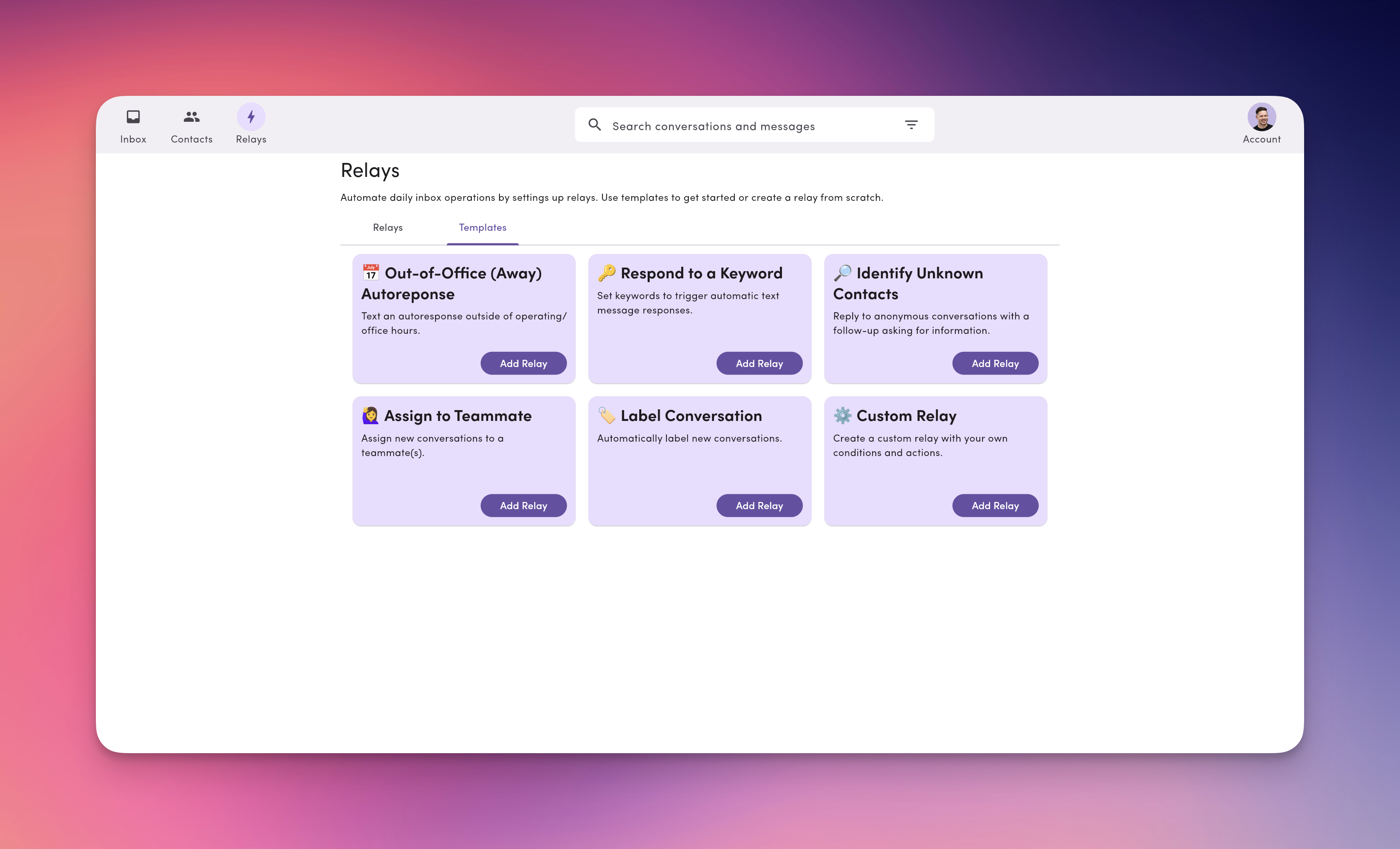
1. **Out-of-office auto-reply:** Send an automatic response outside your business hours.
2. **Keyword replies:** Trigger a preset message when a contact texts a specific keyword.
3. **Identify unknown contacts:** Detect anonymous conversations and request name/phone/email automatically.
4. **Auto-assign:** Assign new conversations to one or more teammates as they arrive.
5. **Auto-label:** Apply labels (e.g., *Support*, *HR: New Hire*, *Region: West*) based on line, content, or rules.
6. **Custom Relays:** Combine your own conditions and actions to match your workflow.
All Relay templates are customizable. You can adjust wording, labels, assignees, active hours, and more.
***
## How Relays work (at a glance)
**Relays = Triggers → Conditions → Actions**
* **Triggers:** When it runs\
*Example:* `MessageReceived` (a new inbound text starts the relay)
* **Conditions:** Where/when it applies\
*Examples:*\
• **Phone line** equals *Support*\
• **Is anonymous** contact is **true**\
• **Active hours** = outside business hours
* **Actions:** What happens\
*Examples:*\
• **Assign teammates**\
• **Add labels**\
• **Send message** (auto-reply with templates/tags)
You can **pause** and **resume** any Relay without deleting it.
***
## Example starter Relay recipes
* **After-hours responder**\
*Trigger:* MessageReceived → *Conditions:* Outside business hours →\
*Actions:* Send “We’ll reply at 8am PT. Reply STOP to opt out.”
* **New lead triage**\
*Trigger:* MessageReceived → *Conditions:* Is anonymous = true →\
*Actions:* Send info-capture prompt → Add label *Lead* → Assign *Sales Queue*
* **Phone Line-based routing**\
*Trigger:* MessageReceived → *Conditions:* Outbound channel = *Dispatch Line* →\
*Actions:* Assign *Dispatcher* → Add label *Route Change*
Want more? See the full [**Relay Recipes**](/relays/recipes) library for ready-to-use configurations covering customer service, operations and routing, and webhook integrations.
**Auto-replies don't mark conversations as Read.** When a Relay sends a message, the conversation moves to **Replied** status (so it leaves the Unread filter), but it stays unreviewed until a teammate opens it in the Inbox. See [Relays and conversation status](/relays/create-edit#relays-and-conversation-status).
 ***
## Why use Relays?
* **Scale without chaos:** Auto-assign and auto-label to keep your inbox tidy as volume grows.
* **Respond faster:** Send **after-hours** and **first-touch** replies automatically.
* **Reduce busywork:** Route by **phone line**, **label**, or **teammate** so work starts in the right place.
* **Stay consistent:** Standardize rules so there are no missed handoffs.
***
## What you can do with Relays
1. **Out-of-office auto-reply:** Send an automatic response outside your business hours.
2. **Keyword replies:** Trigger a preset message when a contact texts a specific keyword.
3. **Identify unknown contacts:** Detect anonymous conversations and request name/phone/email automatically.
4. **Auto-assign:** Assign new conversations to one or more teammates as they arrive.
5. **Auto-label:** Apply labels (e.g., *Support*, *HR: New Hire*, *Region: West*) based on line, content, or rules.
6. **Custom Relays:** Combine your own conditions and actions to match your workflow.
***
## Why use Relays?
* **Scale without chaos:** Auto-assign and auto-label to keep your inbox tidy as volume grows.
* **Respond faster:** Send **after-hours** and **first-touch** replies automatically.
* **Reduce busywork:** Route by **phone line**, **label**, or **teammate** so work starts in the right place.
* **Stay consistent:** Standardize rules so there are no missed handoffs.
***
## What you can do with Relays
1. **Out-of-office auto-reply:** Send an automatic response outside your business hours.
2. **Keyword replies:** Trigger a preset message when a contact texts a specific keyword.
3. **Identify unknown contacts:** Detect anonymous conversations and request name/phone/email automatically.
4. **Auto-assign:** Assign new conversations to one or more teammates as they arrive.
5. **Auto-label:** Apply labels (e.g., *Support*, *HR: New Hire*, *Region: West*) based on line, content, or rules.
6. **Custom Relays:** Combine your own conditions and actions to match your workflow.
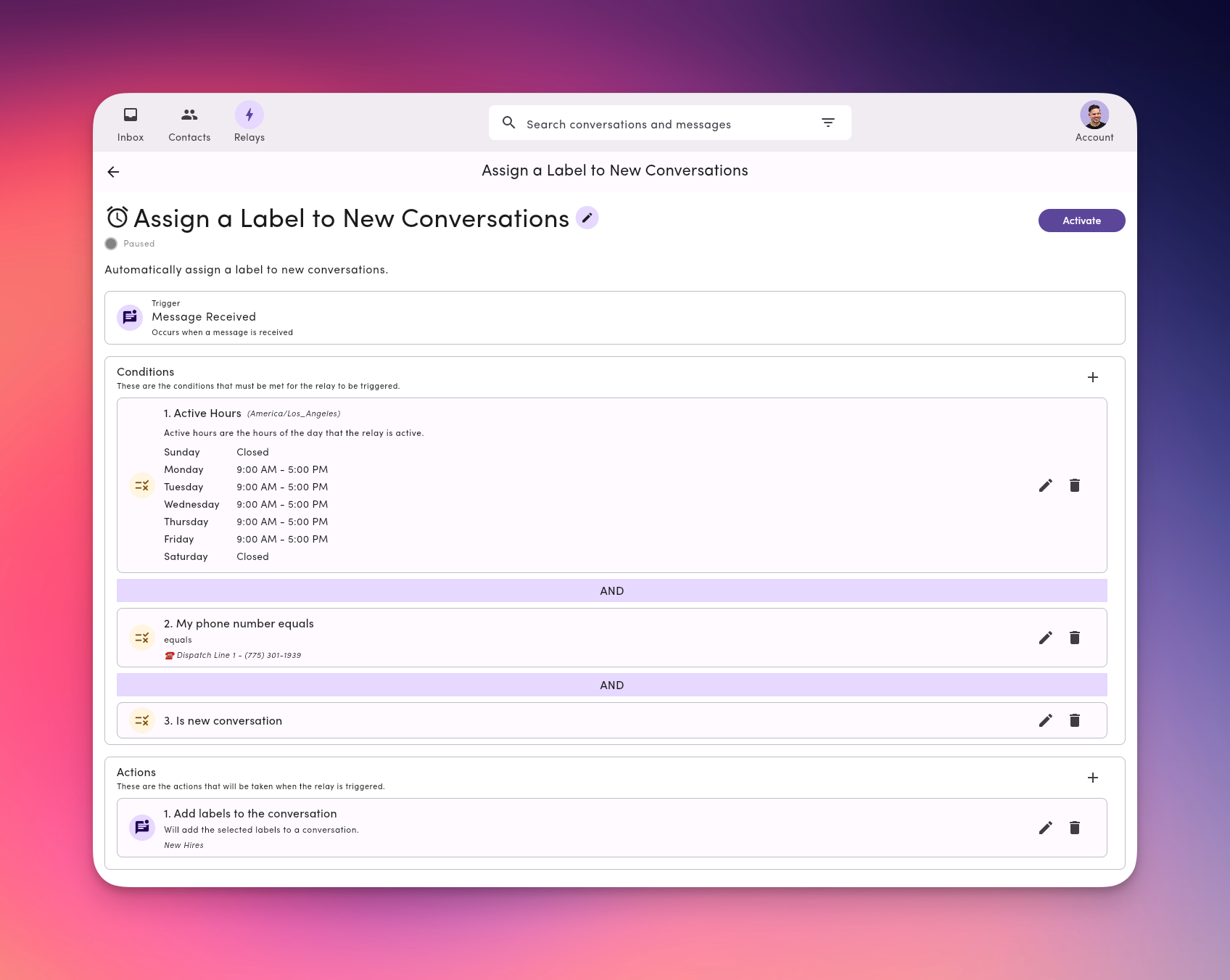 **Relays = Triggers → Conditions → Actions**
* **Triggers:** When it runs\
*Example:* `MessageReceived` (a new inbound text starts the relay)
* **Conditions:** Where/when it applies\
*Examples:*\
• **Phone line** equals *Support*\
• **Is anonymous** contact is **true**\
• **Active hours** = outside business hours
* **Actions:** What happens\
*Examples:*\
• **Assign teammates**\
• **Add labels**\
• **Send message** (auto-reply with templates/tags)
You can **pause** and **resume** any Relay without deleting it.
***
## Example starter Relay recipes
* **After-hours responder**\
*Trigger:* MessageReceived → *Conditions:* Outside business hours →\
*Actions:* Send “We’ll reply at 8am PT. Reply STOP to opt out.”
* **New lead triage**\
*Trigger:* MessageReceived → *Conditions:* Is anonymous = true →\
*Actions:* Send info-capture prompt → Add label *Lead* → Assign *Sales Queue*
* **Phone Line-based routing**\
*Trigger:* MessageReceived → *Conditions:* Outbound channel = *Dispatch Line* →\
*Actions:* Assign *Dispatcher* → Add label *Route Change*
**Relays = Triggers → Conditions → Actions**
* **Triggers:** When it runs\
*Example:* `MessageReceived` (a new inbound text starts the relay)
* **Conditions:** Where/when it applies\
*Examples:*\
• **Phone line** equals *Support*\
• **Is anonymous** contact is **true**\
• **Active hours** = outside business hours
* **Actions:** What happens\
*Examples:*\
• **Assign teammates**\
• **Add labels**\
• **Send message** (auto-reply with templates/tags)
You can **pause** and **resume** any Relay without deleting it.
***
## Example starter Relay recipes
* **After-hours responder**\
*Trigger:* MessageReceived → *Conditions:* Outside business hours →\
*Actions:* Send “We’ll reply at 8am PT. Reply STOP to opt out.”
* **New lead triage**\
*Trigger:* MessageReceived → *Conditions:* Is anonymous = true →\
*Actions:* Send info-capture prompt → Add label *Lead* → Assign *Sales Queue*
* **Phone Line-based routing**\
*Trigger:* MessageReceived → *Conditions:* Outbound channel = *Dispatch Line* →\
*Actions:* Assign *Dispatcher* → Add label *Route Change*