> ## Documentation Index
> Fetch the complete documentation index at: https://docs.messagedesk.com/llms.txt
> Use this file to discover all available pages before exploring further.
# Advanced Search
> Search contacts, conversations, messages, comments, and labels across MessageDesk with per-type filters, pagination, and scroll-to-message routing.
# Advanced Search
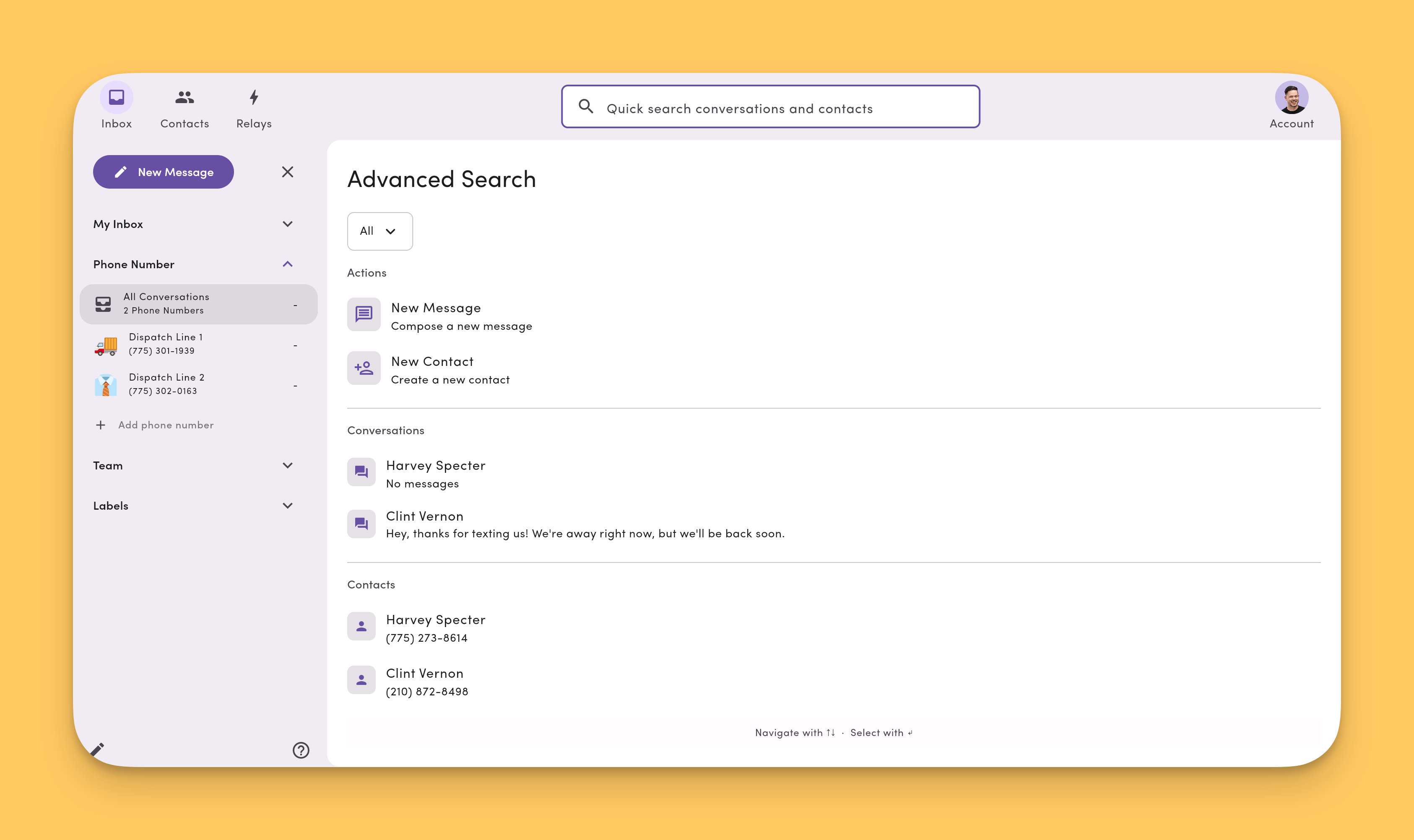
Advanced Search is MessageDesk's full **cross-module** search. It covers every searchable item type (contacts, conversations, messages, comments, and labels) with per-type filters, pagination, and smart routing that takes you exactly where each result lives.
On desktop, **⌘K** opens [Quick Search](/search/quick-search). Press **Enter** on a Quick Search result to escalate to Advanced Search at that result.
***
## Open Advanced Search
You can launch Advanced Search several ways:
* **From Quick Search (desktop):**
* Click the **search icon** next to a Quick Search result.
* Press **Enter** on a highlighted Quick Search result.
* Click **Open Advanced Search** at the bottom of the Quick Search dropdown.
* **From mobile or tablet:** Tap the **search icon** near the account settings icon. Advanced Search has its own embedded search box on mobile and tablet since Quick Search isn't available there.
 ***
## Side nav context is preserved
Advanced Search keeps you anchored in the module you launched it from:
* If you're in the **Inbox**, the inbox side nav stays visible.
* If you're in **Contacts**, the contacts side nav stays visible.
* If you're in **Settings**, the settings side nav stays visible.
This way, you can run a search without losing your place in the app.
***
## Searchable item types
Advanced Search indexes five item types, each with its own filters and results section:
| Type | What it searches | Per-type filters |
| ----------------- | ------------------------------------------- | ---------------- |
| **Contacts** | Saved contact records (name, phone, fields) | ✅ |
| **Conversations** | Threads in your inbox | ✅ |
| **Messages** | SMS message content | ✅ |
| **Comments** | Internal team comments and threaded replies | ✅ |
| **Labels** | Label names applied to conversations | ✅ |
Each result type has its own pagination so you can drill into one type without losing the others.
***
## Routing: where each result takes you
Clicking a result takes you to the right place automatically:
* **Contact** → opens the **contact profile**.
* **Conversation** → opens the conversation in the inbox.
* **Message** → opens the conversation **and scrolls to that message**.
* **Comment** → opens the conversation **and scrolls to that comment**.
* **Label** → opens the **labeled inbox view** for that label.
***
## 30-day index window
Advanced Search keeps a fast, indexed window of the most recent **30 days** of messages and comments. This is what powers near-instant results for live workflows.
Older results are **backfilled from the database**. They may take a moment longer to appear, but you can still search the full archive. Older matches are merged into the same results list.
For broader archive export and reporting, see [Data Center → Message History](/settings/data-center#message-history).
***
## Mobile and tablet
On mobile and tablet, Advanced Search is the **only** search experience. Quick Search isn't available on those form factors. Tap the **search icon** near the account settings icon to open Advanced Search, type into its embedded search box, and tap any result to navigate.
***
## See also
* [Search overview](/search/overview)
* [Quick Search](/search/quick-search)
* [Filter, search & sort (Inbox)](/inbox/filter-search-sort)
* [Keyboard shortcuts](/resources/keyboard-shortcuts)
***
## Side nav context is preserved
Advanced Search keeps you anchored in the module you launched it from:
* If you're in the **Inbox**, the inbox side nav stays visible.
* If you're in **Contacts**, the contacts side nav stays visible.
* If you're in **Settings**, the settings side nav stays visible.
This way, you can run a search without losing your place in the app.
***
## Searchable item types
Advanced Search indexes five item types, each with its own filters and results section:
| Type | What it searches | Per-type filters |
| ----------------- | ------------------------------------------- | ---------------- |
| **Contacts** | Saved contact records (name, phone, fields) | ✅ |
| **Conversations** | Threads in your inbox | ✅ |
| **Messages** | SMS message content | ✅ |
| **Comments** | Internal team comments and threaded replies | ✅ |
| **Labels** | Label names applied to conversations | ✅ |
Each result type has its own pagination so you can drill into one type without losing the others.
***
## Routing: where each result takes you
Clicking a result takes you to the right place automatically:
* **Contact** → opens the **contact profile**.
* **Conversation** → opens the conversation in the inbox.
* **Message** → opens the conversation **and scrolls to that message**.
* **Comment** → opens the conversation **and scrolls to that comment**.
* **Label** → opens the **labeled inbox view** for that label.
***
## 30-day index window
Advanced Search keeps a fast, indexed window of the most recent **30 days** of messages and comments. This is what powers near-instant results for live workflows.
Older results are **backfilled from the database**. They may take a moment longer to appear, but you can still search the full archive. Older matches are merged into the same results list.
For broader archive export and reporting, see [Data Center → Message History](/settings/data-center#message-history).
***
## Mobile and tablet
On mobile and tablet, Advanced Search is the **only** search experience. Quick Search isn't available on those form factors. Tap the **search icon** near the account settings icon to open Advanced Search, type into its embedded search box, and tap any result to navigate.
***
## See also
* [Search overview](/search/overview)
* [Quick Search](/search/quick-search)
* [Filter, search & sort (Inbox)](/inbox/filter-search-sort)
* [Keyboard shortcuts](/resources/keyboard-shortcuts)