> ## Documentation Index
> Fetch the complete documentation index at: https://docs.messagedesk.com/llms.txt
> Use this file to discover all available pages before exploring further.
# Team Roles, Permissions and Invites
> Invite users to your MessageDesk workspace, accept invitations, and manage team access with admin, manager, and agent roles plus granular permissions.
# Team management: invite teammates and set roles with permissions
Get your team on board fast, then control who can see, edit, and delete what without slowing anyone down.
***
## TL;DR
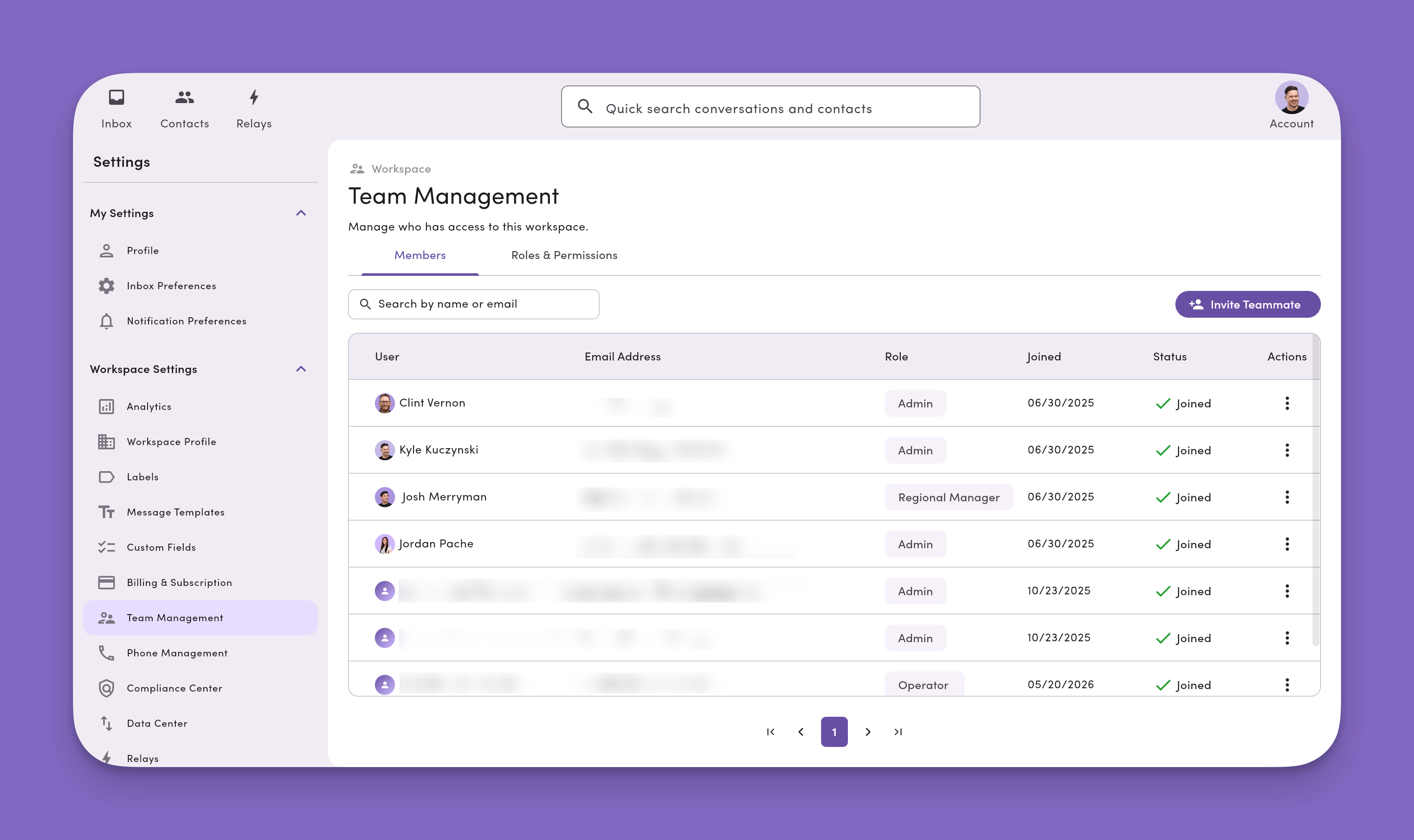
* **Invite teammates.** **Settings → Team Management → Invite Teammate**.
* **Accept invite.** Teammate creates an account with the **same email** from the invite.
* **Access.** Use **Roles** (Admin/Manager/Operator/Custom) + **feature permissions**.
* **Permission levels.** **Owner** (view/edit/delete), **Editor** (view/edit), **Viewer** (view), **No Access** (blocked).
* **Deleting messages from a thread.** Only users with **Owner** permission on a phone number's Inbox Access can delete messages. By default, only **Admins** have Owner access to every phone line.
 ***
## How to invite and manage teammates
### Invite teammates
1. Go to **Settings**, then click your profile image (top right).
2. Open **Team Management** under **Workspace Settings**.
Don't see Team Management? Ask your workspace admin. Your role may not include access.
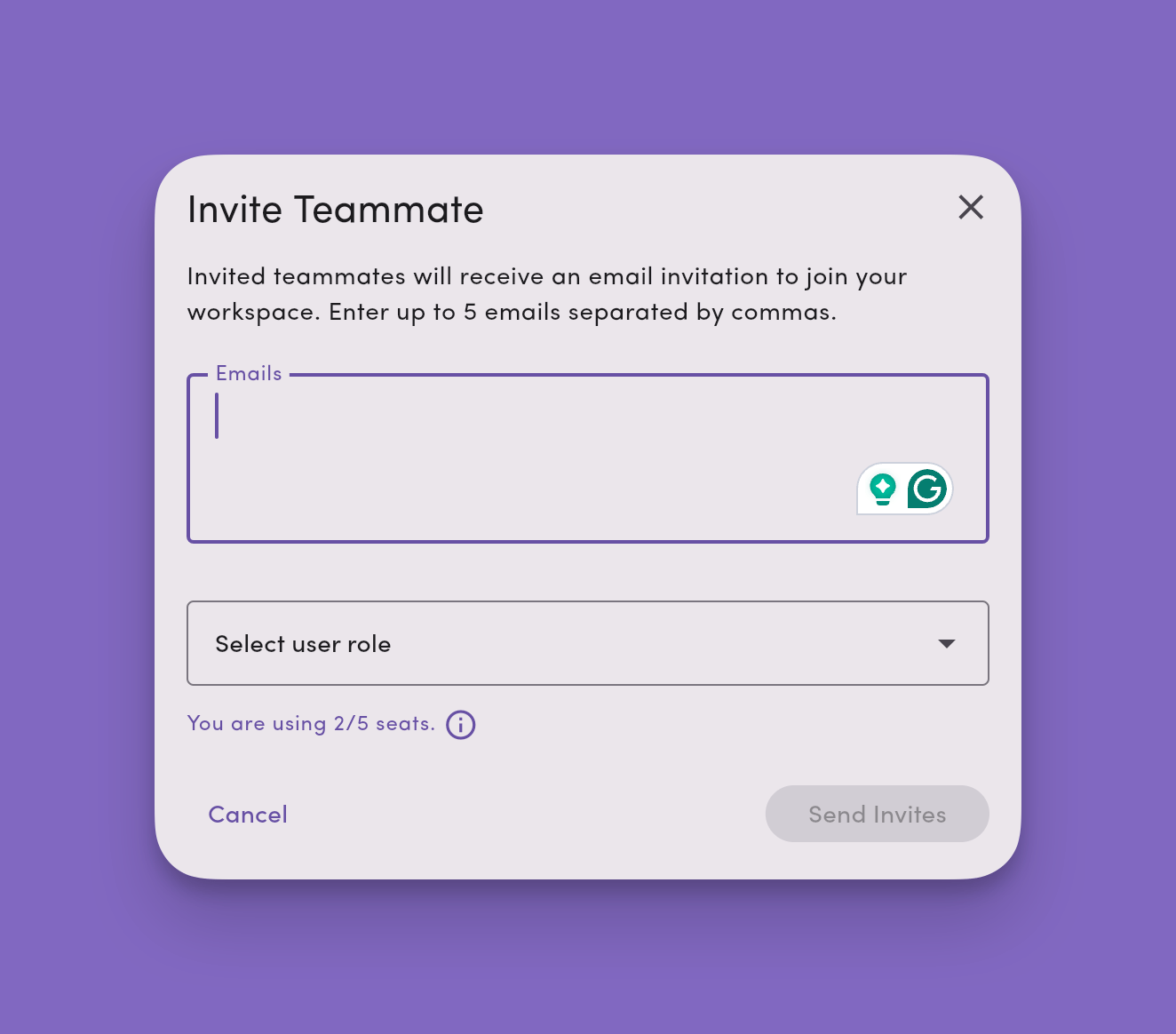
3. Click **Invite Teammate**, enter one or more **email addresses**, select a **Role**, then click **Send**.
Inviting teammates increases your **seat count** and updates your **subscription** automatically. Learn more: [Billing and Subscription](/settings/workspace-settings/billing-subscriptions).
***
## How to invite and manage teammates
### Invite teammates
1. Go to **Settings**, then click your profile image (top right).
2. Open **Team Management** under **Workspace Settings**.
Don't see Team Management? Ask your workspace admin. Your role may not include access.
3. Click **Invite Teammate**, enter one or more **email addresses**, select a **Role**, then click **Send**.
Inviting teammates increases your **seat count** and updates your **subscription** automatically. Learn more: [Billing and Subscription](/settings/workspace-settings/billing-subscriptions).
 ### Accept an invitation
* The invite email links to `inbox.messagedesk.com/#/create-account`.
* The teammate must sign up with the **same email** that received the invite.
* After signup, they're automatically added to your workspace and any assigned inboxes.
### Update a user's role or details
1. **Team Management**, then select the user.
2. Click **Edit Details** or **Change User Role**.
3. Choose a new **Role** from the dropdown.
4. Changes **save automatically** and apply immediately (a refresh may be required).
### Remove a user from your workspace
1. **Team Management**, then select the user.
2. Click **Remove Member**, then **Confirm**.
3. Access is revoked immediately.
### Manage invitations
After sending invites, you'll see each user's status:
* ❌ **Pending:** User hasn't created an account yet.
* ✅ **Joined:** User created an account and joined your workspace.
To **resend** an invite: **Team Management → ⋯ (More) → Resend Invitation**.
***
## User roles and permissions
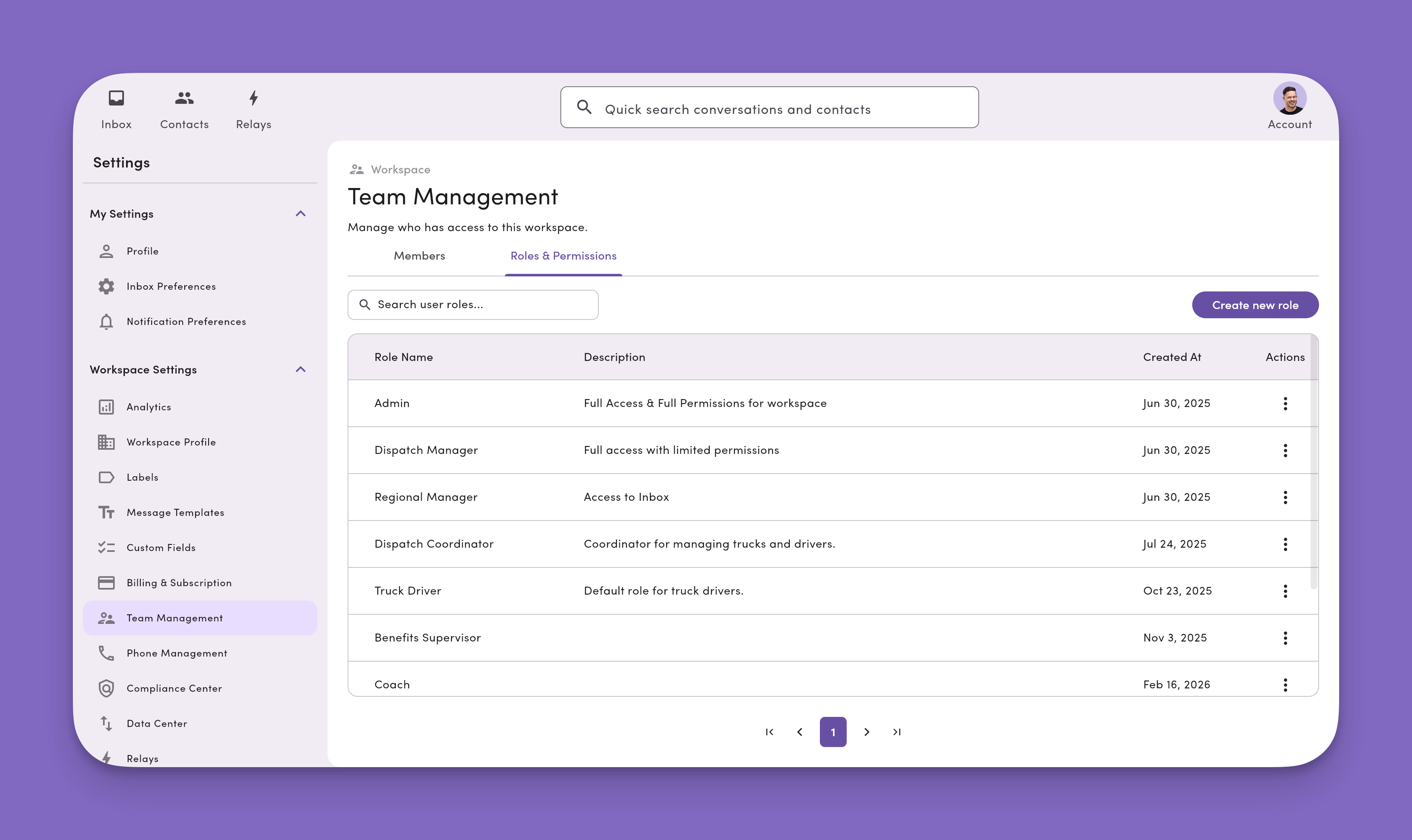
**Roles** are a collection of **Permissions** (access levels for features/settings).
Trying to decide between **per-user permissions** in one workspace and a **separate workspace**? Most teams should start here with roles and permissions. Only spin up a new workspace when distinct teams manage **separate contact lists** independently. See [Workspace vs. UAC](/get-started/tenant-management#do-i-need-a-separate-workspace-or-just-user-permissions) for the full decision guide.
### Accept an invitation
* The invite email links to `inbox.messagedesk.com/#/create-account`.
* The teammate must sign up with the **same email** that received the invite.
* After signup, they're automatically added to your workspace and any assigned inboxes.
### Update a user's role or details
1. **Team Management**, then select the user.
2. Click **Edit Details** or **Change User Role**.
3. Choose a new **Role** from the dropdown.
4. Changes **save automatically** and apply immediately (a refresh may be required).
### Remove a user from your workspace
1. **Team Management**, then select the user.
2. Click **Remove Member**, then **Confirm**.
3. Access is revoked immediately.
### Manage invitations
After sending invites, you'll see each user's status:
* ❌ **Pending:** User hasn't created an account yet.
* ✅ **Joined:** User created an account and joined your workspace.
To **resend** an invite: **Team Management → ⋯ (More) → Resend Invitation**.
***
## User roles and permissions
**Roles** are a collection of **Permissions** (access levels for features/settings).
Trying to decide between **per-user permissions** in one workspace and a **separate workspace**? Most teams should start here with roles and permissions. Only spin up a new workspace when distinct teams manage **separate contact lists** independently. See [Workspace vs. UAC](/get-started/tenant-management#do-i-need-a-separate-workspace-or-just-user-permissions) for the full decision guide.
 ### Default user roles (×3)
**1) Admin: full access**
* All features and resources (including account/billing): **Owner**
* Can't be removed by Managers/Operators
* Not editable or deletable (copy to customize)
**2) Manager: lead access**
* Most features: **Editor**.
* **Billing**, **Workspace Profile**, **Workspace Settings**: **Viewer**.
* **Team Management**, **Phone Numbers**: **Editor**.
* **Relay Management**, **Developer**: **No Access**.
**3) Operator: frontline access**
* **Contacts**, **Contact Properties**, **Custom Fields**, **Labels**, **Message Templates**: **Editor** (Custom Fields: **Viewer**).
* **Relay Management**, **Developer**: **No Access**.
* Everything else: **Viewer**.
***
## Default roles and permissions assignments
### Default role/permission feature assignment/access
| Feature | Purpose | **Admin** | **Manager** | **Operator** |
| --------------------------- | ---------------------------------------------------------------------------------------------------------------------------------------------------------------------------------------------------------------------------------------------------------------------------------------------------------------------------- | :-------: | :---------: | :----------: |
| **Phone number inboxes** | View, create, edit, and phone number views in the inbox | Owner | Editor | Editor |
| **Label inboxes** | View, create, edit, and label views in the inbox | Owner | Editor | Editor |
| **Teammate inboxes** | View, create, edit, and teammate views in the inbox | Owner | Editor | Editor |
| **Workspace profile** | View/update workspace name, address, and info. | Owner | Viewer | Viewer |
| **Inbox settings** | Apply, edit, and create templates and labels | Owner | Viewer | Viewer |
| **Billing & subscriptions** | View and manage workspace subscription, update billing information, and add/remove user seats. | Owner | Viewer | Viewer |
| **Team management** | Invite teammates, create and update user roles, and update user information. | Owner | Editor | Viewer |
| **Phone Management** | View and manage workspace phone numbers | Owner | Editor | Viewer |
| **Custom Fields** | Create, edit, and manage [custom fields](/settings/workspace-settings/custom-fields) on contacts | Owner | Editor | Viewer |
| **Relay Management** | View, create, edit, and manage Relays | Owner | No Access | No Access |
| **Developer** | Access developer features. API keys, webhook endpoints / signing secret in [Developer Tools](/settings/workspace-settings/developer-tools), [Send Webhook Relay action](/relays/webhooks), and [Zapier](/integrations/zapier) authentication. **Editor** or **Owner** required to create or run Zaps under that user's auth. | Owner | No Access | No Access |
| **Analytics** | View workspace messaging metrics, channel stats, and user activity | Owner | Viewer | No Access |
### What each permission level grants access to
Permissions let a user create, read, update, and delete information in MessageDesk. MessageDesk offers four permission levels: **Owner**, **Editor**, **Viewer**, and **No Access**.
| Feature | Owner | Editor | Viewer | No Access |
| --------------------------- | ---------------------------------------------------------------------------------------------------------------------------------------------------------------------------------------------- | ---------------------------------------------------------------------------------------------------------------------------------------------------------------- | ------------------------------------------------------------------------------------------------------------------------------------------------------------------ | ----------------------------------------------------------------------------------------- |
| **Phone number inboxes** | Full access and ownership for every conversation in this Inbox. **Only Owners can delete individual messages from a conversation thread.** Ability to import and export conversations in bulk. | Can create conversations, interact with, and view conversations for this Inbox. **Cannot delete messages from a conversation thread.** No bulk import or export. | Can view and interact with conversations in this inbox, but cannot create new conversations or delete them. **Cannot delete messages from a conversation thread.** | Blocked from viewing, editing, or deleting conversations in this Inbox. |
| **Label inboxes** | Full access and ownership for every conversation in this Inbox. **Only Owners can delete individual messages from a conversation thread.** Ability to import and export conversations in bulk. | Can create conversations, interact with, and view conversations for this Inbox. **Cannot delete messages from a conversation thread.** No bulk import or export. | Can view and interact with conversations in this inbox, but cannot create new conversations or delete them. **Cannot delete messages from a conversation thread.** | Blocked from viewing, editing, or deleting conversations in this Inbox. |
| **Teammate inboxes** | Full access and ownership for every conversation in this Inbox. **Only Owners can delete individual messages from a conversation thread.** Ability to import and export conversations in bulk. | Can create conversations, interact with, and view conversations for this Inbox. **Cannot delete messages from a conversation thread.** No bulk import or export. | Can view and interact with conversations in this inbox, but cannot create new conversations or delete them. **Cannot delete messages from a conversation thread.** | Blocked from viewing, editing, or deleting conversations in this Inbox. |
| **Workspace profile** | Designated owner who can edit and override workspace profile information, including name, address, and company details. | Can edit workspace profile information, including name, address, and company details. | Can view workspace profile information, but cannot make changes. | Blocked from workspace profile. |
| **Inbox settings** | Designated owner who can edit and override all inbox settings, including appearance, Labels, message templates, and configuration. | Can create, edit, and delete Templates and Labels for the workspace. | Can select existing Templates or Labels within the Inbox. Cannot create new or edit existing Templates or Labels. | Blocked from accessing Templates or Labels within the Inbox. No access to Inbox settings. |
| **Billing & subscriptions** | Designated owner who can fully manage billing, subscriptions, payment methods, and user seat allocations. Can upgrade, downgrade, and cancel subscriptions. | Can update billing information, manage subscriptions, and modify user seats. | Can view billing information and subscription details, but cannot make changes. | Blocked from access to billing information and subscription details. |
| **Team management** | Designated owner who cannot be removed from the workspace. They can fully manage team members, invite users, create/edit roles, and reset passwords. | Can invite teammates, remove teammates, manage user roles, and perform team administration. | Can view team member information and roles, but cannot make changes. | Blocked from team management with no ability to remove teammates. |
| **Phone Management** | Designated owner who can fully manage phone numbers, including adding, removing, and configuring all phone settings. | Can manage phone number settings and configuration for the workspace. | Can view phone number information, but cannot modify phone settings. | Blocked from accessing phone management settings and number information. |
| **Custom Fields** | Designated owner who can fully manage [custom fields](/settings/workspace-settings/custom-fields), including creating, editing, and deleting all custom field definitions and values. | Can create, edit, and manage custom fields for the workspace. | Can view custom field values on contacts, but cannot create, edit, or delete custom fields. | Blocked from accessing custom fields. Users see a Blocked Resource placeholder. |
| **Relay Management** | Designated owner who can fully manage Relays, including creating, editing, deleting, and configuring all Relay settings. | Can create, edit, and manage Relays for the workspace. | Can view Relay configurations, but can't create, edit, or delete Relays. | Blocked from accessing the Relays module. Can't view, create, or manage Relays. |
| **Developer** | Full access. Manage API keys, configure the webhook endpoint and signing secret, and build and run Zapier workflows under their own auth. | Can configure Developer Tools, and can build and run Zapier workflows under their own auth. | Read-only view of Developer Tools. Can't create or run Zapier workflows under their own auth. | Blocked from Developer Tools, API keys, and Zapier authentication. |
| **Analytics** | Full access to workspace analytics dashboard, including all metrics, channel-level stats, and user-level activity data. | Can view workspace analytics dashboard, including all metrics, channel-level stats, and user-level data. | Can view workspace analytics dashboard with read-only access to all metrics. | Blocked from accessing the analytics dashboard. |
**Who can delete messages from a conversation thread?**
Only users with **Owner** permission on a phone number's Inbox Access can delete individual messages from a conversation thread. **Editors**, **Viewers**, and users with **No Access** can't delete messages.
By default, only **Admin** users have **Owner** access to all phone lines connected to your MessageDesk workspace. **Managers** and **Operators** receive **Editor** access to phone number inboxes by default and **can't** delete messages.
If you don't want a user to be able to delete messages from a conversation thread, make sure that user **doesn't have Owner permission** on the phone line. Adjust their role or use a [custom role](#custom-roles--permissions) to grant **Editor**, **Viewer**, or **No Access** on the relevant **Phone number inboxes**.
## Custom roles and permissions
Create custom roles for users in your workspace.
### Create a custom role
You can rename, edit, or delete a custom role at any time. Before deleting, reassign any teammates associated with the role.
1. **Account → Settings → Team Management**.
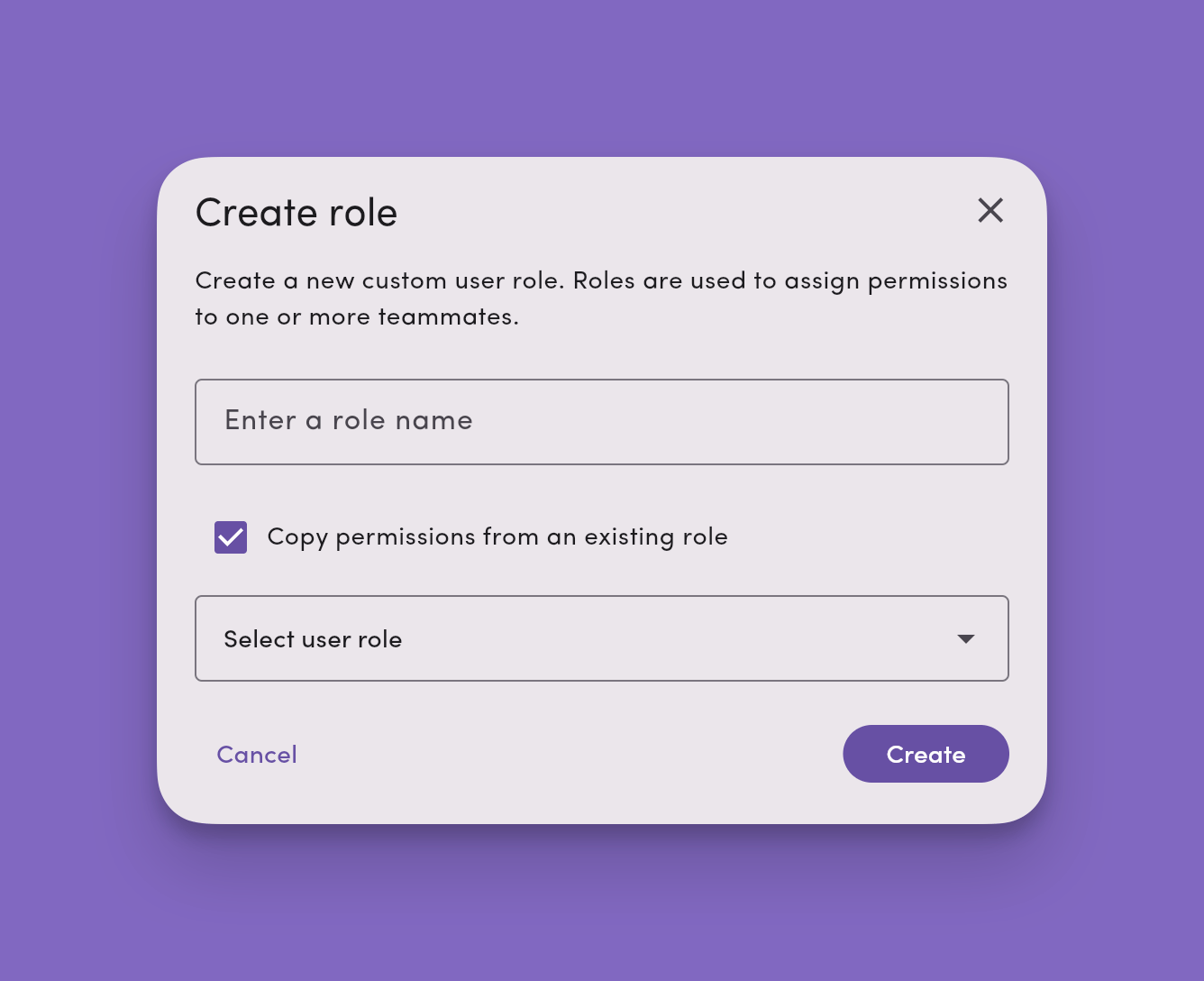
2. Click **Create new role**, name it. (Optional.)
Use **Copy permissions from an existing role** as a starting point.
3. Set per-feature access (**Owner / Editor / Viewer / No Access**).
4. Adjust **feature** access for specific **Phone Lines**, **Labels**, **Teammate** Inboxes, and other **Workspace Settings**.
Uncheck **Select all** to grant/remove access on **specific** phone lines, labels, or teammate inboxes.
5. **Save changes** and apply your new role to teammates.
### Default user roles (×3)
**1) Admin: full access**
* All features and resources (including account/billing): **Owner**
* Can't be removed by Managers/Operators
* Not editable or deletable (copy to customize)
**2) Manager: lead access**
* Most features: **Editor**.
* **Billing**, **Workspace Profile**, **Workspace Settings**: **Viewer**.
* **Team Management**, **Phone Numbers**: **Editor**.
* **Relay Management**, **Developer**: **No Access**.
**3) Operator: frontline access**
* **Contacts**, **Contact Properties**, **Custom Fields**, **Labels**, **Message Templates**: **Editor** (Custom Fields: **Viewer**).
* **Relay Management**, **Developer**: **No Access**.
* Everything else: **Viewer**.
***
## Default roles and permissions assignments
### Default role/permission feature assignment/access
| Feature | Purpose | **Admin** | **Manager** | **Operator** |
| --------------------------- | ---------------------------------------------------------------------------------------------------------------------------------------------------------------------------------------------------------------------------------------------------------------------------------------------------------------------------- | :-------: | :---------: | :----------: |
| **Phone number inboxes** | View, create, edit, and phone number views in the inbox | Owner | Editor | Editor |
| **Label inboxes** | View, create, edit, and label views in the inbox | Owner | Editor | Editor |
| **Teammate inboxes** | View, create, edit, and teammate views in the inbox | Owner | Editor | Editor |
| **Workspace profile** | View/update workspace name, address, and info. | Owner | Viewer | Viewer |
| **Inbox settings** | Apply, edit, and create templates and labels | Owner | Viewer | Viewer |
| **Billing & subscriptions** | View and manage workspace subscription, update billing information, and add/remove user seats. | Owner | Viewer | Viewer |
| **Team management** | Invite teammates, create and update user roles, and update user information. | Owner | Editor | Viewer |
| **Phone Management** | View and manage workspace phone numbers | Owner | Editor | Viewer |
| **Custom Fields** | Create, edit, and manage [custom fields](/settings/workspace-settings/custom-fields) on contacts | Owner | Editor | Viewer |
| **Relay Management** | View, create, edit, and manage Relays | Owner | No Access | No Access |
| **Developer** | Access developer features. API keys, webhook endpoints / signing secret in [Developer Tools](/settings/workspace-settings/developer-tools), [Send Webhook Relay action](/relays/webhooks), and [Zapier](/integrations/zapier) authentication. **Editor** or **Owner** required to create or run Zaps under that user's auth. | Owner | No Access | No Access |
| **Analytics** | View workspace messaging metrics, channel stats, and user activity | Owner | Viewer | No Access |
### What each permission level grants access to
Permissions let a user create, read, update, and delete information in MessageDesk. MessageDesk offers four permission levels: **Owner**, **Editor**, **Viewer**, and **No Access**.
| Feature | Owner | Editor | Viewer | No Access |
| --------------------------- | ---------------------------------------------------------------------------------------------------------------------------------------------------------------------------------------------- | ---------------------------------------------------------------------------------------------------------------------------------------------------------------- | ------------------------------------------------------------------------------------------------------------------------------------------------------------------ | ----------------------------------------------------------------------------------------- |
| **Phone number inboxes** | Full access and ownership for every conversation in this Inbox. **Only Owners can delete individual messages from a conversation thread.** Ability to import and export conversations in bulk. | Can create conversations, interact with, and view conversations for this Inbox. **Cannot delete messages from a conversation thread.** No bulk import or export. | Can view and interact with conversations in this inbox, but cannot create new conversations or delete them. **Cannot delete messages from a conversation thread.** | Blocked from viewing, editing, or deleting conversations in this Inbox. |
| **Label inboxes** | Full access and ownership for every conversation in this Inbox. **Only Owners can delete individual messages from a conversation thread.** Ability to import and export conversations in bulk. | Can create conversations, interact with, and view conversations for this Inbox. **Cannot delete messages from a conversation thread.** No bulk import or export. | Can view and interact with conversations in this inbox, but cannot create new conversations or delete them. **Cannot delete messages from a conversation thread.** | Blocked from viewing, editing, or deleting conversations in this Inbox. |
| **Teammate inboxes** | Full access and ownership for every conversation in this Inbox. **Only Owners can delete individual messages from a conversation thread.** Ability to import and export conversations in bulk. | Can create conversations, interact with, and view conversations for this Inbox. **Cannot delete messages from a conversation thread.** No bulk import or export. | Can view and interact with conversations in this inbox, but cannot create new conversations or delete them. **Cannot delete messages from a conversation thread.** | Blocked from viewing, editing, or deleting conversations in this Inbox. |
| **Workspace profile** | Designated owner who can edit and override workspace profile information, including name, address, and company details. | Can edit workspace profile information, including name, address, and company details. | Can view workspace profile information, but cannot make changes. | Blocked from workspace profile. |
| **Inbox settings** | Designated owner who can edit and override all inbox settings, including appearance, Labels, message templates, and configuration. | Can create, edit, and delete Templates and Labels for the workspace. | Can select existing Templates or Labels within the Inbox. Cannot create new or edit existing Templates or Labels. | Blocked from accessing Templates or Labels within the Inbox. No access to Inbox settings. |
| **Billing & subscriptions** | Designated owner who can fully manage billing, subscriptions, payment methods, and user seat allocations. Can upgrade, downgrade, and cancel subscriptions. | Can update billing information, manage subscriptions, and modify user seats. | Can view billing information and subscription details, but cannot make changes. | Blocked from access to billing information and subscription details. |
| **Team management** | Designated owner who cannot be removed from the workspace. They can fully manage team members, invite users, create/edit roles, and reset passwords. | Can invite teammates, remove teammates, manage user roles, and perform team administration. | Can view team member information and roles, but cannot make changes. | Blocked from team management with no ability to remove teammates. |
| **Phone Management** | Designated owner who can fully manage phone numbers, including adding, removing, and configuring all phone settings. | Can manage phone number settings and configuration for the workspace. | Can view phone number information, but cannot modify phone settings. | Blocked from accessing phone management settings and number information. |
| **Custom Fields** | Designated owner who can fully manage [custom fields](/settings/workspace-settings/custom-fields), including creating, editing, and deleting all custom field definitions and values. | Can create, edit, and manage custom fields for the workspace. | Can view custom field values on contacts, but cannot create, edit, or delete custom fields. | Blocked from accessing custom fields. Users see a Blocked Resource placeholder. |
| **Relay Management** | Designated owner who can fully manage Relays, including creating, editing, deleting, and configuring all Relay settings. | Can create, edit, and manage Relays for the workspace. | Can view Relay configurations, but can't create, edit, or delete Relays. | Blocked from accessing the Relays module. Can't view, create, or manage Relays. |
| **Developer** | Full access. Manage API keys, configure the webhook endpoint and signing secret, and build and run Zapier workflows under their own auth. | Can configure Developer Tools, and can build and run Zapier workflows under their own auth. | Read-only view of Developer Tools. Can't create or run Zapier workflows under their own auth. | Blocked from Developer Tools, API keys, and Zapier authentication. |
| **Analytics** | Full access to workspace analytics dashboard, including all metrics, channel-level stats, and user-level activity data. | Can view workspace analytics dashboard, including all metrics, channel-level stats, and user-level data. | Can view workspace analytics dashboard with read-only access to all metrics. | Blocked from accessing the analytics dashboard. |
**Who can delete messages from a conversation thread?**
Only users with **Owner** permission on a phone number's Inbox Access can delete individual messages from a conversation thread. **Editors**, **Viewers**, and users with **No Access** can't delete messages.
By default, only **Admin** users have **Owner** access to all phone lines connected to your MessageDesk workspace. **Managers** and **Operators** receive **Editor** access to phone number inboxes by default and **can't** delete messages.
If you don't want a user to be able to delete messages from a conversation thread, make sure that user **doesn't have Owner permission** on the phone line. Adjust their role or use a [custom role](#custom-roles--permissions) to grant **Editor**, **Viewer**, or **No Access** on the relevant **Phone number inboxes**.
## Custom roles and permissions
Create custom roles for users in your workspace.
### Create a custom role
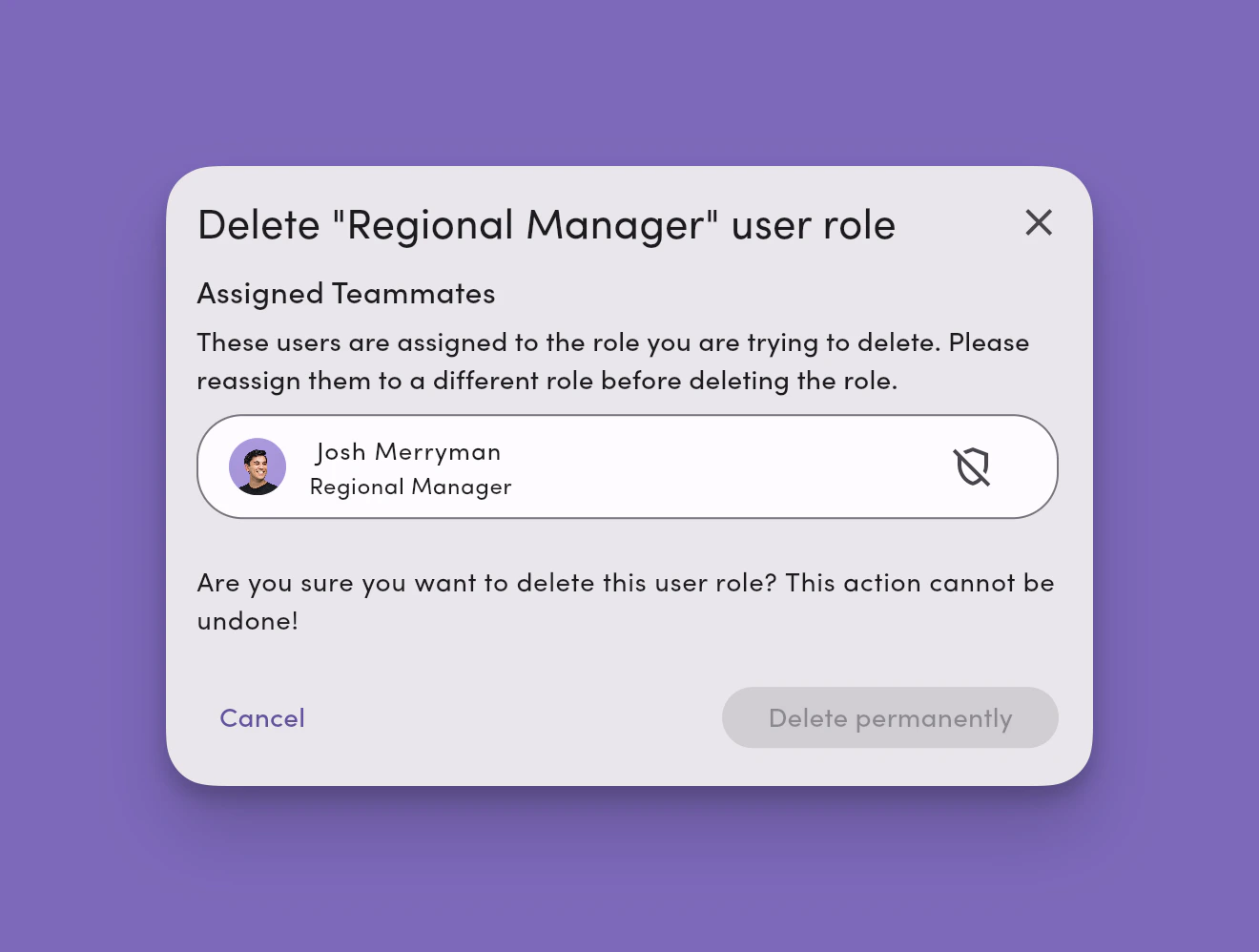
You can rename, edit, or delete a custom role at any time. Before deleting, reassign any teammates associated with the role.
1. **Account → Settings → Team Management**.
2. Click **Create new role**, name it. (Optional.)
Use **Copy permissions from an existing role** as a starting point.
3. Set per-feature access (**Owner / Editor / Viewer / No Access**).
4. Adjust **feature** access for specific **Phone Lines**, **Labels**, **Teammate** Inboxes, and other **Workspace Settings**.
Uncheck **Select all** to grant/remove access on **specific** phone lines, labels, or teammate inboxes.
5. **Save changes** and apply your new role to teammates.
 ### Edit, delete, or rename a custom role
1. **Account → Settings → Team Management**.
2. Click **Edit** on the **custom role** you want to edit.
3. Click **Delete** on the custom role you want to delete.
4. Update the **role name** or adjust **permissions** as needed.
5. **Save changes** to update and apply immediately (users may need to refresh).
### Edit, delete, or rename a custom role
1. **Account → Settings → Team Management**.
2. Click **Edit** on the **custom role** you want to edit.
3. Click **Delete** on the custom role you want to delete.
4. Update the **role name** or adjust **permissions** as needed.
5. **Save changes** to update and apply immediately (users may need to refresh).
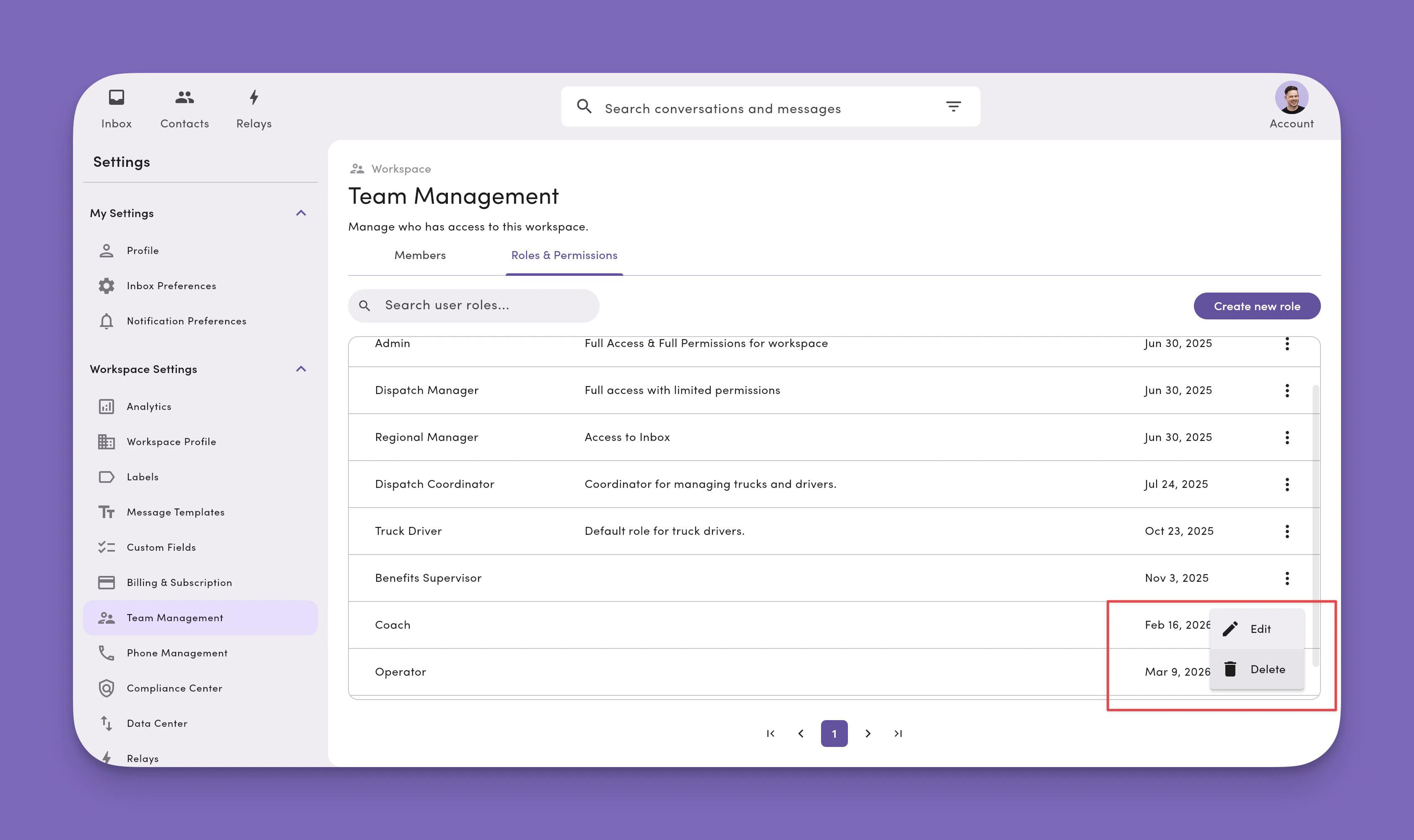 Reassign users associated with a custom role before you can fully delete the role.
 ***
## Custom role templates (examples you can copy)
**Support Agent (Frontline)**
* Features: Contacts/Labels/Templates = **Editor**. Broadcasts = **Viewer**. Billing/Settings = **Viewer**.
* Resource-level: Editor on **Support line(s)** and **Support labels** only.
**Dispatcher (Operations/Logistics)**
* Features: Contacts/Labels/Templates = **Editor**. Phone Numbers = **Viewer**. Relays = **Viewer**.
* Resource-level: Editor on **Dispatch line**, **Region labels** (West/East).
**HR Coordinator (Internal Comms)**
* Features: Broadcasts = **Editor**. Contacts/Labels/Templates = **Editor**. Billing/Phone Numbers = **Viewer**.
* Resource-level: Editor on **HR labels** (Benefits, New Hire), Viewer elsewhere.
**View-Only Auditor (Read-Only)**
* Features: Everything = **Viewer**.
* Resource-level: Viewer on **All**. No Access to Billing if needed.
***
## FAQ
**I invited the wrong email. What now?**\
Remove the pending invite from **Team Management** and send a new invite to the correct email.
**Unlimited teammates and roles?**\
Yes. You can invite unlimited teammates and create unlimited custom roles. Each teammate counts as a **seat**.
**Role vs. Permission?**\
A **Role** is a collection of **Permissions**. A **Permission** is the access level for a specific feature or resource.
**Can I delete a custom role?**\
Yes. Go to **Settings → Team Management**, click **Edit** on the custom role, and select **Delete**. Reassign any teammates currently using the role before it can be fully deleted.
**Can Managers delete things?**\
No. Editors can't delete. Only the **Owner** can delete.
**Who can delete messages from a conversation thread?**\
Only users with **Owner** permission on a phone number's Inbox Access can delete individual messages from a conversation thread. By default, only **Admin** users have **Owner** access to all phone lines. To prevent a user from deleting messages, make sure their role does **not** have **Owner** permission on that phone line. Use **Editor**, **Viewer**, or **No Access** on **Phone number inboxes** instead.
**What happens when a message is deleted?**\
When an Owner deletes a message, it's a **soft delete**. The message is removed from the front end, but MessageDesk retains the message history on the back end. This data is exportable for compliance and record-keeping purposes.
**Limit someone to one phone line?**\
Grant **Editor** on that **Phone Number** and set others to **Viewer/No Access**.
**Can I use phone line extension numbers with MessageDesk?**\
MessageDesk doesn't directly integrate with or support texting for phone line extension numbers. You can configure **user Roles and Permissions** to limit access to certain phone lines. You can also use **conversation assignment** and **Relays** to automate who gets assigned to what conversation on any given phone line.
**See a conversation without line/label access?**\
Yes. **Assignment** to the conversation grants **Editor** on that thread.
**Restrict to certain labels (e.g., Support: Urgent)?**\
Grant **Editor** on that label and set others to **Viewer/No Access**.
**Do changes apply immediately?**\
Yes. Have users **refresh** to see the updated UI.
**Who can access Relays by default?**\
Only **Admin** users have access to Relays and Zapier by default. Admins can grant **Relay Management** or **Developer** permissions to other roles via custom role configuration to unlock those features. Learn more: [Relays Overview](/relays/overview).
**Who can build Zapier workflows?**\
Any user whose role grants **Editor** or **Owner** on the **Developer** feature. Admins have this by default. For other roles, grant Developer access via a custom role. Viewers can't authenticate Zapier under their own account, so any Zap built or owned by a Viewer will fail to run. See [Zapier](/integrations/zapier).
***
## Troubleshooting
**Invite not received**
* Check **spam/junk** and verify the **email address**.
* Resend: **Team Management → ⋯ → Resend Invitation**.
* Still missing? Ask IT to allowlist `messagedesk.com` and try again.
**User can't see Team Management**
* Their role likely has **Viewer/No Access** for **Team Management**. An **Admin** or **Manager** (Editor) must adjust.
**User can't see Relays**
* By default, only **Admin** users have access to Relays. An **Admin** must grant **Relay Management** permissions to the user's role via custom role configuration.
**Buttons are greyed out**
* The user is likely a **Viewer** on that feature, or the action requires **Owner**. Hover for the tooltip, then upgrade access if appropriate.
**User sees conversations they shouldn't**
* Check for **assignment** (assignment grants Editor).
* Review **resource-level** permissions (wildcards `*` on Labels or Phone Numbers).
* Remove any **user override** that elevates access.
**Role changes didn't "stick"**
* Ask them to **refresh**.
* Confirm there isn't a conflicting **override** or **resource-level** restriction.
***
## Team management best practices
* **Least privilege first.** Start with **Operator**. Elevate only as needed.
* **Prefer roles over overrides.** Keep exceptions rare and documented.
* **Mirror your routing.** If you route by **phone line** or **label**, set permissions the same way.
* **Quarterly audits.** Review who has **Owner** on **Billing**, **Phone Numbers**, and **Team Management**.
* **Onboarding checklist.** Invite, assign role, confirm resource-level access, share key labels/lines, verify login.
* **Offboarding checklist.** Remove member, reassign conversations, review resource permissions, audit roles.
***
***
## Custom role templates (examples you can copy)
**Support Agent (Frontline)**
* Features: Contacts/Labels/Templates = **Editor**. Broadcasts = **Viewer**. Billing/Settings = **Viewer**.
* Resource-level: Editor on **Support line(s)** and **Support labels** only.
**Dispatcher (Operations/Logistics)**
* Features: Contacts/Labels/Templates = **Editor**. Phone Numbers = **Viewer**. Relays = **Viewer**.
* Resource-level: Editor on **Dispatch line**, **Region labels** (West/East).
**HR Coordinator (Internal Comms)**
* Features: Broadcasts = **Editor**. Contacts/Labels/Templates = **Editor**. Billing/Phone Numbers = **Viewer**.
* Resource-level: Editor on **HR labels** (Benefits, New Hire), Viewer elsewhere.
**View-Only Auditor (Read-Only)**
* Features: Everything = **Viewer**.
* Resource-level: Viewer on **All**. No Access to Billing if needed.
***
## FAQ
**I invited the wrong email. What now?**\
Remove the pending invite from **Team Management** and send a new invite to the correct email.
**Unlimited teammates and roles?**\
Yes. You can invite unlimited teammates and create unlimited custom roles. Each teammate counts as a **seat**.
**Role vs. Permission?**\
A **Role** is a collection of **Permissions**. A **Permission** is the access level for a specific feature or resource.
**Can I delete a custom role?**\
Yes. Go to **Settings → Team Management**, click **Edit** on the custom role, and select **Delete**. Reassign any teammates currently using the role before it can be fully deleted.
**Can Managers delete things?**\
No. Editors can't delete. Only the **Owner** can delete.
**Who can delete messages from a conversation thread?**\
Only users with **Owner** permission on a phone number's Inbox Access can delete individual messages from a conversation thread. By default, only **Admin** users have **Owner** access to all phone lines. To prevent a user from deleting messages, make sure their role does **not** have **Owner** permission on that phone line. Use **Editor**, **Viewer**, or **No Access** on **Phone number inboxes** instead.
**What happens when a message is deleted?**\
When an Owner deletes a message, it's a **soft delete**. The message is removed from the front end, but MessageDesk retains the message history on the back end. This data is exportable for compliance and record-keeping purposes.
**Limit someone to one phone line?**\
Grant **Editor** on that **Phone Number** and set others to **Viewer/No Access**.
**Can I use phone line extension numbers with MessageDesk?**\
MessageDesk doesn't directly integrate with or support texting for phone line extension numbers. You can configure **user Roles and Permissions** to limit access to certain phone lines. You can also use **conversation assignment** and **Relays** to automate who gets assigned to what conversation on any given phone line.
**See a conversation without line/label access?**\
Yes. **Assignment** to the conversation grants **Editor** on that thread.
**Restrict to certain labels (e.g., Support: Urgent)?**\
Grant **Editor** on that label and set others to **Viewer/No Access**.
**Do changes apply immediately?**\
Yes. Have users **refresh** to see the updated UI.
**Who can access Relays by default?**\
Only **Admin** users have access to Relays and Zapier by default. Admins can grant **Relay Management** or **Developer** permissions to other roles via custom role configuration to unlock those features. Learn more: [Relays Overview](/relays/overview).
**Who can build Zapier workflows?**\
Any user whose role grants **Editor** or **Owner** on the **Developer** feature. Admins have this by default. For other roles, grant Developer access via a custom role. Viewers can't authenticate Zapier under their own account, so any Zap built or owned by a Viewer will fail to run. See [Zapier](/integrations/zapier).
***
## Troubleshooting
**Invite not received**
* Check **spam/junk** and verify the **email address**.
* Resend: **Team Management → ⋯ → Resend Invitation**.
* Still missing? Ask IT to allowlist `messagedesk.com` and try again.
**User can't see Team Management**
* Their role likely has **Viewer/No Access** for **Team Management**. An **Admin** or **Manager** (Editor) must adjust.
**User can't see Relays**
* By default, only **Admin** users have access to Relays. An **Admin** must grant **Relay Management** permissions to the user's role via custom role configuration.
**Buttons are greyed out**
* The user is likely a **Viewer** on that feature, or the action requires **Owner**. Hover for the tooltip, then upgrade access if appropriate.
**User sees conversations they shouldn't**
* Check for **assignment** (assignment grants Editor).
* Review **resource-level** permissions (wildcards `*` on Labels or Phone Numbers).
* Remove any **user override** that elevates access.
**Role changes didn't "stick"**
* Ask them to **refresh**.
* Confirm there isn't a conflicting **override** or **resource-level** restriction.
***
## Team management best practices
* **Least privilege first.** Start with **Operator**. Elevate only as needed.
* **Prefer roles over overrides.** Keep exceptions rare and documented.
* **Mirror your routing.** If you route by **phone line** or **label**, set permissions the same way.
* **Quarterly audits.** Review who has **Owner** on **Billing**, **Phone Numbers**, and **Team Management**.
* **Onboarding checklist.** Invite, assign role, confirm resource-level access, share key labels/lines, verify login.
* **Offboarding checklist.** Remove member, reassign conversations, review resource permissions, audit roles.
***